
Read summarized version with
Every growing company hits the same wall eventually:
You need a training manual.
Maybe you’re exhausted from walking each new hire through the same processes. Maybe your best employee is thinking about leaving, and all their knowledge lives entirely in their head. Or maybe you’ve just had your third “that’s not how I was told to do it” conversation this week and want to see what good training manuals look like before you start.
Creating a training manual sounds like a big undertaking. And honestly - yes - it can be. But with the right approach and tools, you can get it done in no time.
I’m Yuval, founder of Glitter AI. I’ve made training manuals before (pretty rough ones at first, then gradually better), and I’ve since built a tool to make the whole process faster.
Here’s what I’ve figured out about creating training manuals that people actually use, plus where to surface them so new hires can find them. If you want the condensed version, our step-by-step guide to creating a training manual walks through it fast.
Teach your co-workers or customers how to get stuff done – in seconds.


What Is a Training Manual?
A training manual is essentially a guide that teaches employees how to do their jobs. It pulls together procedures, policies, and reference materials into one organized place.
Think of it this way: a single SOP (Standard Operating Procedure) covers one specific task. A training manual covers an entire role or function from start to finish.
A training manual typically includes:
- Company overview and context
- Role responsibilities and expectations
- Step-by-step procedures for key tasks
- Policies and guidelines
- Reference information
- Troubleshooting help
- Resource links
Training manuals are used for:
- Onboarding new employees
- Cross-training existing employees
- Reference when questions arise
- Ensuring consistency across the team
When Do You Need a Training Manual?
Not every company needs formal training manuals. But you probably do if:
- You’re hiring several people for similar roles
- Training new hires takes way too long
- Your experienced employees get interrupted constantly with the same questions
- Different people do the same task in different ways
- Critical knowledge lives in one person’s head
- You’re scaling and need things to stay consistent
Even small teams benefit from some documentation. A simple training manual beats having nothing at all.
Step 1: Define the Scope
Before you write a single word, figure out what the manual needs to cover.
Answer These Questions
Who is the audience?
- What role(s) will use this manual?
- What do they already know coming in?
- What level of detail do they need?
What needs to be covered?
- What are all the tasks this role performs?
- What policies and guidelines apply?
- What context helps them understand the “why”?
What’s the end goal?
- After reading, what should someone be able to do?
- What does “fully trained” look like?
Don’t Boil the Ocean
It’s tempting to document everything. Don’t.
Start with the essentials. The things every person in the role absolutely must know - the same scoping discipline our walkthrough on documenting processes recommends. You can always add more later. An incomplete manual that exists is far more useful than a complete one that never gets finished.
Just demonstrate tasks - Glitter AI writes the documentation
Step 2: Gather Information
The best training manuals draw from multiple sources.
Interview Subject Matter Experts
Talk to the people who actually do the work:
- What do you actually do day to day?
- What do new hires struggle with most?
- What’s different about how you do things vs. the “official” way?
- What do you wish you knew when you started?
Observe the Work
Watching someone do a task reveals things that interviews miss:
- Steps that seem “obvious” but really aren’t
- Workarounds people have developed
- Common mistakes and how to avoid them
- The actual tools and screens involved
Review Existing Documentation
Gather whatever already exists:
- Old training materials
- SOPs and procedures
- Policy documents
- Email explanations people have sent
- Notes and checklists people use
Even if this material is outdated or incomplete, it gives you somewhere to start.
Note the Gaps
As you gather information, keep track of:
- What’s missing?
- What’s contradictory?
- What’s outdated?
- What questions still need answers?
Step 3: Organize the Content
How you structure the manual matters. A well-organized training manual is easier to use and easier to maintain.
Typical Manual Structure
1. Introduction
- Welcome and overview
- How to use this manual
- Who to contact with questions
2. Company/Team Context
- Company overview and mission
- Team structure and key contacts
- Role responsibilities and expectations
3. Getting Started
- Day one essentials
- Tools and access setup
- Orientation to key systems
4. Core Procedures
- Step-by-step guides for key tasks
- Organized by category or workflow
- Visual aids and screenshots
5. Policies and Guidelines
- Relevant policies
- Dos and don’ts
- Compliance requirements
6. Reference
- Glossary of terms
- Frequently asked questions
- Troubleshooting guide
- Additional resources
Organization Principles
Logical flow. Organize in the order someone would learn things, not alphabetically.
Clear sections. Use headers and subheaders. Make it easy to find specific content.
Consistent format. Use the same structure for similar content throughout.
Teach your co-workers or customers how to get stuff done – in seconds.
Step 4: Write the Content
Time to actually write.
Writing Guidelines
Use plain language. Aim for an 8th-grade reading level. Avoid jargon, or define it when you must use it.
Be specific. “Enter the customer information” is vague. “Enter the customer’s full name in the Name field” is specific.
Use active voice. “Click the Submit button” not “The Submit button should be clicked.”
Keep it concise. Say what needs to be said. Nothing more. Short paragraphs, clear sentences.
Include visuals. Screenshots, diagrams, and images make a huge difference in how well people understand instructions. For software processes, include a screenshot for every step.
For more on writing style, check out my guide on writing effective instruction manuals.
Writing the Procedure Sections
For each procedure, include:
- Title: Clear, specific name
- Purpose: Why this task matters (one sentence)
- Prerequisites: What needs to be in place before starting
- Steps: Numbered, actionable steps with visuals
- Tips: Common mistakes and how to avoid them
- Related content: Links to additional resources
Making It Faster
The traditional way to create a training manual means hours of writing and taking screenshots. That’s exactly why most companies never get around to making one.
Tools like Glitter AI can speed this up dramatically. Instead of writing and screenshotting each procedure, you just do the task while talking through it. Glitter captures your clicks as screenshots and turns your words into written instructions.
That 20-step procedure that would normally take 2 hours to document? You can knock it out in 10 minutes.
Step 5: Add Examples and Scenarios
Abstract instructions only get you so far. Concrete examples help things actually click.
Types of Examples to Include
Screenshots and visuals. Show exactly what the user should see.
Sample scenarios. “For example, if a customer requests a refund for a digital product…”
Before/after. Show what something looks like when done wrong vs. done right.
Edge cases. Address the “what if” questions people are going to have.
Don’t Over-Example
Examples should clarify, not overwhelm. Two good examples beat ten mediocre ones.
Step 6: Review and Test
A training manual that’s wrong is worse than no manual at all. Verify before you publish.
Have Experts Review
Get subject matter experts to check for:
- Accuracy (are the steps correct?)
- Completeness (is anything missing?)
- Currency (does this reflect current processes?)
Test With Newcomers
The real test is watching someone new try to follow the manual.
Have someone unfamiliar with the task attempt to do it using only the manual. Watch where they get stuck. Those are the spots that need work.
Iterate Based on Feedback
Fix problems, fill gaps, clarify the confusing parts. This might take a few rounds.
Step 7: Publish and Distribute
A manual nobody can find is a manual nobody uses.
Choose the Right Format
Digital (recommended for most cases):
- Easy to search
- Easy to update
- Accessible from anywhere
- Can include links and multimedia
Print:
- Works offline
- Some people prefer physical copies
- Harder to keep updated
Usually, digital is the primary format with print as an optional backup.
Choose the Right Platform
Options include:
- Company wiki or knowledge base (Notion, Confluence, etc.)
- Shared drive (Google Drive, SharePoint)
- Learning Management System (LMS)
- Dedicated documentation tools
What matters most: people can find it and access it easily, ideally through a single onboarding portal new hires already use.
Make It Discoverable
- Link from places new hires already look
- Include in onboarding checklist
- Reference in training sessions
- Add to bookmarks/favorites for the team
Step 8: Maintain and Update
A training manual is never really “done.” Processes change, and documentation has to keep up.
Assign Ownership
Every manual (or section) needs an owner who’s responsible for keeping it current.
Schedule Reviews
At minimum, review the manual quarterly. More often for areas that change quickly.
Build Updates Into Process Changes
When a process changes, updating the manual should be part of the change. Not an afterthought.
Make Updating Easy
The harder it is to update, the less often it happens. Use tools that make maintenance simple.
See my full guide on keeping documentation updated.
Training Manual Template
Here’s a simplified template to get you started:
TRAINING MANUAL: [Role/Department]
Version: [X.X]Last Updated: [Date]Owner: [Name]
TABLE OF CONTENTS[Auto-generate based on sections]
---
1. INTRODUCTION
Welcome to [Company/Team]!
This manual will help you [purpose].
How to use this manual:- [Instructions]
Questions? Contact: [Name/Email]
---
2. ABOUT US
Company Overview:[Brief description]
Team Structure:[Key roles and contacts]
Your Role:[Responsibilities and expectations]
---
3. GETTING STARTED
Day One Checklist:- [ ] [Item]- [ ] [Item]
Tools You'll Use:[List with links]
Setting Up:[Setup instructions]
---
4. KEY PROCEDURES
[Procedure Title]Purpose: [Why this matters]Prerequisites: [What you need]
Steps:1. [Step with screenshot]2. [Step with screenshot]...
Tips: [Common mistakes to avoid]
[Repeat for each procedure]
---
5. POLICIES AND GUIDELINES
[Policy Area]:[Guidelines]
[Policy Area]:[Guidelines]
---
6. REFERENCE
Glossary:[Term]: [Definition]
FAQ:Q: [Question]A: [Answer]
Troubleshooting:Problem: [Issue]Solution: [Fix]
Additional Resources:[Links]
Frequently Asked Questions
What is the difference between a training manual and an SOP?
A standard operating procedure (SOP) documents one specific task, while a training manual covers an entire role or function from start to finish. Think of SOPs as individual building blocks and training manuals as the complete guide that includes those SOPs plus company context, policies, troubleshooting help, and reference materials. Training manuals are used for onboarding new employees and cross-training, while SOPs are focused procedure documents.
How long should an employee training manual be?
Focus on essentials rather than page count. An incomplete manual that actually exists is far more useful than a comprehensive one that never gets finished. Start by documenting the core tasks every person in the role absolutely must know, which might be just 10-20 pages. You can always expand later based on the questions new hires ask most frequently. A concise manual people actually read beats an exhaustive one they ignore.
Should training manuals be digital or printed?
Digital formats are recommended for most cases because they're easy to search, update, and access from anywhere, plus they support links and multimedia like screenshots. Print works well as an optional backup for offline situations or employees who prefer physical copies, but maintaining printed versions becomes difficult as processes change. Most companies use digital as primary with print available on request.
How do I keep training manuals up to date?
Assign a specific owner responsible for each manual or section, and schedule quarterly reviews at minimum. The key is building updates into your process change workflow - when any procedure changes, updating the documentation should be part of that change, not an afterthought. Use platforms that make editing simple so maintenance doesn't become a barrier. Track questions from new hires to identify sections that need clarification.
What should be included in a training manual structure?
A well-organized training manual typically includes six main sections: an introduction explaining how to use the manual, company and team context covering the role's responsibilities, getting started content for day-one essentials and tool setup, core procedures with step-by-step guides and screenshots, relevant policies and guidelines, and reference materials like glossaries and troubleshooting guides. Organize content in the order someone would learn it, not alphabetically, and use consistent formatting throughout.
How can I create a training manual faster?
Instead of spending hours writing and taking screenshots manually, demonstrate tasks while talking through them. This approach lets you document a 20-step procedure in about 10 minutes rather than 2 hours. Start by documenting just one task to test your process, then iterate based on feedback from someone new to the role. Interview subject matter experts to capture their knowledge, observe actual work to catch non-obvious steps, and gather any existing documentation as a starting point rather than building from scratch.
Getting Started
Creating a training manual can feel like a lot. Here’s how to start small:
- Pick one role that needs documentation most
- List the 5-10 core tasks that role performs
- Document one task using the structure above
- Test it with someone new to the role
- Iterate based on what you learn
- Repeat until you have the essentials covered
And if the creation process feels like too much of a time sink, try Glitter AI. You can create visual, step-by-step guides in minutes by demonstrating tasks while talking through them. Build your training manual one guide at a time, without it consuming your life.
Download Training Manual Template
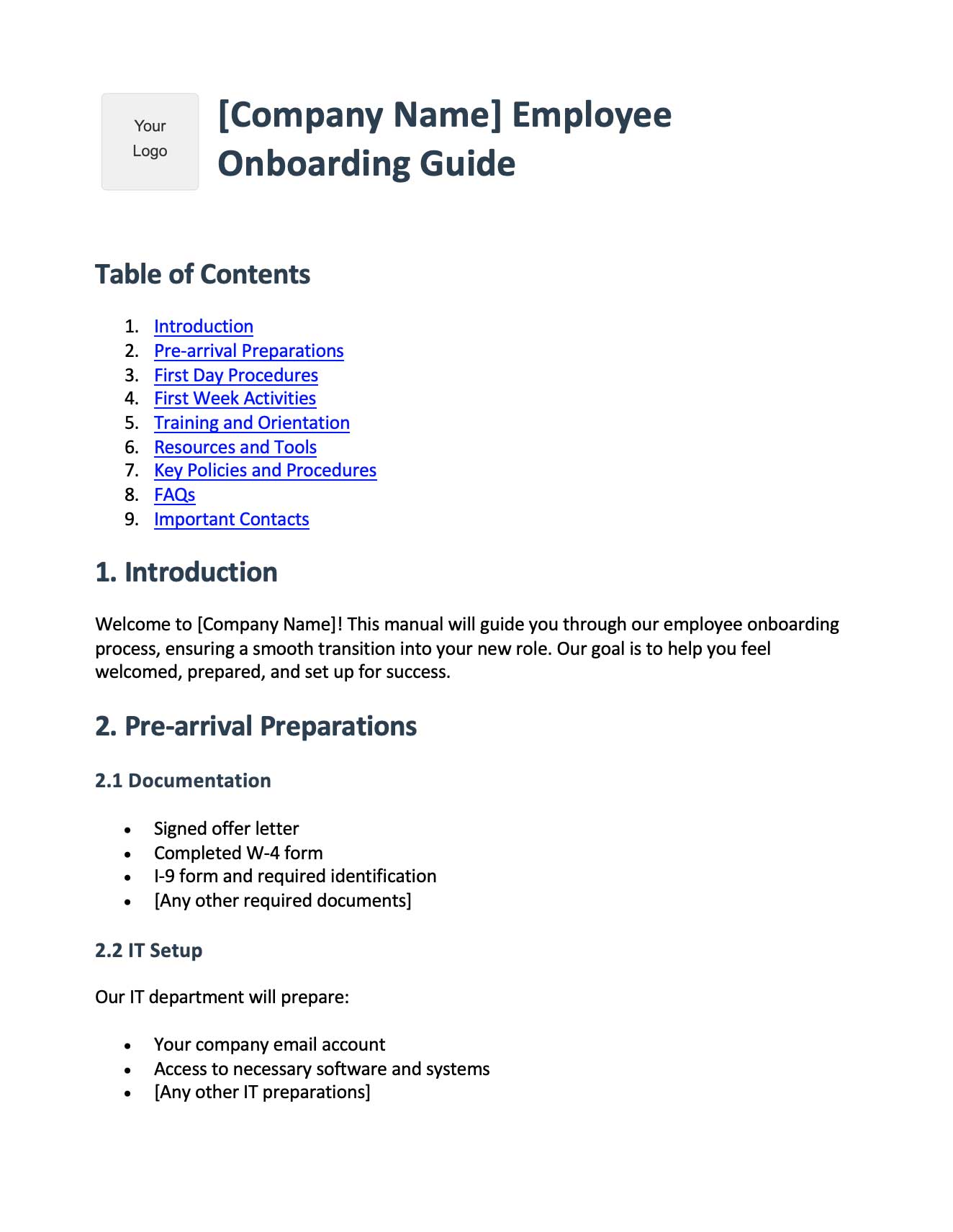
Get started with this free employee onboarding template:
Employee Onboarding Template
Free training manual template in Word format. Pre-built sections for pre-boarding, first day procedures, first week activities, training schedules, company policies, and key contacts. Perfect for building your employee training manual.
Download Training Template