
One day I had zero customer messages. The next day I had 300.
Bug reports, feature requests, random questions, feedback on things I didn’t even know were broken. All of it just sitting there as a wall of unstructured text.
And I was alone. It was early days for Glitter.
I stared at my Intercom inbox thinking, “How the in the world am I supposed to keep up with this?” I could already feel anxiety building up.
So I did what any reasonable person would do: I built an AI agent to handle it. That system has saved me around 5 hours a week, and at this point I’ve run over 2,000 conversations through it.
Here’s how I set it up, and how you can do the same.
I’m Yuval, founder of Glitter AI. And this is how I handle customer feedback with AI agents.
Want to skip ahead? You can download the templates below.
What You’ll Learn
- Connecting Intercom (or whatever support tool you use) to Make.com
- Using ChatGPT to automatically sort and categorize customer conversations
- Building a “Second Brain” in Notion that actually shows you patterns in your feedback
- The exact prompt I use to turn messy conversations into stuff I can act on
Total setup time: Around 1 hour
What you’ll need:
- A Make.com account (free tier works fine)
- An OpenAI API key
- A Notion workspace
- Intercom or a similar support tool
Teach your co-workers or customers how to get stuff done – in seconds.


Why I Built This
Glitter’s team is tiny. It’s a few people plus a bunch of AI agents. I do a lot of work myself that, at my last startup, I would have hired someone for, which is the same thinking behind how I replaced 20 employees with AI. It is the lean, ship-fast mindset I keep coming back to.
The real breaking point came after Glitter AI won “Product of the Day” on Product Hunt. We got picked up by newsletters, blogs, and news outlets, part of the same push toward finally investing in marketing. Suddenly I went from getting maybe a handful of Intercom messages to getting hundreds.
I could either miss important stuff or burn myself out trying to read everything.
Neither option sounded great, so I started building.
The Plan: Build a Junior PM That Never Sleeps
I basically wanted a junior product manager who also did customer support. Something that could:
- Summarize every customer conversation
- Tag it as a bug, feature request, feedback, or use case
- Drop it into a database I could search and prioritize later
To be clear, this automation doesn’t help me reply to customers. I still do that myself. But it keeps me from drowning in context-switching all day.
I put it together with Make.com, OpenAI, and Notion. If you haven’t used Make.com before, it’s like Zapier. You connect APIs together without writing code. Works great for this kind of thing.
How I Did It: Step-by-Step
Here’s exactly how I set things up:
1. Create a Make.com Scenario
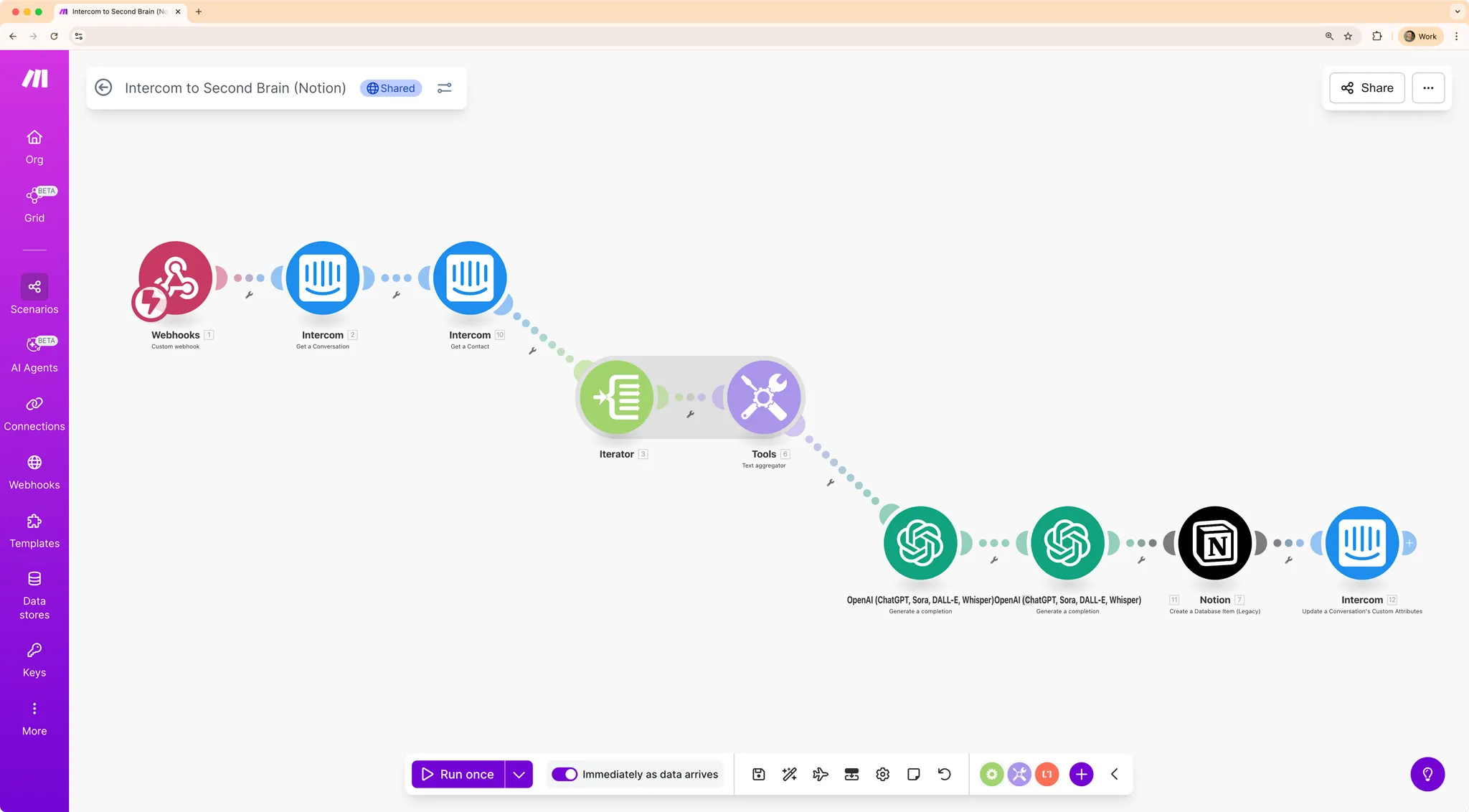
A “Scenario” in Make.com is a series of steps that run one after the other. Mine starts when a webhook is triggered (a webhook is basically a URL that causes something to happen when you hit it).
Here’s what the final scenario looks like. I’ll explain each piece below.
2. Set Up an Intercom Trigger
Most of my customer interactions come through Intercom. It’s where I get bug reports, feature requests, and general feedback.
Intercom has a feature called Custom Actions that can trigger a webhook. When I’m done talking with a customer and ready to categorize the conversation, I hit CMD + Shift + J in Intercom and select my Custom Action. That triggers the webhook in Make.com, which kicks off the whole pipeline.
Using a different tool? Most support platforms (Zendesk, Freshdesk, Help Scout) have similar webhook capabilities. The principle is the same.
3. Categorize with ChatGPT
This is where the magic happens.
In Make.com, I grab the full conversation text using the Intercom API, then pass it to OpenAI’s API with a specific prompt.
The prompt tells ChatGPT to act like an expert product manager and extract every bug, feature request, use case, and piece of feedback from the conversation.
Here’s the exact prompt I use:
You are an expert product manager extracting information from a conversation between admin and user.

Given the following conversation, write a summary of every bug OR feature request OR use case OR feedback provided by the user.

Some conversations may have multiple things (for example, bugs AND feature requests), but this may not always be the case.

Use your best judgment as an expert product manager to create the correct summary for this SaaS company.

Examples of use case:
"I'm using this to teach my new employees how to use our CRM"
"I want to show my VAs how to use a new system"
"I struggle with Zoom calls and this saved me the stress of jumping on one"

Examples of bugs:
"I can't log in"
"I keep getting this error"
"I get this error message when I install the desktop app"

Examples of feedback:
"I love how sleek the UX is"

Examples of feature suggestions (sometimes masked as questions):
"Does this support converting an existing video to a guide?"
"Does this integrate with Notion?"
"I wish I could remove the button from a screenshot"
Feel free to steal this and adapt it for your product.
4. Send to Notion
Glitter AI! You can create guides and send them straight to Notion to share with your team.
After ChatGPT does its thing, Make.com sends the categorized information to Notion. I’ve set up a database I call my “Second Brain” that stores everything- feature requests, bugs, use cases, feedback.
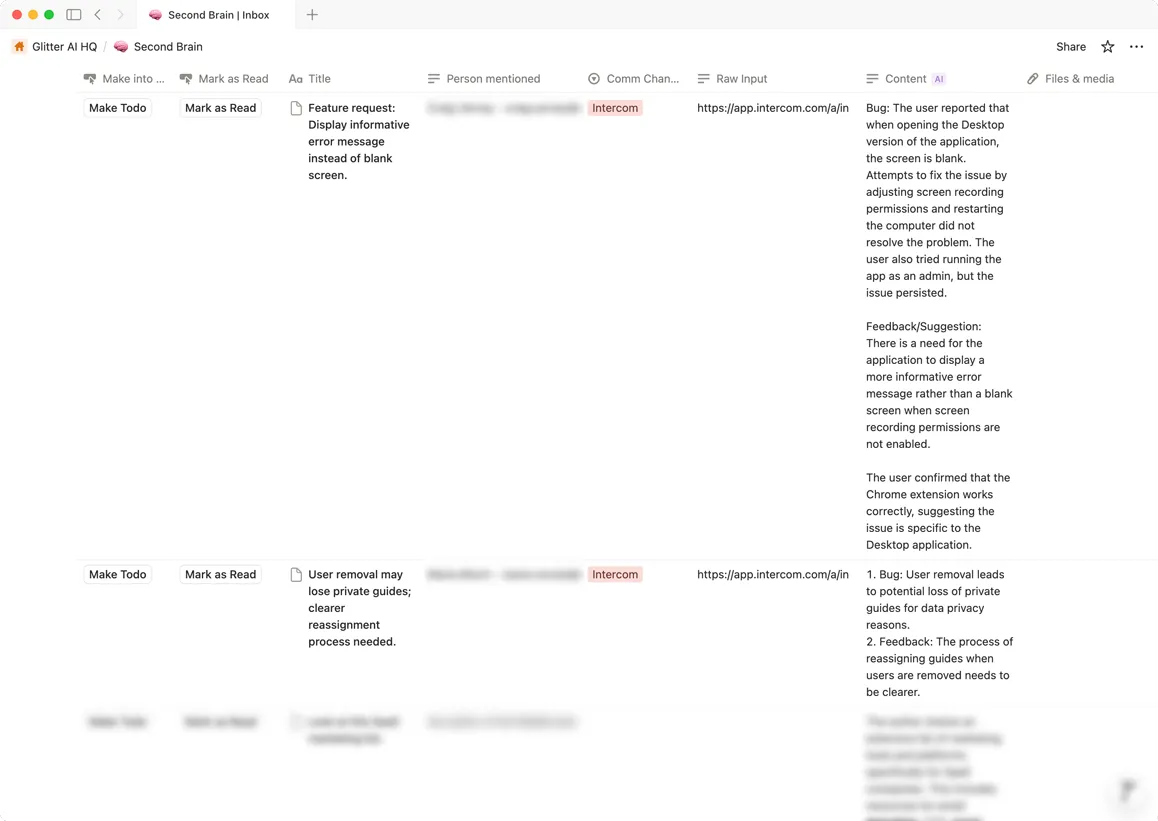
Each entry auto-links back to the original Intercom conversation, so I can always get the full context if I need it.
5. Find Patterns by Counting
Here’s where the system really pays off.
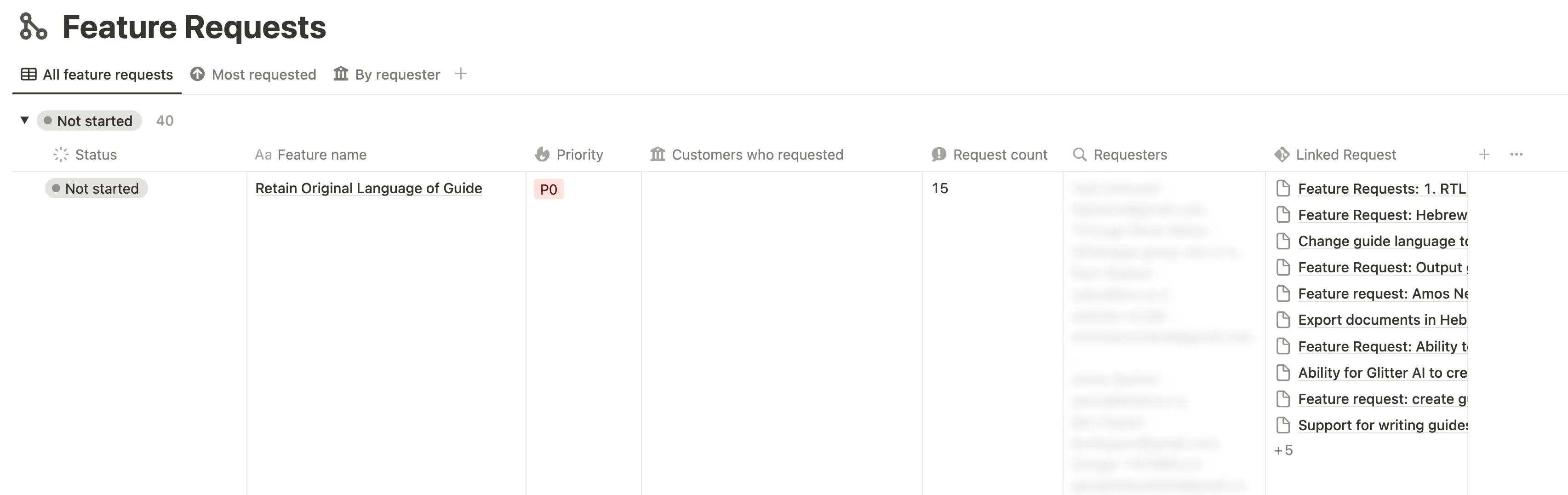
Once data is in Notion, I attach each summary to existing feature requests or bugs. Over time, I can see how many times something has been requested.
The beauty is that it’s not just tracking- it’s prioritization. By counting how many times a feature gets requested, I know exactly what to build next. I use a variation of the RICE framework to decide priorities.
What This System Tells Me
Before I had this, customer feedback felt like playing whack-a-mole. Now I can actually answer questions that used to be guesswork:
-
What features do people want most? Multi-language support kept showing up, so I moved it up the list.
-
What bugs should I fix first? The ones that come up over and over, obviously.
-
What are people using this for? Some use cases I never would have guessed.
-
Who should I be marketing to? The data shows me who’s actually using the product, not who I thought would.
-
What did I think was obvious but isn’t? If five people ask the same question, that’s a UX problem I need to fix.
The Tools
- Make.com - automation pipelines (free tier is enough to start)
- OpenAI API - intelligent categorization (~$0.01-0.03 per conversation)
- Notion - the “Second Brain” database
- Intercom - customer communication (or use whatever you have)
What to Do Next
- Sign up for Make.com and create a scenario with a webhook trigger
- Grab your OpenAI API key from platform.openai.com
- Set up a Notion database with columns for Type, Summary, Source Link, and Date
- Hook up your support tool’s webhook to fire when a conversation closes (or do it manually like I do)
- Download the resources below and tweak them for your product
The whole setup took me maybe 1 hour. It’s been saving me 5+ hours a week since then.
If you’re buried in customer feedback and can’t make sense of it all, this works. And if you’re curious how else I run Glitter without a big team, I wrote about learning to delegate.
Got questions? Reach out. And if you haven’t tried Glitter AI yet, it’s free to get started.
Frequently Asked Questions
How much does it cost to automate customer feedback with Make.com and OpenAI?
The setup uses Make.com's free tier, which is sufficient to get started. The main cost is OpenAI API usage at approximately $0.01-0.03 per conversation processed. For processing 2,000 conversations, expect to spend around $20-60 total on API calls. Notion's free tier works fine for the database, making this an extremely cost-effective automation solution.
Can I use this automation system without Intercom?
Yes, most customer support platforms support webhook functionality that can trigger this automation. Zendesk, Freshdesk, and Help Scout all have similar webhook capabilities. The core principle remains the same: trigger a webhook when a conversation closes, send the conversation text to ChatGPT for categorization, and store the results in Notion. You'll need to adjust the API connections in Make.com based on your specific platform.
How does ChatGPT categorize customer feedback automatically?
ChatGPT uses a specialized product manager prompt to analyze conversation text and extract bugs, feature requests, use cases, and general feedback. The prompt provides specific examples of each category, helping the AI distinguish between different types of customer input. For instance, it can recognize that a question like 'Does this integrate with Notion?' is actually a feature request, not just a question. The AI then creates structured summaries that get stored in your Notion database with proper categorization.
What is a Second Brain database in Notion?
A Second Brain is a centralized Notion database that stores all categorized customer feedback with columns for Type, Summary, Source Link, and Date. The key advantage is being able to attach multiple conversation summaries to the same feature request or bug, creating a count of how many times something has been requested. This counting mechanism enables data-driven prioritization using frameworks like RICE, transforming scattered customer feedback into actionable product insights.
How long does it take to set up customer feedback automation?
The complete setup takes approximately 1 hour from start to finish. This includes creating a Make.com scenario with a webhook trigger, obtaining your OpenAI API key, setting up the Notion database structure, and connecting your support tool's webhook. Once configured, the system runs automatically and can save 5+ hours per week by eliminating manual categorization and preventing context-switching throughout the day.
Does this automation reply to customers automatically?
No, this system does not automate customer responses. It specifically handles the backend categorization and organization of customer conversations after you've already responded. The automation summarizes each conversation, tags it appropriately as a bug, feature request, feedback, or use case, and stores it in Notion for future analysis. You maintain full control over customer interactions while eliminating the manual administrative work.
What can I learn from tracking customer feedback with this system?
The system reveals five key insights: which features are most requested (enabling evidence-based prioritization), which bugs occur most frequently (for targeted fixes), actual use cases customers have (often surprising), who your real users are versus who you thought they'd be (informing marketing strategy), and which aspects of your product aren't intuitive (when multiple people ask the same question, it signals a UX problem). For example, one founder discovered multi-language support was consistently requested and moved it up the priority list based on the data.
How does Make.com compare to Zapier for customer feedback automation?
Make.com and Zapier serve similar purposes as no-code automation platforms that connect different APIs together. For this customer feedback automation workflow, Make.com offers a free tier that's sufficient to get started and handles the webhook-to-OpenAI-to-Notion pipeline effectively. The choice between the two largely comes down to personal preference and which integrations you're already using. Both platforms can successfully execute this automation without requiring any coding knowledge.
Downloads
I’m sharing the exact templates I use. Grab them, duplicate them, and make them your own.
Make.com Automation Scenario
The complete workflow that connects Intercom to ChatGPT to Notion. Import it into your Make.com account and customize it for your product.
Download Make.com Scenario
Second Brain Notion Template
The Notion database I use to track bugs, feature requests, and customer feedback. Duplicate it to your workspace and start organizing.
Download Notion Template