
Read summarized version with
A founder I know once told me their team accidentally ordered 500 standing desks instead of 50.
The mistake cost them $45,000 and three weeks of logistics nightmares. All because someone misread a purchase order approval email and nobody caught it before hitting submit.
The worst part? This wasn’t an isolated incident. They had vendor contracts expiring without anyone noticing. Purchase requisitions sitting in limbo for weeks. Three different team members negotiating with the same supplier without knowing it.
They didn’t have a purchasing problem. They had a purchasing SOP problem.
I’m Yuval, founder of Glitter AI. At my first startup, we had our own procurement chaos - duplicate software subscriptions, vendors billing us months after we stopped working with them, zero visibility into what we were actually spending. I want to share what I’ve learned about creating purchasing SOPs that actually prevent these disasters.
Teach your co-workers or customers how to get stuff done – in seconds.


What is a Purchasing SOP?
A purchasing SOP (Standard Operating Procedure) is a documented set of instructions that standardizes how your organization handles procurement activities. From the moment someone realizes they need to buy something, to the moment that invoice gets paid, a purchasing SOP (sometimes called a procurement SOP) outlines exactly how it should happen. If you need a refresher on what SOPs are and why they matter, start there.
The key word here is “standard.” Without SOPs, purchasing becomes a free-for-all where everyone does things their own way. With SOPs, you get:
- Consistency in how vendors are evaluated and selected
- Controls that prevent unauthorized or duplicate spending
- Compliance with internal policies and external regulations
- Audit trails that show who approved what and when
- Knowledge retention when procurement staff leave (see why knowledge sharing is so critical)
Think of purchasing SOPs as the rules of engagement for spending company money. They’re not meant to slow things down - they’re meant to prevent the expensive mistakes that actually slow things down.
Why Purchasing SOPs Matter More Than You Think
Here’s a statistic that should get your attention: according to PwC, companies can achieve 30-40% savings on non-direct spending by purchasing only from preferred suppliers with standardized procedures.
But let me make it more concrete with what I’ve seen.
At my first startup, before we had purchasing SOPs, our procurement was chaos. We had:
- Three people accidentally ordering the same software licenses from different vendors
- Vendors we’d stopped working with six months ago still billing us
- Purchase orders approved by people who had no idea what they were approving
- Zero visibility into what we were actually spending money on
One person described their procurement situation on Reddit as “everyone just does their own thing until Finance gets angry.” That was us.
The Real Cost of Not Having Purchasing SOPs
Maverick Spending
This is when employees bypass procurement procedures and buy things on their own. Sometimes it’s because they don’t know the procedure. Sometimes it’s because the procedure is so painful they avoid it.
Either way, it destroys your negotiating leverage with vendors, makes budgeting impossible, and creates compliance nightmares. The Hackett Group’s 2025 procurement research shows organizations without disciplined purchasing controls lose around 60% more in savings to maverick buying and contract noncompliance than top-performing teams - a concrete measure of what undocumented procedures actually cost.
Vendor Risk
Without a standardized vendor selection process, you end up working with suppliers who haven’t been properly vetted. Financial instability, poor quality, compliance violations - you don’t discover these problems until it’s too late.
Fraud and Errors
Here’s an uncomfortable truth: procurement processes without proper controls are vulnerable to fraud. Invoice manipulation, kickbacks, duplicate payments - these things happen when procedures aren’t documented and followed.
Even without fraud, simple errors are expensive. One company I know paid the same invoice three times because different people in different departments each processed it.
Slow Procurement Cycles
Without clear procedures, purchase requisitions sit in limbo. Nobody knows whose approval is needed. People chase down signatures. Projects stall waiting for equipment.
Ironically, the perception that SOPs slow things down is backwards. Well-designed purchasing SOPs actually speed up procurement by making the path clear. The Hackett Group finds that the best procurement teams complete the requisition-to-PO cycle 58% faster than their peers - not because they skip steps, but because those steps are documented and don’t require anyone to figure out the path each time.
Glitter AI captures your procurement workflows automatically. Just perform the process once while talking through it.
Essential Purchasing SOPs Every Procurement Team Needs
Let me walk you through the critical SOPs that actually matter for procurement. These are the ones that prevented our purchasing disasters.
1. Vendor Selection and Approval SOP
This SOP standardizes how you evaluate and approve new suppliers.
Why it matters: Without this, you end up with vendors who can’t deliver, don’t meet compliance requirements, or present unnecessary risk to your business - it’s the front end of a healthy vendor management process.
What to include:
Vendor Qualification Criteria
- Financial stability requirements (credit checks, financial statements)
- Quality certifications needed (ISO, industry-specific)
- Insurance and bonding requirements
- References from other clients
- Compliance with regulations (safety, environmental, labor)
Evaluation Process
- Who requests new vendor approval (procurement team, department heads)
- How vendors are researched and compared
- Required documentation from vendors
- Who performs the vendor assessment
- Scoring criteria for vendor comparison
- Final approval authority
Vendor Onboarding
- Contract negotiation and signing process
- Payment terms and banking setup
- Addition to approved vendor list
- Communication of vendor policies
Example process: At Glitter, any vendor that will receive more than $10,000 annually requires a formal evaluation, and once approved they move into our structured vendor onboarding process. The requesting department fills out a vendor assessment form, procurement researches alternatives, we score vendors on price/quality/reliability, and our CFO gives final approval before any purchase orders are issued.
2. Purchase Requisition SOP
This SOP defines how employees request purchases and get them approved.
Why it matters: This is your first line of defense against unnecessary spending. A clear requisition process ensures that every purchase is justified, budgeted, and approved before money gets spent, much like a well-defined expense reimbursement policy controls spending after the fact.
What to include:
When a Requisition is Required
- Spending thresholds (e.g., anything over $500)
- Categories that always require requisitions (IT, equipment, services)
- Exceptions (emergency purchases, pre-approved recurring expenses)
Requisition Information
- Item description and specifications
- Quantity needed
- Estimated cost
- Business justification
- Budget code or cost center
- Preferred vendor (if any)
- Delivery timeline required
Approval Workflow
- Who can submit requisitions
- First-level approval (manager, up to certain amount)
- Second-level approval (director, for larger amounts)
- Final approval (CFO, for major purchases)
- Approval timeframes (SLA for each level)
What Happens After Approval
- How requisition moves to procurement team
- Timeline for procurement to create PO
- Communication back to requester
Example: We use a tiered approval system. Under $1,000 needs manager approval. $1,000-$10,000 needs director approval. Over $10,000 needs CFO approval. Our SOP specifies that approvers have 48 hours to respond or it escalates to the next level.
3. Purchase Order Creation and Management SOP
This SOP covers how approved requisitions become formal purchase orders.
Why it matters: Purchase orders are legally binding commitments, so it helps to map out the end-to-end purchase order process before writing this SOP. Getting them wrong creates contract disputes, payment problems, and receiving nightmares.
What to include:
PO Creation Process
- Who creates purchase orders (procurement team only, or others)
- Required information on every PO (vendor, items, quantities, prices, delivery terms, payment terms)
- PO numbering system
- How changes are requested and approved
- Communication of PO to vendor
PO Types
- Standard PO for one-time purchases
- Blanket PO for recurring purchases
- Contract PO for services
PO Approval Levels
- Dollar thresholds for different approval levels
- Who can approve what
- Documentation required for approval
PO Modifications
- Process for changing PO after vendor acceptance
- Who can authorize changes
- How to document change history
Example process: At Glitter, only our procurement specialist creates POs. Every PO includes a unique number, references the original requisition, specifies exact quantities and prices, and includes delivery instructions. POs under $5,000 auto-approve if they match the requisition. Over $5,000 requires procurement manager review before sending to vendor.
Teach your co-workers or customers how to get stuff done – in seconds.
4. Receiving and Inspection SOP
This SOP standardizes how you receive, inspect, and accept deliveries.
Why it matters: This is where you catch discrepancies between what you ordered and what you got, which is why it often lives alongside your broader logistics SOP. Without a receiving SOP, you end up paying for things you didn’t receive or accepting defective goods.
What to include:
Receiving Process
- Where deliveries should go (loading dock, mailroom, etc.)
- Who receives shipments (receiving clerk, office manager)
- What to check immediately (PO match, quantity, obvious damage)
Inspection Procedures
- Who inspects what types of goods
- Inspection timeframe (inspect within 24 hours of receipt)
- What to inspect for (quantity, quality, specifications, damage)
- How to document inspection results
Acceptance Criteria
- When goods are accepted vs. rejected
- Partial acceptance procedures
- How to handle damaged shipments
- How to handle incorrect shipments
Documentation
- How to record receipt in system
- Required photos or notes for damaged goods
- How to notify procurement and AP of receipt
- How to update PO status
Rejected Goods
- Process for rejecting delivery
- Who to notify (vendor, procurement, AP)
- Return authorization process
- How to track rejected items
Example: Our warehouse manager receives all shipments, following the receiving steps in our warehouse SOP. They immediately verify the PO number and count the items. For technology purchases, our IT team inspects within 24 hours. We take photos of any damage and immediately notify the vendor and procurement. Nothing gets marked as “received” in our system until it passes inspection.
5. Invoice Processing and Three-Way Matching SOP
This SOP ensures you only pay for what you actually ordered and received.
Why it matters: This is your last line of defense against overpayment, duplicate payment, and fraud. Three-way matching (PO, receipt, invoice) catches almost all payment errors.
What to include:
Invoice Receipt
- Where vendors should send invoices (email, portal, address)
- How invoices are logged into system
- Timeframe for initial review
Three-Way Matching
- Compare invoice to PO (quantities, prices, terms)
- Compare invoice to receiving documentation
- Identify and resolve discrepancies
- Who can authorize payment for matched invoices
- Escalation for discrepancies
Discrepancy Resolution
- Process for handling price differences
- Process for handling quantity differences
- Who investigates and resolves
- Documentation of resolution
- Timeline for resolution
Payment Authorization
- Who approves payment after matching
- Different approval levels for different amounts
- How to handle early payment discounts
- Payment terms adherence
Payment Processing
- How approved invoices move to payment
- Payment methods by vendor/amount
- Payment schedule (weekly, biweekly)
- How vendors are notified of payment
Example process: Invoices come to our AP email. Our AP clerk verifies the PO number exists and receipt is logged. The system automatically does three-way matching. Matched invoices under $5,000 auto-approve for payment. Discrepancies over $100 go to procurement for investigation. We pay on Net 30 terms unless there’s a discount for early payment.
6. Contract Management and Renewal SOP
This SOP ensures contracts don’t expire without notice and renewal decisions are made thoughtfully.
Why it matters: I’ve seen companies continue paying for services they stopped using months ago because nobody noticed the contract auto-renewed. I’ve also seen critical services interrupted because a contract expired and nobody renewed it.
What to include:
Contract Documentation
- Where contracts are stored (contract management system, shared drive)
- Required contract information (parties, term, value, renewal dates, termination clauses)
- Who has access to contracts
Renewal Tracking
- System for tracking renewal dates
- Advance notice periods (90 days before renewal, 60 days, 30 days)
- Who gets notified of upcoming renewals
- Auto-renewal identification
Renewal Decision Process
- Who decides to renew or terminate
- Required information for decision (usage data, performance, alternatives)
- Timeline for making decision
- Process for renegotiating terms
Contract Amendments
- How to request contract changes
- Who can approve amendments
- Documentation of amendments
- How amendments are stored
Example: We use a spreadsheet (yes, really) with every contract, start date, end date, value, and renewal type. Every Monday, our procurement manager reviews contracts renewing in the next 90 days. At 60 days, the contract owner (person responsible for that service) gets asked: renew, renegotiate, or terminate? At 30 days, decision must be made.
7. Emergency and Expedited Purchasing SOP
This SOP handles situations when normal procurement timelines don’t work.
Why it matters: Emergencies happen. Equipment fails. Deadlines move up. Without a documented emergency procedure, people bypass all controls “just this once,” which becomes a habit.
What to include:
What Qualifies as Emergency
- Clear definition (operational shutdown, safety issue, critical deadline)
- What doesn’t qualify (poor planning, convenience)
- Who determines if something is an emergency
Emergency Approval Process
- Simplified approval chain
- Required documentation (justification for emergency)
- Spending limits for emergency purchases
- Retroactive documentation required
Expedited Procurement
- How to fast-track PO creation
- Communication with vendors for rush delivery
- Premium costs approval
Post-Emergency Documentation
- Required documentation after emergency purchase
- Review of emergency decision
- Process improvement (how to prevent future emergency)
Example: At Glitter, a true emergency (system down, safety issue) can be approved verbally by our COO with email confirmation within 4 hours. All other “urgent” purchases follow an expedited process: 24-hour approval timeline instead of 48 hours. We review every emergency purchase monthly to see if we can prevent future emergencies.
Glitter AI turns your purchasing workflows into clear SOPs with screenshots and step-by-step instructions
How to Create Purchasing SOPs That Actually Work
I’ve created a lot of bad purchasing SOPs. Here’s what I learned about making them actually useful.
Start with Your Current Reality, Not Your Ideal
The biggest mistake I made with our first purchasing SOP was writing what I wished our process looked like instead of what it actually was.
The result? Nobody followed it because it didn’t match reality.
Start by documenting what people actually do now. Shadow your procurement team. Watch requisitions move through the system. Then improve the process and document that.
Involve the People Who Do the Work
Your procurement team knows things you don’t. They know which vendors are a pain to work with. They know which approval steps are bottlenecks. They know what information is actually needed vs. what’s just bureaucracy.
When I created our vendor selection SOP, I wrote the first draft. Then I sat with our procurement specialist, watched her actually vet a vendor, and realized I’d missed half the process.
Get input from:
- Procurement staff who create POs
- AP staff who process invoices
- Department heads who request purchases
- Warehouse staff who receive goods
- Finance who tracks spending
Make Approval Workflows Crystal Clear
Ambiguous approval authority is procurement kryptonite.
Your SOP needs to specify exactly:
- Who can approve what dollar amounts
- What happens if someone is out of office
- How long each approver has to respond
- What happens if approval is denied
- How to escalate if needed
We use a simple table in our SOP:
| Amount | Requester Manager | Department Director | CFO | CEO |
|---|---|---|---|---|
| $0-$500 | Approve | - | - | - |
| $501-$5,000 | Approve | Approve | - | - |
| $5,001-$25,000 | Approve | Approve | Approve | - |
| $25,000+ | Approve | Approve | Approve | Approve |
No confusion about who needs to sign off.
Build in Controls Without Making It Painful
The goal of purchasing SOPs is control without bureaucracy.
Yes, you need approvals. Yes, you need documentation. But if your process is so onerous that people avoid it, they’ll just bypass it.
Some ways to balance control and efficiency:
Auto-approval for low-risk purchases: If it’s under $1,000, from an approved vendor, and has budget, let it through automatically.
Pre-approved vendor lists: Instead of vetting every purchase, vet vendors once and approve them for certain categories.
Blanket POs for recurring purchases: Don’t make people requisition the same thing every month. Set up a blanket PO and let them order against it.
Clear escalation paths: When something is stuck, people need to know how to unstick it.
Use Technology to Enforce the Process
Manual SOPs require people to remember and follow steps. Technology can enforce them.
We use a procurement system that:
- Routes requisitions to the right approvers based on amount
- Blocks PO creation until requisition is approved
- Flags invoices that don’t match POs
- Sends automatic reminders for pending approvals
You don’t need expensive software for this. Even a shared spreadsheet with formulas and notifications is better than nothing.
Make SOPs Easy to Find and Follow
A purchasing SOP hidden in a SharePoint folder that nobody can find is useless.
Put your purchasing SOPs:
- Where people actually work (link from your procurement system)
- In a central, searchable location
- With clear, descriptive titles
- In a format that’s easy to scan (not walls of text)
We keep a one-page “quick reference” version of each SOP posted in our office and linked from our procurement software. The full detailed version is available but most people just need the quick reference.
Include Real Examples and Scenarios
Abstract procedures are hard to follow. Concrete examples make it click.
For each SOP, include:
- Sample forms filled out correctly
- Decision tree for common scenarios (“If X happens, do Y”)
- Screenshots of systems
- Examples of good and bad vendor proposals
- Common mistakes and how to avoid them
In our purchase requisition SOP, we have examples:
- “Good requisition example: includes specs, business justification, cost comparison”
- “Bad requisition example: vague description, no justification, no cost research”
Showing what good looks like is more effective than just telling.
Common Purchasing SOP Mistakes to Avoid
Making the SOP Too Restrictive
I once created a vendor selection SOP that required three written quotes for every purchase over $500, even if we had a preferred vendor.
Guess what happened? People stopped getting quotes. They just bought things for $499 to avoid the process.
Your SOP should standardize, not straitjacket. Build in flexibility for situations that genuinely need it.
Ignoring the Small Purchases
Most companies focus SOP rigor on large purchases and ignore small ones. But small purchases add up.
Without controls, you get:
- Hundreds of subscriptions nobody tracks
- Duplicate purchases because people don’t know what others bought
- Unchecked recurring charges
Our rule: every purchase, no matter how small, needs a PO. For small purchases it’s quick (auto-approved if from approved vendor), but it gets tracked.
Not Connecting Purchasing to Budgeting
A purchasing SOP without budget integration is incomplete.
Every requisition should reference a budget line. Every PO should check available budget. Every invoice should charge to the correct cost center.
Otherwise you end up with department heads approving purchases without realizing they’ve blown their budget.
Failing to Update When Processes Change
Software changes. Vendors change. Approval authorities change. If your SOP doesn’t change with them, people stop trusting it.
We review all purchasing SOPs quarterly. Any time we change a system or process, updating the SOP is part of the project.
Not Training People on the SOPs
Writing the SOP is not the same as implementing it.
When we rolled out our new purchasing procedures, we:
- Walked through each SOP with affected teams
- Did hands-on practice with the new requisition form
- Made ourselves available for questions
- Sent reminder emails the first few weeks
Just emailing a PDF and expecting people to follow it doesn’t work.
How Glitter AI Makes Purchasing SOP Creation Easy
I’ll be honest: creating purchasing SOPs the traditional way is tedious.
You sit with your procurement team. You watch them work. You take screenshots. You write steps. You format everything. It takes hours per SOP.
This is why we built Glitter AI the way we did.
Instead of manually documenting your purchasing process, you just do the process once while the software watches. Talk through what you’re doing as you do it. Glitter captures:
- Screenshots of each step automatically
- Your voice explanations converted to written instructions
- Clicks and actions in sequence
That three-way invoice matching process that would take me an hour to document manually? I recreated it in about 10 minutes with Glitter.
For procurement teams, this means:
- Document your current processes as-is quickly
- Update SOPs when processes change without dreading it
- Create vendor-specific procedures (how to order from this vendor)
- Build training materials for new procurement staff
The best part? Since it’s so easy to update, your SOPs stay current instead of becoming outdated artifacts.
Measuring Purchasing SOP Success
How do you know if your purchasing SOPs are actually working? Track these metrics:
Maverick Spend Reduction: Percentage of purchases that bypass procurement procedures. Should decrease over time.
Requisition-to-PO Cycle Time: How long from requisition submission to PO issuance. Should decrease as process gets smoother.
Invoice Processing Time: Days from invoice receipt to payment. Should decrease with better three-way matching.
Purchase Order Accuracy: Percentage of POs that need modification after vendor acceptance. Should decrease.
Vendor Compliance Rate: Percentage of active vendors that have been properly vetted per SOP. Should increase to 100%.
Emergency Purchase Frequency: Number of emergency purchases per month. Should decrease as planning improves.
Contract Renewal Surprises: Contracts that expired or auto-renewed without proper review. Should be zero.
We review these metrics monthly. If something is trending wrong, we look at whether the SOP is the problem (unclear, too restrictive) or if people aren’t following it (need training, need enforcement).
Frequently Asked Questions
What is a purchasing SOP and why do procurement teams need one?
A purchasing SOP (Standard Operating Procedure) is a documented set of instructions that standardizes how your organization handles procurement activities, from purchase requests through payment. PwC research shows companies can achieve 30-40% savings on non-direct spending by purchasing only from preferred suppliers with standardized procedures. Without purchasing SOPs, you get chaos: duplicate orders, unauthorized spending, vendor contracts expiring unnoticed, invoices paid without proper verification, and zero visibility into what you're actually spending. Purchasing SOPs create consistency, controls, compliance, audit trails, and knowledge retention that prevent expensive procurement mistakes.
What are the essential purchasing SOPs every company should have?
Every procurement team needs seven core SOPs: (1) Vendor Selection and Approval - standardizes how you evaluate and approve suppliers; (2) Purchase Requisition - defines how employees request purchases and get approval; (3) Purchase Order Creation - covers how approved requisitions become formal POs; (4) Receiving and Inspection - standardizes how you receive and accept deliveries; (5) Invoice Processing and Three-Way Matching - ensures you only pay for what you ordered and received; (6) Contract Management and Renewal - tracks contract dates and renewal decisions; (7) Emergency Purchasing - handles situations when normal timelines don't work. These SOPs work together to create a complete procurement control framework.
How do you create a purchasing SOP that people will actually follow?
Start by documenting your current reality, not your ideal process - shadow your procurement team to see what they actually do. Involve the people who do the work; they know which steps are bottlenecks and what information is actually needed. Make approval workflows crystal clear with specific dollar thresholds and escalation paths. Build in controls without making it painful by using auto-approval for low-risk purchases and pre-approved vendor lists. Use technology to enforce the process rather than relying on people to remember steps. Include real examples and scenarios - show what good requisitions look like versus bad ones. Test the SOP with someone unfamiliar with the process before publishing.
What is three-way matching in procurement and why does it matter?
Three-way matching is the process of comparing the purchase order (what you ordered), receiving documentation (what you actually got), and the vendor invoice (what you're being asked to pay) to ensure they all match before authorizing payment. This is your last line of defense against overpayment, duplicate payment, and fraud. The process catches almost all payment errors: quantity differences, price discrepancies, charges for items never received, and duplicate invoices. Your invoice processing SOP should specify who performs the match, acceptable tolerance levels for small differences, escalation process for major discrepancies, and approval authority for matched invoices at different dollar amounts.
How do you balance procurement controls with speed and efficiency?
The goal is control without bureaucracy. Use tiered approval thresholds so small purchases move quickly while large ones get proper scrutiny. Implement auto-approval for low-risk purchases under a certain amount from pre-approved vendors with available budget. Create blanket POs for recurring purchases so people don't requisition the same thing monthly. Establish pre-approved vendor lists so you vet vendors once rather than for each purchase. Build clear escalation paths so when something is stuck, people know how to unstick it. Use technology to enforce workflows automatically rather than manual checking. The perception that SOPs slow things down is backwards - well-designed purchasing SOPs actually speed up procurement by making the path clear.
What are the biggest purchasing SOP mistakes companies make?
The most common mistakes: (1) Making SOPs too restrictive, which causes people to bypass them entirely; (2) Focusing only on large purchases while ignoring hundreds of small purchases that add up; (3) Not connecting purchasing to budgeting, so purchases get approved without checking available budget; (4) Failing to update SOPs when software, vendors, or approval authorities change; (5) Writing SOPs without involving the procurement staff who actually do the work; (6) Not training people on the new procedures - just emailing a PDF doesn't work; (7) Making approval workflows ambiguous instead of specifying exactly who approves what dollar amounts. Another critical mistake is writing what you wish your process looked like instead of documenting current reality first, then improving it.
How often should purchasing SOPs be reviewed and updated?
Most purchasing SOPs should be reviewed quarterly, with immediate updates whenever underlying processes change. Schedule the first review before publishing the SOP. Any time you change procurement software, modify vendor relationships, adjust approval authorities, or update payment terms, updating the SOP must be part of that project. Assign an owner responsible for each SOP's maintenance - unowned SOPs inevitably become stale. Track metrics like requisition-to-PO cycle time, invoice processing time, and purchase order accuracy to identify SOPs that need improvement. Outdated purchasing SOPs are dangerous because people follow old procedures and wonder why things go wrong, or they stop trusting the SOP entirely and bypass it.
Getting Started with Purchasing SOPs
Here’s your action plan:
-
Audit your current procurement process: Shadow your team for a week. Document what actually happens now, not what should happen.
-
Identify your biggest pain points: Where do purchases get stuck? Where do errors happen? Where is there no visibility? Start with SOPs that address these.
-
Start with one critical SOP: Don’t try to document everything at once. Pick your biggest problem (probably requisition or approval workflow).
-
Involve your procurement team: They know what actually works. Get their input before writing, and their feedback after drafting.
-
Test it with real transactions: Have someone follow your SOP for actual purchases. Fix everything they struggle with.
-
Roll out with training: Walk through the new SOP with everyone affected. Don’t just email it.
-
Measure and improve: Track your metrics. Review quarterly. Update when processes change.
If you want to make this process much faster, try Glitter AI. Just perform your purchasing process once while talking through it, and you’ll have a documented SOP with screenshots in minutes instead of hours.
The goal isn’t perfect purchasing SOPs. The goal is getting your procurement under control so you stop having expensive surprises like ordering 500 standing desks when you meant 50.
Start with one SOP this week. Your finance team will thank you.
Download Procurement SOP Template
Get started with this free purchasing SOP template:
Purchasing SOP Template
Free procurement SOP template in Word format. Includes ready-to-fill sections for vendor selection, purchase requisitions, PO creation, receiving procedures, invoice processing, and contract management. Start standardizing your purchasing today.
Download Purchasing SOP Template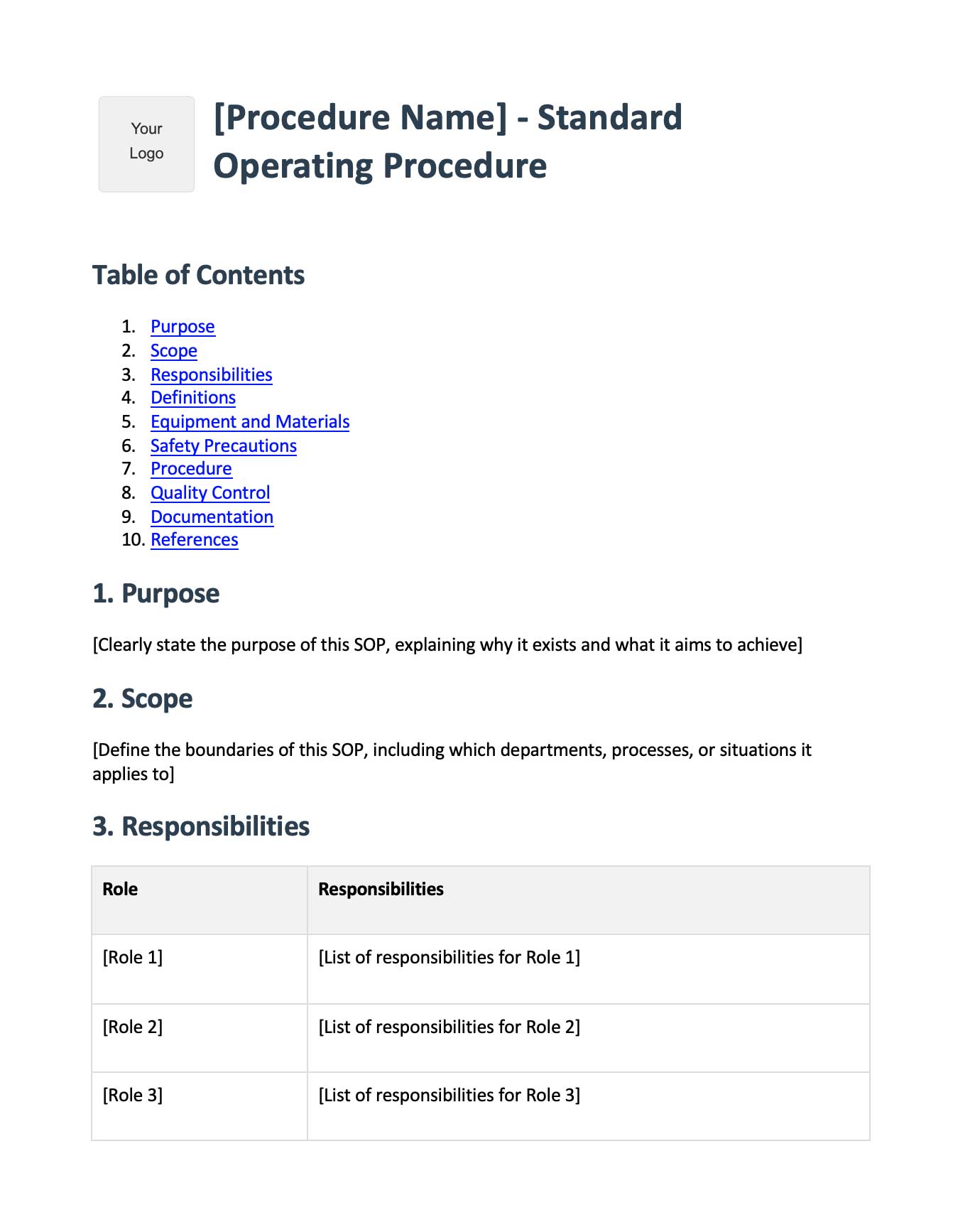
For a full step-by-step walkthrough of the underlying process, see our procurement process guide. It also covers the purchase order process end to end.
Create purchasing SOPs in minutes with Glitter AI - just perform the process while talking through it