
Read summarized version with
I’ll be honest with you.
For the first two years at my first startup, I thought SOPs and work instructions were the same thing. We’d use the terms interchangeably in meetings. Someone would ask for a “work instruction” and get handed an SOP. Nobody seemed to care.
Then I started learning more about documentation best practices and realized we had it all wrong. What we were calling “work instructions” were actually SOPs. We didn’t have real work instructions at all.
Turns out, there’s a real difference. And understanding it matters if you want your team to actually know what they’re doing.
I’m Yuval, founder of Glitter AI. After years of building documentation systems (first at my previous startup, now at Glitter), I’ve learned exactly when you need an SOP, when you need a work instruction, and why mixing them up causes problems.
Teach your co-workers or customers how to get stuff done – in seconds.


What is an SOP?
A Standard Operating Procedure (SOP) is a high-level document that outlines the overall process for completing a task or activity. If the acronym still trips people up, our primer on what an SOP means in a business context covers the basics before you go further here.
Think of it as the “what” and “why” of a process.
SOPs typically include:
- The purpose of the procedure
- Who is responsible for what
- What resources you need
- The major steps in the process
- When and why the process should be followed
- What happens if things go wrong
Here’s an example: An SOP for “Customer Refund Process” might say:
- Receive refund request from customer
- Verify purchase details in the system
- Determine eligibility based on refund policy
- Process refund through payment system
- Send confirmation to customer
- Update records
Notice what’s missing? The exact button clicks. The specific fields to fill out. The troubleshooting for edge cases.
That’s intentional. SOPs give you the roadmap, not the turn-by-turn directions, which is exactly why a domain-specific document like a logistics SOP stays readable, and our complete guide to writing effective SOPs walks through how to keep that level right.
What is a Work Instruction?
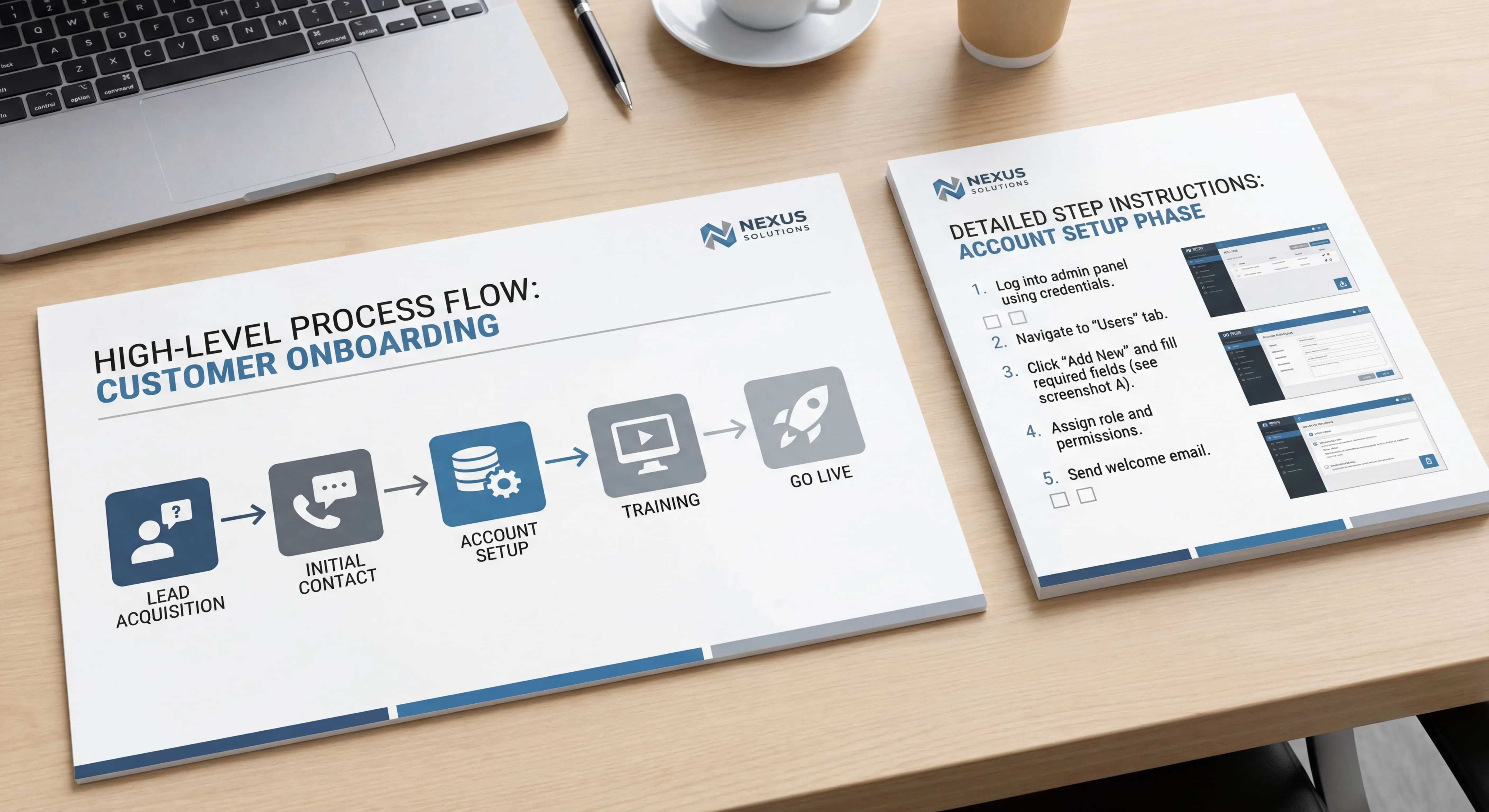
A step-by-step task guide is a detailed set of directions for performing a specific task.
It’s the “how” of the process.
Work instructions assume you already understand the broader context (from the standard operating procedure) and just need to know exactly how to complete one specific task correctly.
Using the same refund example, a work instruction for “Processing a Refund in Shopify” would include:
- Click “Orders” in the left sidebar
- Type the order number in the search box
- Click on the correct order from the results
- Scroll down to the “Items” section
- Click the three dots next to the item being refunded
- Select “Refund” from the dropdown menu
- Enter the refund amount in the “Amount” field
- Check the box next to “Send notification to customer”
- Click “Refund $XX.XX” button
- Wait for the green confirmation banner to appear
See the difference? Every single click. Every field. Every confirmation.
Work instructions, sometimes called a desktop procedure when they cover a single workstation task, leave nothing to interpretation.
Glitter AI captures your screen and voice to generate both types of documentation automatically
The Key Differences Between SOPs and Work Instructions
Let me break down the real differences that matter:
Level of Detail
SOPs describe what needs to happen and in what order. They’re concise overviews.
Work Instructions describe exactly how to make it happen. They’re detailed and specific.
If your SOP is 2 pages, the work instructions supporting it might be 15 pages combined.
Scope
SOPs cover an entire process that might involve multiple people, departments, or systems.
Work Instructions cover a single task that one person completes.
Think: SOP = entire recipe. Work instruction = how to chop an onion without crying.
Audience
SOPs are written for people who need to understand the process, coordinate with others, or make decisions.
Work Instructions are written for the people actually doing the hands-on work.
Managers and coordinators read SOPs. Operators and individual contributors use work instructions.
Flexibility
SOPs allow for some judgment and interpretation. They describe the standard approach while acknowledging exceptions exist.
Work Instructions are rigid. You follow them exactly as written. There’s no room for interpretation.
This is why work instructions are critical in regulated industries. When the FDA audits your pharmaceutical plant, they check that you’re following the work instructions to the letter.
Purpose
SOPs ensure consistency across the process and alignment between teams.
Work Instructions ensure quality and accuracy at the task level.
Both are necessary. Neither replaces the other.
SOP vs Work Instructions: A Side-by-Side Comparison
Here’s a quick reference table:
| Aspect | SOP | Work Instruction |
|---|---|---|
| Scope | Entire process | Single task |
| Detail Level | High-level steps | Granular, step-by-step |
| Length | Usually 1-5 pages | Can be many pages for complex tasks |
| Audience | Managers, coordinators, cross-functional teams | Operators, individual contributors |
| Purpose | Process overview and coordination | Task execution |
| Includes | Purpose, scope, responsibilities, major steps | Exact actions, buttons, fields, confirmations |
| Flexibility | Some judgment allowed | Must be followed exactly |
| Updates | Less frequent (quarterly to annually) | More frequent (as tools/systems change) |
| Example | “How to onboard a new employee” | “How to create a Slack account for a new hire” |
When to Use an SOP vs a Work Instruction
The question I get asked most: “Which one do I need?”
The answer is usually both. But here’s how to decide:
Use an SOP when you need to:
- Document a multi-step process that crosses departments
- Show how different tasks connect to each other
- Explain the purpose and context behind procedures
- Define roles and responsibilities
- Ensure compliance at the process level
- Coordinate multiple people or teams
Example scenarios:
- Employee onboarding process
- Incident response procedure
- Sales qualification methodology
- Quality assurance process
- Data backup and recovery procedure
Use a Work Instruction when you need to:
- Document a specific task within a larger process
- Ensure exact steps are followed every time
- Train someone with no prior knowledge
- Meet quality or safety requirements
- Prevent errors on detailed tasks
- Provide reference material for occasional tasks
Example scenarios:
- How to configure a specific software setting
- How to operate a particular machine
- How to fill out a specific form correctly
- How to perform a quality control check
- How to package a product for shipping
Here’s a practical example
Let’s say you run a customer support team.
You need an SOP for: “Handling Customer Complaints”
This SOP would outline:
- What qualifies as a complaint vs a general inquiry
- Who handles different types of complaints
- The escalation path for serious issues
- Required documentation
- Follow-up procedures
- Success metrics
Within that SOP, you’d reference several work instructions:
- How to log a complaint in Zendesk
- How to issue a refund in Stripe
- How to escalate a ticket to Tier 2 support
- How to send the complaint follow-up email template
The SOP gives the big picture. The work instructions handle the details.
Teach your co-workers or customers how to get stuff done – in seconds.
How SOPs and Work Instructions Work Together
Here’s something important: SOPs and work instructions aren’t competing options. They’re complementary layers of documentation.
Think of them like a pyramid:
Level 1: Policy - The high-level rules and standards Level 2: SOP - The process overview and major steps Level 3: Work Instruction - The detailed how-to for each task
For example, in manufacturing:
Policy: “All products must meet quality standards before shipping”
SOP: “Quality Control Inspection Process”
- Receive finished product from assembly
- Conduct visual inspection
- Perform functional testing
- Document results
- Accept or reject product
Work Instructions:
- “How to Perform Visual Inspection on Product X” (with photos of acceptable vs defective items)
- “How to Run Functional Test #47 on Testing Equipment” (with exact button sequences)
- “How to Complete Quality Control Form in System” (with screenshot of every field)
Each level supports the next. Remove any layer and the system breaks down.
Common Mistakes When Creating SOPs and Work Instructions
After helping hundreds of companies document their processes, I’ve seen these mistakes repeatedly:
Mistake #1: Mixing the Two
This is the most common problem. You start writing an SOP and suddenly you’re describing which buttons to click.
Or you’re writing a work instruction and you add a whole section about the purpose and stakeholders.
Pick one or the other. If you need both, create separate documents.
Mistake #2: Making SOPs Too Detailed
When your SOP includes screenshots of every screen, it’s not an SOP anymore. It’s a work instruction that you’re calling an SOP.
This makes SOPs unreadable and hard to maintain.
Mistake #3: Making Work Instructions Too Vague
“Log into the system and process the refund” is not a work instruction. That’s an SOP step.
Work instructions need to be so detailed that someone who has never seen the system before can follow them.
Mistake #4: Creating Work Instructions for Everything
Not every task needs a work instruction.
If someone does a task once a day and knows it by heart, they probably don’t need a 10-page work instruction. They might just need a quick reference checklist.
Work instructions are for:
- Complex tasks with many steps
- Infrequent tasks people might forget
- Tasks where errors have serious consequences
- Tasks performed by new or rotating staff
Mistake #5: Not Connecting Them
Your SOP should reference the relevant work instructions. Your work instructions should indicate which SOP they support.
Without these connections, people don’t know which documentation to use when.
Glitter AI creates both SOPs and work instructions as you work - just talk through what you're doing
How to Create SOPs and Work Instructions
Let me share the process that actually works:
Creating an SOP
- Define the process boundaries - Where does it start? Where does it end?
- Identify stakeholders - Who’s involved? Who owns what?
- Map the major steps - What are the 5-10 key stages?
- Document decision points - Where do choices get made?
- Define success criteria - How do you know it worked?
- Review with all stakeholders - Get buy-in from everyone involved
- Publish and assign an owner - Someone needs to keep it current
Keep it high-level. If you’re writing more than 5 pages, you’re probably going too deep.
For detailed guidance, check out my complete SOP guide.
Creating a Work Instruction
- Watch the expert - Observe someone who does this task well
- Capture every action - Click by click, field by field
- Screenshot everything - Every screen state, every step
- Write in active voice - “Click Submit” not “The Submit button should be clicked”
- One action per step - Don’t combine multiple actions
- Test with a novice - Give it to someone who has never done this task
- Revise based on their struggles - Fix anything that confused them
- Schedule regular updates - Software changes frequently
The testing step is critical. If someone struggles following your work instruction, the problem is the instruction, not the person.
Using Glitter AI for Both
Here’s where I’ll be a bit self-promotional (but it’s genuinely relevant).
Creating SOPs and work instructions manually is tedious. Screenshots, writing, formatting - it takes hours.
At Glitter AI, we built a tool that captures everything automatically. You just perform the task while talking through what you’re doing.
Glitter captures:
- Screenshots of every step
- Your voice explaining what you’re doing
- Mouse clicks and keyboard inputs
Then it generates both the high-level SOP and the detailed work instructions.
For the SOP, it extracts the major steps and purpose from your explanation.
For the work instructions, it creates detailed step-by-step guides with all the screenshots.
You can then edit and refine as needed. But the heavy lifting is automated.
I built this because I got tired of spending hours creating documentation that would be outdated in six months. Now we can regenerate it in minutes.
Try it free if you’re curious.
Real-World Examples
Let me show you how this works in practice:
Example 1: Restaurant Operations
SOP: Opening Procedures
- Unlock and disarm security system
- Turn on equipment
- Check inventory and prep areas
- Prepare cash registers
- Complete opening checklist
- Confirm readiness with manager
Work Instructions:
- “How to Start the Commercial Oven Model XYZ” (with photos and exact temperature settings)
- “How to Count and Record Register Float” (with step-by-step cash counting procedure)
- “How to Check Refrigerator Temperatures” (with acceptable ranges and recording method)
Example 2: Software Development
SOP: Code Review Process
- Developer submits pull request
- Automated tests run
- Reviewer is assigned
- Review is conducted
- Feedback is addressed
- Code is approved and merged
Work Instructions:
- “How to Create a Pull Request in GitHub” (with screenshots)
- “How to Run the Test Suite Locally” (with exact commands)
- “How to Request Changes in a PR Review” (with screenshot of every field)
Example 3: Healthcare
SOP: Patient Intake Process
- Patient arrives and checks in
- Insurance verification
- Medical history review
- Vital signs measurement
- Physician examination
- Treatment plan documentation
Work Instructions:
- “How to Verify Insurance Eligibility in the System” (detailed steps)
- “How to Properly Measure Blood Pressure” (with photos of correct cuff placement)
- “How to Complete the Intake Form” (field-by-field instructions)
Notice the pattern? The SOP tells you what happens. The work instructions tell you how to do each part.
Updating and Maintaining Both Types of Documentation
Here’s something nobody tells you: creating the documentation is the easy part. Keeping it current is hard.
For SOPs:
SOPs change less frequently because they describe high-level processes. But when they do change, the impact is big.
Review schedule: Quarterly for most processes, annually for stable ones.
Update triggers:
- Organizational changes (new departments, new roles)
- Major process improvements
- Compliance requirement changes
- Technology platform changes
Owner responsibility: The SOP owner should schedule reviews, gather feedback, and coordinate updates.
For Work Instructions:
Work instructions change more frequently because they describe specific tools and systems. Every software update might require changes.
Review schedule: Monthly for software-based tasks, quarterly for physical tasks.
Update triggers:
- Software updates or new features
- Equipment changes
- Process improvements
- User feedback about confusion or errors
Owner responsibility: Often the person who performs the task most frequently should own the work instruction.
A System That Works
Here’s what I recommend:
- Every document has an owner - One person responsible for keeping it current
- Every document has a review date - Put it on the calendar before you publish
- Create an update request system - Make it easy for users to report issues
- Version control - Track changes so you can see what changed and when
- Notification system - Alert users when documents change
Without this system, your documentation will be outdated within months.
Frequently Asked Questions
What is the main difference between an SOP and a work instruction?
The main difference is scope and detail level. An SOP (Standard Operating Procedure) provides a high-level overview of an entire process, outlining what needs to happen and in what order. A work instruction provides detailed, step-by-step directions for completing one specific task within that process. If an SOP is 2 pages describing the overall customer refund process, the work instructions supporting it might be 15 pages combined, showing exactly how to process a refund in each specific system with screenshots of every button click.
Do I need both SOPs and work instructions?
For most business processes, yes. They serve different purposes and complement each other. SOPs give your team the big picture - the overall process, responsibilities, and how tasks connect. Work instructions give them the exact details needed to complete specific tasks correctly. Think of it like a pyramid: policies at the top set the rules, SOPs in the middle describe the processes, and work instructions at the bottom provide task-level details. Remove any layer and your documentation system breaks down.
When should I use an SOP instead of a work instruction?
Use an SOP when you need to document a multi-step process that crosses departments, show how different tasks connect, explain the purpose and context behind procedures, or define roles and responsibilities. For example, "Employee Onboarding Process" or "Incident Response Procedure" should be SOPs. Use a work instruction for specific tasks within those processes, like "How to create a Slack account for a new hire" or "How to configure the firewall settings during an incident."
How detailed should a work instruction be?
Work instructions should be detailed enough that someone with no prior knowledge of the task can follow them successfully. Every click, every field, every confirmation should be documented. A good test: give your work instruction to someone who has never performed the task and watch them try to follow it without helping. If they get stuck or confused, your work instruction isn't detailed enough. Include screenshots for every step in software-based tasks, and photos or diagrams for physical tasks.
Can an SOP include work instructions?
While technically possible, it's not recommended. Mixing them creates documents that are too long and hard to maintain. Instead, your SOP should reference the relevant work instructions. For example, your "Customer Complaint Handling" SOP might include a step that says "Log the complaint using the procedure in WI-047: How to Log Complaints in Zendesk." This keeps your SOP readable while connecting users to the detailed instructions they need.
How often should I update SOPs vs work instructions?
Work instructions typically need more frequent updates because they describe specific tools and systems that change regularly. Review work instructions monthly for software-based tasks and quarterly for physical tasks. SOPs change less frequently since they describe high-level processes. Review SOPs quarterly for active processes and annually for stable ones. However, both should be updated immediately when the underlying process or system changes significantly - don't wait for the scheduled review if something important has changed.
The Bottom Line
Here’s what you need to remember:
SOPs answer: “What is the process and why does it matter?” Work Instructions answer: “Exactly how do I do this task?”
You need both. They work together.
Stop using the terms interchangeably. Stop mixing the two. Create proper SOPs for your processes and proper work instructions for your tasks.
Your team will thank you. Your new hires will thank you. And if you’re in a regulated industry, your auditors will thank you.
Get Started
Here’s my recommendation:
- Start with one critical process - Pick something that’s currently inconsistent or hard to hand off
- Write the SOP first - Map out the high-level process
- Create work instructions for the complex parts - Not every step needs one, just the detailed or error-prone tasks
- Test both with real users - Watch someone follow your documentation
- Refine based on feedback - Fix what confused them
- Assign owners and schedule reviews - Or they’ll be outdated in months
If you want to speed this up dramatically, try Glitter AI. It creates both types of documentation automatically as you work. Just perform the task while explaining what you’re doing, and Glitter generates the SOP and work instructions with screenshots.
However you do it, just start documenting. The difference between having documentation and not having it is bigger than the difference between perfect and imperfect documentation.
Good luck.







