
Read summarized version with
Here’s what I’ve learned about HR documentation after years of running startups: most companies wing it until something goes wrong.
Someone quits and nobody documented what they did. A new hire shows up and there’s no onboarding process. Performance reviews happen whenever managers remember. Leave requests get approved or denied based on who asks and when.
Then the company hits 20 employees, or 50, or 100, and suddenly this approach doesn’t work anymore. People are confused. Processes are inconsistent. HR is drowning in questions about things that should be standardized.
I’m Yuval, founder of Glitter AI. I learned the hard way at my first startup that HR standard operating procedures aren’t optional bureaucracy. They’re the difference between an HR department that enables growth and one that creates bottlenecks.
Let me show you how to build HR SOPs that actually help your team.
Teach your co-workers or customers how to get stuff done – in seconds.


What Are HR Standard Operating Procedures?
HR standard operating procedures (HR SOPs) are documented step-by-step instructions for completing routine human resources tasks. They ensure that critical HR processes happen the same way every time, regardless of who performs them, whether that’s a recruitment SOP, a focused hiring SOP, or an onboarding SOP for new starters.
The key word is “standard.” HR SOPs create consistency in how your organization handles:
- Recruiting and hiring
- Employee onboarding and offboarding
- Performance management
- Leave and time-off requests
- Policy enforcement
- Benefits administration
- Compliance documentation
Unlike general HR guidelines or policies (which explain what to do), HR SOPs explain exactly how to do it, from a termination SOP that protects you legally to the everyday leave request. They’re the instruction manuals for your HR department.
Why HR Departments Need Standard Operating Procedures
I get it. Creating documentation feels like a luxury when you’re busy actually doing HR work.
But here’s what happens without HR SOPs:
Inconsistency Creates Legal Risk
When different managers handle the same situation differently, your company is exposed. One manager approves remote work requests casually while another denies them strictly. One team does thorough performance reviews while another skips them.
Inconsistent application of HR policies is a compliance nightmare waiting to happen.
Tribal Knowledge Disappears
Your star HR coordinator, or the HR manager who trained them, knows exactly how to process international hires, file FMLA paperwork, and handle tricky benefits questions. Then they leave.
Suddenly nobody knows how to do critical tasks. You’re scrambling to reverse-engineer processes while urgent work piles up.
Onboarding Takes Forever
Every new HR team member needs to be trained individually. The training is different each time because it’s based on whoever has time to explain things. Some steps get forgotten. Mistakes happen.
Research shows that employees spend roughly five hours every week just trying to find information they need to do their jobs. For HR teams without documented procedures, that number is probably higher.
Scaling Is Impossible
The same HR processes that work for 20 employees completely fall apart at 100. Without SOPs, you can’t identify bottlenecks, optimize workflows, or delegate effectively.
You’re stuck with senior HR people doing tasks that could be handled by anyone with good documentation.
Glitter AI captures your screen and voice to create SOPs automatically
Essential HR SOPs Every Department Needs
Not every HR task needs a formal SOP. But these core processes absolutely do.
1. Recruitment and Hiring SOP
Your hiring process touches multiple people and departments. Without clear procedures, it becomes chaos.
Key steps to document:
- Creating and posting job descriptions
- Screening resumes and scheduling interviews
- Conducting interviews (including standard questions to ensure fairness)
- Reference and background check procedures
- Making offers and handling negotiations
- Processing rejections professionally
- Complying with equal employment opportunity requirements
Why it matters: A consistent hiring SOP reduces bias, improves candidate experience, and protects against discrimination claims. When everyone follows the same procedure, you can actually compare candidates fairly.
Common mistake: Companies document the happy path but ignore edge cases. What happens when a candidate doesn’t respond? When a background check reveals issues? When a hiring manager goes rogue? Document these scenarios too.
2. New Employee Onboarding SOP
About 30% of employees quit within their first 90 days. Poor onboarding is often the reason.
Key steps to document:
- Pre-boarding tasks (before day one)
- Day one procedures and paperwork
- First week orientation and training
- 30/60/90 day milestones and check-ins
- Equipment and system access setup
- Introduction to company culture and values
- Assignment of mentors or buddies
Why it matters: A structured onboarding SOP leads to 82% better retention and 70% higher productivity. But only if everyone actually follows the process every time.
I wrote a detailed new employee onboarding checklist that you can adapt into an SOP for your organization.
Pro tip: Include pre-boarding activities that happen before day one. The worst onboarding experiences start with “your laptop isn’t ready yet” on someone’s first morning.
3. Performance Review SOP
Over 90% of managers dislike traditional performance reviews. Part of the reason? The process is unclear, inconsistent, and feels arbitrary.
Key steps to document:
- Review schedule and timeline
- Performance documentation throughout the year
- Goal-setting frameworks
- Review meeting structure and talking points
- Rating scales and calibration process
- Documentation and record-keeping
- Handling performance improvement plans
- Connecting reviews to compensation decisions
Why it matters: Managers dedicate approximately 210 hours per year to performance activities. Make those hours count by giving them a clear, fair process to follow.
Common mistake: Companies create elaborate rating systems but don’t document how to actually use them. Document the criteria, provide examples of each rating level, and explain how to handle disagreements.
4. Leave Request and Time-Off SOP
This seems simple until you don’t have a process. Then you get chaos.
Key steps to document:
- How employees request different types of leave (vacation, sick, FMLA, parental, etc.)
- Approval workflows and timelines
- Documentation requirements for each leave type
- Coverage planning during absences
- Tracking and recording leave
- Compliance with federal and state leave laws
- Handling leave denials and conflicts
- Return-to-work procedures
Why it matters: Leave management involves legal compliance (FMLA, ADA, state sick leave laws). Get it wrong and you’re facing lawsuits.
Pro tip: Different types of leave have different requirements. Don’t lump everything into one generic “time off” procedure. FMLA has specific documentation requirements that vacation requests don’t need.
5. Employee Offboarding SOP
People remember how they’re treated on their way out. They also remember whether they got their final paycheck on time.
Key steps to document:
- Exit interview process
- Equipment and access recovery
- Final paycheck and benefits processing
- Continuation of benefits (COBRA) notifications
- Knowledge transfer procedures
- System access revocation timeline
- Reference and verification policy
- Non-disclosure and non-compete reminders
Why it matters: Incomplete offboarding creates security risks (former employees with system access), compliance issues (late final paychecks), and knowledge loss (undocumented work).
Common mistake: HR has an offboarding checklist but IT and managers don’t know they’re supposed to follow it. Make sure all departments understand their role in the process.
6. Policy Violation and Disciplinary Action SOP
Nobody wants to use this SOP, but you need it before you need it.
Key steps to document:
- Reporting procedures for violations
- Investigation process and timelines
- Documentation requirements
- Progressive discipline steps
- When to involve legal counsel
- Termination procedures
- How to communicate decisions
- Record retention
Why it matters: Inconsistent discipline is one of the fastest ways to end up in wrongful termination lawsuits. Following a documented process protects both employees and the company.
Pro tip: Include decision trees for common scenarios. “If X happens, follow these steps. If Y happens, escalate to Z.” This helps HR make consistent decisions under pressure.
7. Benefits Enrollment and Changes SOP
Benefits are complicated. Benefits without clear procedures are a disaster.
Key steps to document:
- Annual open enrollment process and timeline
- New hire benefits enrollment
- Qualifying life events and special enrollment
- Documentation required for changes
- Provider communication procedures
- Enrollment deadline policies
- How to handle missed deadlines
- Benefits education and communication
Why it matters: Benefits mistakes are expensive. Enrolling someone incorrectly can cost thousands of dollars and create serious problems for employees counting on coverage.
Common mistake: Documenting enrollment but not changes. Someone gets married and wants to add their spouse - what’s the exact process? How long do they have? What proof do you need? Document all of it.
Teach your co-workers or customers how to get stuff done – in seconds.
How to Create HR Standard Operating Procedures
Here’s the process I recommend for creating HR SOPs that people will actually use.
Step 1: Identify Which Processes Need SOPs
Start with the processes that:
- Happen regularly (at least quarterly)
- Involve multiple people or departments
- Have compliance or legal implications
- Are currently inconsistent
- Would cause major problems if done wrong
Don’t try to document everything at once. Pick the most critical three to five processes and start there.
Step 2: Observe the Current Process
Don’t just write down how you think things should work. Watch how they actually work.
Shadow the person who does this task best. Ask questions:
- Why do you do it in this order?
- What happens when X goes wrong?
- What mistakes have you made in the past?
- What do new people always get confused about?
This is where you discover the tribal knowledge that makes processes actually function.
Step 3: Draft the SOP
Use this structure for HR SOPs:
Title: Be specific (e.g., “SOP: Processing FMLA Leave Requests”)
Purpose: Why this SOP exists in one sentence
Scope: What’s covered and what’s not
Roles and Responsibilities: Who does what
Prerequisites: Required access, information, or tools
Step-by-Step Procedure: The actual instructions
Required Documentation: What needs to be recorded and where
Compliance Notes: Relevant laws or regulations
Exceptions and Escalations: When to deviate and who to ask
Revision History: Track changes over time
Step 4: Make It Visual
Every screen-based step should have a screenshot. Every form should have an example.
People learn better with visuals, and screenshots serve as confirmation that they’re in the right place.
This is actually why I built Glitter AI. Taking screenshots manually is tedious. Glitter captures everything automatically as you work, turning your actual workflow into visual documentation in minutes.
Step 5: Test with Someone New
This step is critical and almost everyone skips it.
Give your draft SOP to someone who has never done this task. Watch them try to follow it without helping (unless they’re completely stuck).
You’ll immediately see:
- Steps you forgot to include
- Instructions that seemed clear but aren’t
- Jargon they don’t understand
- Where they get confused
Fix everything they struggled with, then test again.
Step 6: Get Approval
HR SOPs often need approval from:
- Subject matter experts (for accuracy)
- Legal (for compliance)
- Management (for policy decisions)
Even if formal approval isn’t required, have at least two other people review before publishing.
Step 7: Train the Team
Don’t just email a link to the new SOP. Walk through it with everyone who will use it.
Answer questions. Show them where to find it. Make sure they actually know it exists and understand when to use it.
Step 8: Schedule Regular Reviews
Before you publish, schedule the first review. Put it on your calendar.
HR processes change when laws update, systems change, or company policies shift. SOPs need quarterly reviews for active processes, annual reviews for stable ones.
Assign an owner responsible for keeping each SOP current.
HR SOP Best Practices
These tips will make your HR standard operating procedures more effective:
Write for Your Actual Audience
An SOP for experienced HR professionals looks different from one for hiring managers or new HR coordinators.
Consider who will actually use this SOP and write at their level. Define acronyms. Explain context they might not have.
Include Decision Trees
HR work involves judgment calls. Help people make consistent decisions by including “if this, then that” guidance.
Example: “If the leave request is less than 3 days, manager approves directly. If 3-5 days, manager approves with HR notification. If more than 5 days, requires HR approval.”
Document the Why (Briefly)
People follow procedures better when they understand the reasoning.
Example: “Send COBRA notice within 14 days (federal requirement)” vs. just “Send COBRA notice.”
That parenthetical explains why timing matters.
Link to Related Resources
Don’t duplicate information that exists elsewhere. Link to relevant policies, forms, templates, or other SOPs.
This keeps each SOP focused while giving people access to everything they need.
Use Templates and Examples
Include sample completed forms, email templates, documentation examples, and decision scenarios.
These examples dramatically reduce confusion and speed up execution.
Make Them Easy to Find
Your beautifully documented SOPs are worthless if nobody can find them when they need them.
Create a central HR SOP repository. Organize by process type. Make it searchable. Train people on where to look.
Glitter AI captures your work and creates visual SOPs automatically
Common HR SOP Mistakes to Avoid
Creating SOPs That Are Too Rigid
HR work requires judgment. Good SOPs provide structure while allowing for reasonable discretion.
Document the standard process. Include guidance for common exceptions. But accept that you can’t anticipate every scenario.
Making Compliance Notes Hard to Find
If a step has legal implications, make it obvious. Use callout boxes, bold text, or special formatting.
HR professionals need to know when they’re approaching compliance landmines.
Writing SOPs That Require Outdated Tools
I’ve seen HR SOPs that reference software the company stopped using two years ago. Or manual processes that could be automated.
When creating SOPs, document the current state but also flag processes that should be improved.
Not Assigning Clear Ownership
Every SOP needs an owner responsible for:
- Keeping it current
- Answering questions about it
- Scheduling reviews
- Making updates when processes change
Without ownership, SOPs become abandoned documents.
Ignoring Feedback from Users
When HR coordinators say an SOP is confusing, or managers say they can’t follow it, listen.
Create a simple way for people to suggest improvements. Review and act on feedback regularly.
Documenting Everything Identically
Not all HR processes need the same level of detail. A straightforward time-off request needs less documentation than a complex FMLA leave process.
Match the documentation depth to the process complexity and risk level.
HR SOP Templates and Examples
Here are practical templates for common HR standard operating procedures:
Template: New Hire Onboarding SOP
Purpose: Ensure consistent, compliant, and positive onboarding experience for all new employees
Scope: Covers all new full-time and part-time hires from offer acceptance through 90-day review
Roles:
- HR: Administrative setup and compliance
- Hiring Manager: Role-specific training and expectations
- IT: Equipment and system access
- Onboarding Buddy: Cultural integration and day-to-day questions
Pre-Boarding (1-2 weeks before start):
- Send offer letter and obtain signature
- Conduct background check (if required by role)
- Add employee to HRIS system with all required information
- Submit equipment request to IT (laptop, phone, accessories)
- Create email account and essential system access
- Prepare workspace or ship home office equipment
- Send welcome email including start time, location, parking, dress code, and first-day contact
- Notify team of new hire start date
- Assign onboarding buddy
- Schedule manager one-on-one for day one
Day One:
- Greet new hire personally (manager or HR)
- Complete I-9 verification
- Process all HR paperwork (W-4, state withholding, emergency contacts, etc.)
- Review employee handbook and obtain acknowledgment signature
- Explain benefits and begin enrollment process
- Set up direct deposit
- Provide building access, WiFi credentials, and equipment
- Conduct office tour showing workspace, facilities, exits, and amenities
- Introduce to team and onboarding buddy
- Manager one-on-one: Role expectations, 30/60/90 day goals
- End-of-day check-in
First Week:
- Daily manager or buddy check-ins
- Complete benefits enrollment by day 3
- Company orientation session
- Tool and system training
- Shadow experienced team members
- Review relevant documented processes
- Begin first assignment
- Team lunch or coffee
- Friday: Week one feedback session
First 30 Days:
- Weekly manager one-on-ones
- Complete role-specific training
- Regular buddy check-ins
- Increasing assignment ownership
- 30-day review meeting (assess progress against goals, address concerns, adjust plan)
- Send 30-day onboarding survey
60-Day Check-in:
- Formal meeting with manager
- Review progress against 60-day goals
- Identify skill gaps or training needs
- Assess cultural fit and team integration
- Address any concerns
90-Day Review:
- Comprehensive performance review
- Evaluate against 90-day goals
- Discuss strengths and development areas
- Transition to regular performance management
- Collect feedback on onboarding experience
- Celebrate completion of onboarding period
Documentation Required:
- All signed paperwork stored in personnel file
- Benefits elections recorded in system
- One-on-one notes from all check-ins
- 30/60/90 day review documentation
- Onboarding survey responses
Compliance Notes:
- I-9 must be completed by day one (federal law)
- Benefits enrollment deadline is typically 30 days
- State-specific new hire reporting requirements vary
Template: Performance Review SOP
Purpose: Ensure fair, consistent, and documented performance evaluations across the organization
Scope: Annual performance reviews for all employees except those on performance improvement plans (separate process)
Timeline:
- 6 weeks before review due date: HR sends notification to managers
- 4 weeks before: Employees complete self-assessment
- 3 weeks before: Managers complete draft reviews
- 2 weeks before: Calibration meetings (managers and HR)
- 1 week before: Final reviews completed in system
- On review date: In-person review meetings
- 1 week after: All documentation signed and filed
Process:
Phase 1: Preparation (6-4 weeks out)
- HR generates list of employees due for review
- HR sends email to managers with:
- Employee list
- Review template and instructions
- Timeline and deadlines
- Links to goal documentation from previous review
- HR sends email to employees with:
- Self-assessment template
- Timeline
- Reminder to review their goals
- Managers collect input from peers, other stakeholders (if applicable)
Phase 2: Assessment (4-3 weeks out)
- Employees submit self-assessments
- Managers complete draft reviews including:
- Overall performance rating (scale 1-5, with definitions)
- Goal achievement assessment
- Competency ratings
- Strengths and development areas
- New goals for upcoming period
- Compensation recommendation
- Managers submit drafts to HR
Phase 3: Calibration (3-2 weeks out)
- HR analyzes ratings distribution
- Calibration meetings by department to ensure consistency
- Managers discuss ratings and adjust as needed
- HR approves compensation recommendations within budget guidelines
- Managers finalize reviews in system
Phase 4: Delivery (1 week out through review date)
- Managers schedule one-on-one meetings (minimum 45 minutes)
- Review meeting structure:
- Ask employee about self-assessment highlights
- Discuss accomplishments from past period
- Review overall rating and rationale
- Discuss each competency rating
- Agree on development areas
- Set goals for upcoming period
- Discuss compensation changes (if applicable)
- Ask for employee feedback on the review
- Obtain employee signature (acknowledging receipt, not agreement)
- Submit signed review to HR within 48 hours
Phase 5: Follow-up (1 week after)
- HR verifies all reviews completed and filed
- HR processes any compensation changes
- Managers schedule follow-up to discuss goal progress (typically quarterly)
Rating Definitions:
- 5 (Exceptional): Consistently exceeds all expectations, demonstrates leadership beyond role
- 4 (Exceeds Expectations): Regularly exceeds most objectives, strong performer
- 3 (Meets Expectations): Consistently meets all expectations and sometimes exceeds
- 2 (Needs Improvement): Sometimes meets expectations but frequently falls short
- 1 (Unsatisfactory): Rarely meets expectations, immediate improvement required
Documentation Required:
- Employee self-assessment
- Manager review with all sections completed
- Goal documentation for upcoming period
- Signed acknowledgment from employee
- Calibration meeting notes
- All stored in HRIS and personnel file
Compliance Notes:
- Documentation must be objective and specific (avoid bias or discriminatory language)
- Ensure consistent application of ratings across protected classes
- Reviews must be completed before compensation changes take effect
Exceptions:
- Employees on PIP: Follow separate PIP review process
- New employees (under 6 months): May delay review or conduct abbreviated version
- Employees on leave: May delay review until return or conduct based on available performance data
- Terminations: Conduct offboarding process instead
Template: Leave Request SOP
Purpose: Ensure compliant and consistent handling of employee leave requests
Scope: All types of employee leave including vacation, sick, FMLA, parental, medical, and unpaid leave
Process Varies by Leave Type:
Vacation/PTO:
- Employee submits request in HRIS system (minimum 2 weeks advance notice for over 3 days)
- System notifies manager
- Manager reviews:
- Team coverage during absence
- PTO balance sufficiency
- Business needs and blackout periods
- Manager approves or denies within 2 business days
- If denied, manager must provide reason and work with employee on alternative dates
- System automatically updates PTO balance upon approval
- Calendar invitation created for employee’s out-of-office period
Sick Leave:
- Employee notifies manager as soon as possible (phone call or text preferred for same-day)
- For absences over 3 consecutive days, medical documentation may be required
- Manager documents absence in HRIS
- HR reviews for patterns or concerns
- If FMLA-qualifying condition suspected, HR initiates FMLA process
FMLA Leave:
- Employee or manager notifies HR of qualifying event
- HR provides FMLA packet within 5 business days including:
- Employee rights and responsibilities notice
- Medical certification form
- Designation notice
- Employee returns completed medical certification within 15 days
- HR reviews certification and determines FMLA eligibility
- HR sends designation notice within 5 business days of sufficient information
- For intermittent or reduced schedule leave:
- Document specific restrictions from medical provider
- Create coverage plan with manager
- Track all absences against FMLA allotment
- HR tracks remaining FMLA balance and notifies employee
- Before leave exhausted, HR communicates with employee about return date or additional leave options
- Process return-to-work (may require fitness-for-duty certification)
Parental Leave:
- Employee notifies manager and HR as soon as possible (recommended 30 days advance)
- HR determines eligibility (FMLA, state leave laws, company policy)
- HR provides information packet including:
- Available leave types and duration
- Pay continuation policies
- Benefits continuation
- Required documentation (birth certificate, adoption papers, etc.)
- Employee and HR create leave plan including:
- Start date and expected return date
- Coverage plan during absence
- Communication expectations during leave
- HR coordinates with payroll for any paid leave
- Before return, HR confirms return date and any accommodations needed (lactation space, schedule changes, etc.)
Medical Leave (non-FMLA):
- Employee provides medical documentation of need for leave
- HR reviews to determine if ADA accommodation applies
- If accommodation: Engage in interactive process to determine reasonable accommodations
- If leave beyond company policy: Evaluate as unpaid leave request
- Document all communications and decisions
- Require periodic updates on status
- Determine return-to-work process
Documentation Required:
- All leave requests and approvals in HRIS
- Medical certifications (FMLA, ADA, doctor’s notes) in separate medical file
- Communications with employee about leave
- Tracking of intermittent leave usage
- Return-to-work documentation
Compliance Notes:
- FMLA notices must be provided within specific timeframes (federal law)
- Medical information must be kept in separate file from personnel file (ADA requirement)
- State leave laws may provide additional rights (CA, NY, WA, etc.)
- Do not ask for diagnosis; only restrictions and expected duration
Decision Tree:
- Leave under 3 days + employee has PTO: Manager approves, auto-deducts from PTO
- Leave 3+ days: Manager approves with HR notification
- Leave mentions own medical condition: HR evaluates for FMLA/ADA
- Leave mentions family member medical condition: HR evaluates for FMLA
- Leave for birth/adoption: HR provides parental leave information
- Leave for military service: HR processes under USERRA
- Uncertainty about leave type: Employee contacts HR for guidance
Implementing HR SOPs in Your Organization
Having great HR SOPs is useless if nobody follows them. Here’s how to actually implement them:
Start Small
Don’t try to document your entire HR department at once. Pick the three most critical processes and start there.
High-impact starting points:
- Onboarding (touches every new employee)
- Leave management (involves legal compliance)
- Performance reviews (often inconsistent)
Build momentum with early wins before expanding to other processes.
Involve the People Doing the Work
The best HR SOPs come from HR professionals who actually perform these tasks daily.
Don’t have managers write SOPs in conference rooms. Shadow your team, ask questions, and incorporate their knowledge.
Create a Central Repository
Your HR SOPs need a home where everyone can find them. Options include:
- HR section of your company knowledge base
- Dedicated HR procedures portal
- HRIS system documentation section
Wherever you put them, make sure they’re:
- Easy to search
- Organized by process type
- Accessible to everyone who needs them
- Version controlled so you can track changes
Train Your Team
Walk through each new SOP with everyone who will use it. Don’t just email a link.
Answer questions. Show examples. Make sure people understand when to use each SOP and where to find it.
Monitor Compliance and Gather Feedback
After implementing HR SOPs:
- Check that people are actually following them
- Ask users what’s working and what’s not
- Track common questions (these indicate documentation gaps)
- Measure outcomes (time to complete processes, error rates, consistency)
Use this feedback to continuously improve your SOPs.
Review and Update Regularly
HR processes change when:
- Laws and regulations update
- Company policies change
- Software systems are replaced or updated
- You discover better ways to do things
Schedule quarterly reviews for active processes. Update immediately when underlying systems or requirements change.
Frequently Asked Questions
What is an HR SOP?
An HR SOP (Standard Operating Procedure) is a documented set of step-by-step instructions for completing routine human resources tasks. Unlike general HR policies that explain what to do, HR SOPs provide exact instructions for how to execute processes like onboarding, leave requests, performance reviews, and benefits enrollment. The goal is ensuring critical HR processes happen consistently every time, regardless of who performs them, while maintaining legal compliance and quality standards.
What HR processes need standard operating procedures?
The most critical HR processes requiring SOPs include: recruitment and hiring (from job posting through offer acceptance), new employee onboarding (pre-boarding through 90 days), performance management and reviews, leave requests and time-off approval, employee offboarding and exit procedures, policy violations and disciplinary actions, and benefits enrollment and changes. Focus on processes that happen regularly, involve multiple people, have legal/compliance implications, are currently inconsistent, or would cause major problems if done incorrectly.
How do you write an SOP for HR department?
Start by observing how experienced HR professionals actually perform the task (not how you think it should work). Document the process using this structure: specific title, purpose statement, scope definition, roles and responsibilities, prerequisites, step-by-step procedures, required documentation, compliance notes, exception handling, and revision history. Make it visual with screenshots for every screen-based step. Test the draft with someone who has never done the task - watch them follow it without helping to identify gaps. Get approval from subject matter experts and legal if needed, then train the team before publishing.
What are the benefits of HR standard operating procedures?
HR SOPs reduce legal risk by ensuring consistent application of policies across all employees. They preserve institutional knowledge so critical processes don't disappear when experienced HR staff leave. They speed up onboarding of new HR team members who can learn from documentation rather than only through individual training. They enable scaling by allowing you to identify bottlenecks, optimize workflows, and delegate effectively. Research shows employees spend roughly five hours every week searching for information - good SOPs dramatically reduce this wasted time by making procedures clear and findable.
How often should HR SOPs be reviewed and updated?
Most HR SOPs should be reviewed quarterly to ensure they remain accurate and compliant. Processes directly tied to frequently-changing regulations (like benefits enrollment or FMLA procedures) may need monthly reviews. Stable processes might only require annual reviews. Beyond scheduled reviews, update SOPs immediately when underlying systems change, company policies shift, or laws are updated. Always assign an owner responsible for each SOP who schedules reviews, monitors for needed changes, and ensures updates happen promptly.
What's the difference between HR policies and HR SOPs?
HR policies define what employees and managers should do - they're the rules and guidelines (e.g., "Employees may request up to 3 weeks vacation per year"). HR SOPs explain exactly how to execute those policies step-by-step (e.g., "How to process a vacation request in the HRIS system"). Policies are typically shared company-wide, while SOPs are detailed instructions for HR staff and managers who need to implement those policies. You need both: policies communicate expectations to employees, SOPs ensure consistent execution by those administering the policies.
How do you ensure employees actually follow HR SOPs?
People don't follow SOPs when they're too long, outdated, impossible to find, or don't match reality. Make them easy to follow by including visuals, keeping them concise (1-5 pages), using clear language without jargon, and providing decision trees for common scenarios. Make them easy to find by creating a central, searchable repository and training people on where to look. Monitor compliance by checking that processes are being followed consistently, asking users for feedback, and measuring outcomes like completion time and error rates. When people consistently skip an SOP, investigate why - often it's the SOP that needs fixing, not the people.
Getting Started with HR Standard Operating Procedures
Here’s your action plan:
- Identify your top three priority processes (likely onboarding, leave management, or performance reviews)
- Shadow your best HR person performing each task and document what they actually do
- Draft your first SOP using the templates and structure in this guide
- Make it visual with screenshots of every screen-based step
- Test it with someone unfamiliar with the process
- Publish in a central location where your team can actually find it
- Train your team on the new SOP and gather feedback
- Schedule the first review for 90 days out
If you want to speed up this process dramatically, try Glitter AI. It captures your screen and voice as you perform HR processes, automatically creating visual step-by-step guides. What normally takes hours of screenshot-taking and writing happens in minutes.
However you do it, start now. One documented HR process is infinitely better than zero. And once you experience how much easier documented procedures make your work, you’ll be motivated to document more.
HR SOP Template Download
Get started with this free HR SOP template:
HR SOP Template
Free HR standard operating procedure template in Word format. Includes sections for purpose, scope, roles & responsibilities, step-by-step procedures, compliance notes, required documentation, and revision tracking. Adaptable for any HR process.
Download HR SOP Template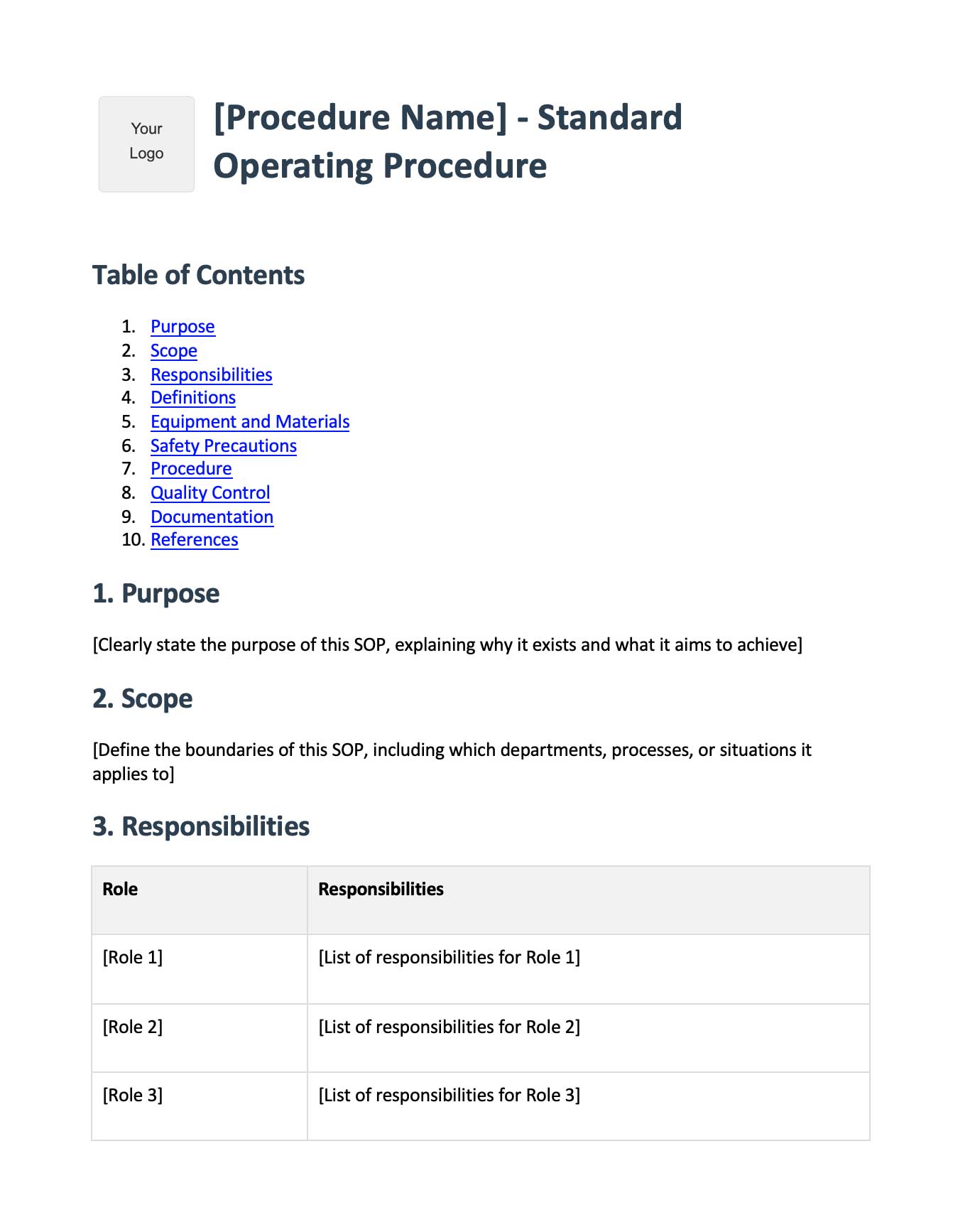
Glitter AI captures your work and turns it into visual documentation automatically