

Read summarized version with
Let me tell you about the worst onboarding experience I’ve ever heard from a new hire.
They shared that on their first day, everyone forgot they were starting. They spent hours stuck at security trying to prove it was actually their first day. When someone finally tracked them down, they got dumped in an empty office. No laptop. No instructions. No one to talk to. They couldn’t even get pen and paper for weeks because it had to be “ordered.”
This wasn’t some tiny startup. This was a Fortune 500 company.
Here’s what’s wild: 88% of employees do not believe their organizations provide good onboarding. In other words, almost nine out of ten people think their employer dropped the ball.
I’m Yuval, founder and CEO of Glitter AI. I’ve been on both sides of this. I’ve been the new employee feeling completely lost, and I’ve been the founder trying to onboard people while juggling a dozen other responsibilities. This guide is everything I’ve learned about making new hire onboarding actually work, from the first day through ramp-up. It pairs well with our detailed employee onboarding checklist guide when you want to centralize everything in one place.
Teach your co-workers or customers how to get stuff done – in seconds.


Why Employee Training and Onboarding Matter
Some numbers worth paying attention to:
- 30% of employees leave within the first 90 days
- Companies with good onboarding improve retention by 82%
- 70% of new hires decide if a job is the right fit within the first month
- Replacing an employee costs 50-200% of their annual salary
Bad onboarding doesn’t just make new hires feel unwelcome. It costs you real money when they quit, and it drains productivity when they stick around but struggle to get up to speed.
The Hidden Costs of Poor Training
Turnover is the obvious cost, but bad training creates problems that stick around:
Mistakes and rework. Untrained employees make avoidable errors. Someone else ends up fixing them.
Slow ramp-up. New hires take longer to become productive when they’re left to figure things out.
Burden on existing staff. Poor onboarding means experienced employees get interrupted constantly with questions.
Inconsistent quality. Without proper training, everyone invents their own way of doing things. Not always the right way.
Low confidence. Employees who don’t feel properly trained don’t feel confident. That shows up in their performance and their willingness to take on new challenges.
What Makes Onboarding Good (or Terrible)
Research shows what new hires actually want:
- Realistic previews of job responsibilities
- Hands-on work training (not just getting handed a pile of documents)
- Clear performance expectations
- A mentor or go-to person for questions
- Team bonding activities during those first weeks
What makes onboarding terrible?
- Information overload on day one
- No structure or clear plan
- Forgetting they’re coming (happens more than you’d think)
- Tools and access not being ready
- Trial by fire with no support
One developer on Reddit shared that across three different jobs, they never had real onboarding or a mentor. Every single time, they had to “play obsessed detective” and piece things together on their own while “strategically bothering colleagues.”
That’s not training. That’s survival.
Create clear, visual guides your new hires will actually use
The Four Phases of Effective Onboarding
Good onboarding isn’t a single day or even a single week. It’s a process that unfolds over time.
Phase 1: Pre-boarding (Before Day One)
The onboarding experience starts before anyone walks through the door.
What to do:
- Send a welcome email and starter kit with day one logistics
- Prepare equipment (laptop, accounts, access)
- Set up their workspace
- Assign a buddy or mentor
- Share reading materials they can look through at their own pace
- Make sure the team knows they’re coming
Common mistakes:
- Waiting until day one to start anything
- Assuming IT will “figure it out”
- Being vague about what to expect
Phase 2: Orientation (Days 1-7)
The first week is about getting oriented, not being productive. Don’t expect new hires to contribute meaningfully yet. That’s not the point.
What to do:
- Welcome them properly (don’t forget they’re starting!)
- Give them a tour, physical or virtual
- Introduce them to the team
- Walk through the tools and systems they’ll use most
- Share the company’s mission and values
- Set clear expectations with a 30-60-90 day plan
- Start building relationships
Common mistakes:
- Cramming everything into day one
- Throwing documentation at them and walking away
- No human connection
- Vague or nonexistent expectations
Phase 3: Training (Weeks 2-4)
Now you actually teach them how to do their job, and this is where structured new hire training earns its keep.
What to do:
- Provide role-specific training
- Give hands-on practice with real but low-stakes tasks
- Check in regularly to answer questions
- Introduce them to key stakeholders
- Give them access to training materials they can reference later
Common mistakes:
- Assuming they’ll “figure it out”
- No structure or curriculum
- Too much theory, not enough practice
- No feedback loop
Phase 4: Integration (Months 2-3)
This last phase is about fully integrating the new hire into their team and role.
What to do:
- Gradually increase responsibility
- Provide ongoing feedback
- Check in on how they’re feeling
- Adjust training based on what they actually need
- Celebrate milestones
- Start talking about development goals
Common mistakes:
- Thinking onboarding ends after week one
- No ongoing support
- No feedback mechanisms
- Throwing them into the deep end too soon
Building Your Training Program
A good training program has structure but stays flexible. Here’s how to put one together:
Step 1: Define Learning Objectives
What should a new hire know and be able to do after training? Get specific:
Vague: “Understand our sales process”
Specific: “Be able to navigate Salesforce, create a new opportunity, and move it through each pipeline stage”
For each role, list the concrete skills and knowledge required.
Step 2: Assess Current Knowledge
Not every new hire starts from scratch. A salesperson with five years of experience needs different training than someone fresh out of college.
Build in assessment or discovery conversations to figure out what they already know and where they need help.
Step 3: Create Training Materials
This is where most programs fall apart. Creating good training materials takes time, and most managers don’t have much of it.
You need:
- Documentation for reference (SOPs, guides, checklists)
- Training sessions for complex topics
- Practice opportunities to apply what they’ve learned
- Feedback mechanisms to check understanding
For documentation, check out my guide on how to write effective instruction manuals. Or use a tool like Glitter AI to create visual guides automatically.
Step 4: Structure the Curriculum
Map out what gets taught and when. Don’t frontload everything into week one.
A good structure might look like:
- Day 1: Company orientation, meet the team, basic logistics
- Week 1: Tool access, core concepts, shadowing
- Week 2: Hands-on training with guidance
- Week 3-4: Independent work with support
- Month 2-3: Advanced topics, full independence
Step 5: Assign Trainers and Mentors
Who will deliver training? Who will be the go-to person for questions?
Don’t assume “everyone” will help. Assign specific people and give them time to actually do it.
Step 6: Build Feedback Loops
How will you know if training is working?
- Regular check-ins (daily at first, then weekly)
- Assessments or quizzes for critical knowledge
- Observation of work quality
- Surveys about the onboarding experience
- Metrics like time to productivity
Teach your co-workers or customers how to get stuff done – in seconds.
Training Delivery Methods
Different content works better with different delivery methods.
Self-Paced Materials
Best for: Reference information, procedures, background knowledge
Formats:
- Written guides and SOPs
- Video walkthroughs
- Training manuals
- Knowledge base articles
Tips:
- Keep content searchable in a central onboarding portal
- Break it into digestible chunks
- Include visuals (people learn better that way)
- Make it easy to update
Live Training Sessions
Best for: Complex topics, Q&A, interactive learning
Formats:
- In-person workshops
- Video calls
- Lunch and learns
- Department presentations
Tips:
- Keep sessions focused (60-90 minutes max)
- Leave time for questions
- Record sessions for future reference
- Follow up with documentation
Hands-On Practice
Best for: Skill development, applying knowledge
Formats:
- Shadowing experienced employees
- Practice in test environments
- Low-stakes real tasks
- Role-playing scenarios
Tips:
- Start with observation
- Give them safe environments to make mistakes
- Provide immediate feedback
- Gradually increase difficulty
Mentorship
Best for: Ongoing development, cultural integration, support
How it works:
- Pair new hires with experienced employees
- Schedule regular check-ins (not just “call me if you need anything”)
- Focus on both job skills and navigating the culture
Tips:
- Choose mentors who actually want to mentor
- Give mentors guidance and time to do it
- Define expectations for both parties
- Check in with both mentor and mentee
Common Training Mistakes to Avoid
Learn from other people’s failures:
The Documentation Dump
Sending new hires a folder of 50 documents and saying “read through these” is not training. It’s overwhelming and it doesn’t work.
Instead: Curate what’s essential. Introduce documentation in context. Use it as reference, not as the main training.
Death by Meeting
Back-to-back meetings all day, every day of the first week is exhausting. People need time to absorb what they’re learning.
Instead: Balance structured learning with processing time. Let them explore on their own.
Sink or Swim
“Just dive in and figure it out” might work for some people. For most, it’s stressful and leads to avoidable mistakes.
Instead: Provide structure and support, especially early on. Gradually increase independence.
One-Size-Fits-All
The same training for everyone ignores that people come in with different backgrounds, learning styles, and roles.
Instead: Assess individual needs. Offer multiple ways to learn. Customize where it makes sense.
Set It and Forget It
Creating training once and never updating it means new hires learn outdated processes.
Instead: Review and update training materials regularly. Build feedback into your process.
Measuring Training Effectiveness
How do you know if your training is actually working?
Leading Indicators
- New hire satisfaction scores
- Training completion rates
- Quiz and assessment scores
- Manager feedback on progress
Lagging Indicators
- Time to productivity
- 90-day retention
- Error rates for new hires
- Performance review scores
What to Ask New Hires
Survey new hires regularly:
- Did training prepare you for your role?
- What was missing?
- What was most helpful?
- How could we improve?
Then actually listen to the answers and make changes.
Frequently Asked Questions
How long should employee onboarding take?
Effective onboarding should last 30-90 days minimum, structured in four phases: pre-boarding (before day one), orientation (days 1-7), training (weeks 2-4), and integration (months 2-3). The exact timeline depends on role complexity, but 70% of new hires decide if a job is the right fit within the first month, making those initial weeks critical. Research shows companies with structured onboarding programs improve retention by 82%, so investing time upfront pays off significantly.
What are the most common mistakes in employee onboarding?
The biggest mistakes include information overload on day one, having no structured plan, forgetting a new hire is starting (more common than you'd think), not preparing tools and access beforehand, and assuming new hires will "figure it out" on their own. Documentation dumps where you send 50 files without context, back-to-back meetings with no processing time, and one-size-fits-all training that ignores individual backgrounds also consistently fail. Perhaps most damaging is treating onboarding as a one-week event rather than a 90-day process.
What should be included in a new hire training program?
A comprehensive training program needs five key components according to research on what new hires actually want: realistic previews of job responsibilities, hands-on work training (not just documents), clear performance expectations, an assigned mentor or go-to person for questions, and team bonding activities during the first weeks. Structurally, this means company orientation, role-specific skills training, tools and systems walkthroughs, introductions to key stakeholders, and a mix of delivery methods including self-paced materials, live training sessions, hands-on practice in safe environments, and ongoing mentorship.
Why do so many employees quit within 90 days?
30% of employees leave within the first 90 days primarily due to poor onboarding experiences. In fact, 88% of employees believe their organizations don't provide good onboarding. The hidden costs compound quickly: replacing an employee costs 50-200% of their annual salary, and those who stay but weren't properly trained make more mistakes, take longer to become productive, burden experienced staff with constant questions, and deliver inconsistent quality. When new hires feel thrown into trial-by-fire situations without support or clarity, they understandably look elsewhere.
What's the difference between onboarding and training?
Onboarding is the comprehensive process of integrating a new hire into your organization, covering orientation, company culture, team relationships, logistics, and setting them up for success in their role. Training is one specific component within onboarding focused on teaching the actual job skills and knowledge needed to perform their duties. Think of onboarding as the full journey (pre-boarding through month three) and training as the "how to do your job" piece that happens primarily in weeks 2-4, though both overlap and continue throughout the integration period.
How do you measure if employee training is working?
Track both leading indicators (new hire satisfaction scores, training completion rates, quiz and assessment scores, manager feedback on progress) and lagging indicators (time to productivity, 90-day retention rates, error rates for new hires, performance review scores). The most valuable data often comes from surveying new hires regularly with specific questions: Did training prepare you for your role? What was missing? What was most helpful? How could we improve? Then actually use those answers to iterate on your program rather than letting feedback sit unused.
Your Action Plan
If you’re starting from scratch or rebuilding your program:
- Map the new hire journey from pre-boarding through month three
- Define learning objectives for each role
- Create essential training materials for the most critical processes
- Assign trainers and mentors and give them time to do it
- Build feedback mechanisms to keep improving
- Use the onboarding checklist so nothing falls through the cracks
One thing to keep in mind: your new hires are forming opinions about your company from day one. Make those first impressions count.
If creating training materials feels overwhelming, try Glitter AI. You can create visual guides in minutes by demonstrating the process while talking through it. It’s free for your first 10 guides.
Download Onboarding Template
Get started with this free onboarding template:
Employee Onboarding Template
Free employee onboarding checklist template in Word format. Covers pre-boarding, first day procedures, first week activities, training schedules, company policies, and key contacts. Get new hires up to speed faster.
Download Onboarding Template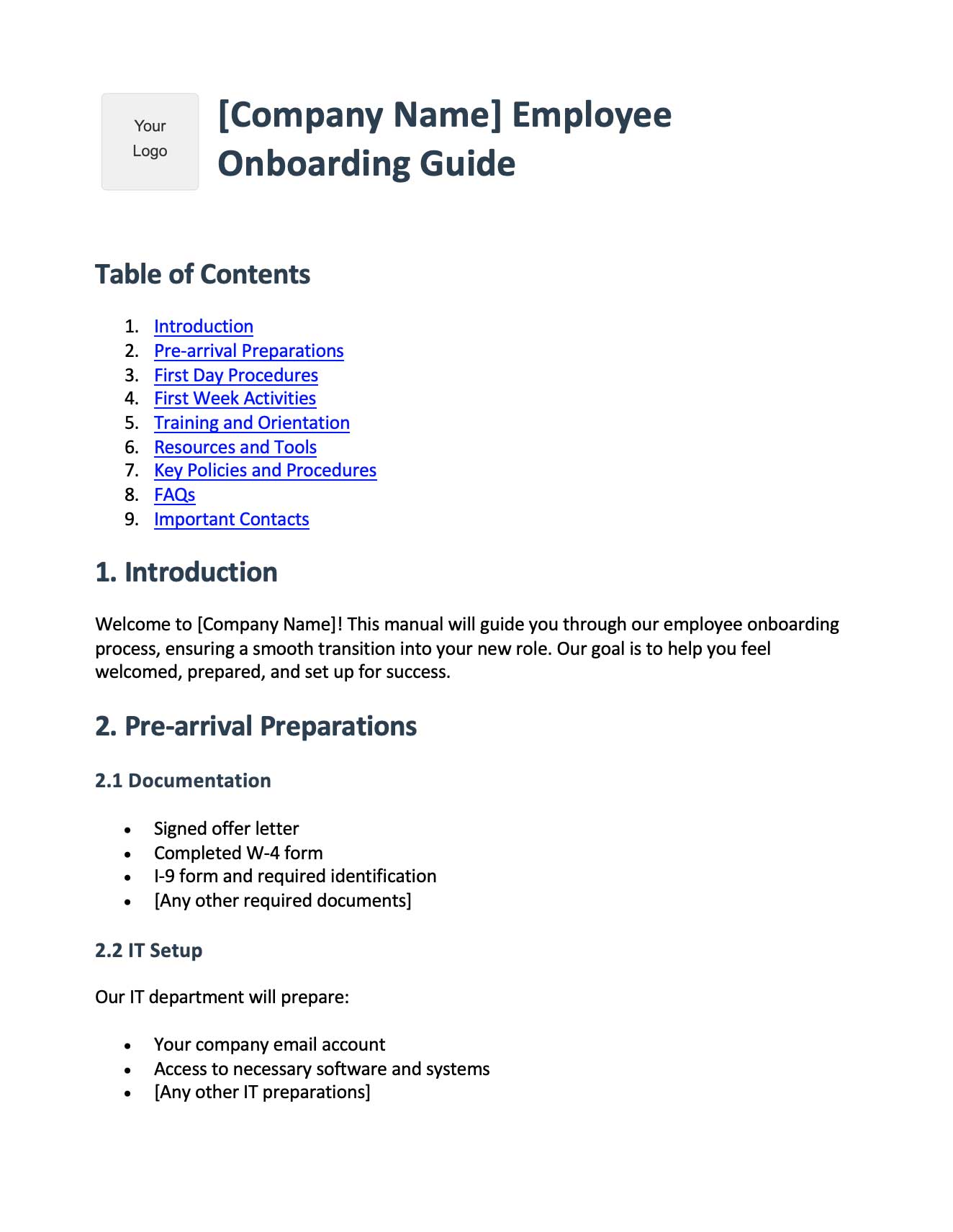
Glitter AI turns your demonstrations into professional guides







