
How to Create Standard Operating Procedures (SOPs) [With Free Template]
A practical guide to writing SOPs that your team will actually follow. Learn the common mistakes that make SOPs useless and how to avoid them.

Read summarized version with
Let me tell you about the worst SOP I ever encountered.
It was 47 pages long. Single-spaced. No screenshots. Written by someone who clearly enjoyed the sound of their own typing. The font was size 10.
Nobody read it. Not once. It sat in a shared drive collecting digital dust while people just asked each other how to do things.
That SOP was technically thorough. It was also completely useless.
I'm Yuval, founder of Glitter AI, and after running my first startup for years without proper SOPs (and paying the price), I've learned what actually makes standard operating procedures work. Here's everything I wish someone had told me.
What is an SOP?
A Standard Operating Procedure (SOP) is a documented set of step-by-step instructions describing how to perform a routine task. The key word is "standard." The goal is making sure the task gets done the same way, every time, by whoever does it.
SOPs tend to be more formal than general process documentation. They're typically used for:
- Compliance-sensitive procedures
- Safety-critical tasks
- Quality-controlled processes
- Tasks where consistency is non-negotiable
Think of an SOP as a recipe that must be followed exactly. You can wing it with a home-cooked meal, but if you're making medicine or handling hazardous materials, you follow the recipe to the letter.
Why Most SOPs Fail
Before we talk about how to create good SOPs, let's talk about why most fail. Understanding this will save you from repeating the same mistakes.
They're Written by the Wrong People
I've seen managers sit in conference rooms writing SOPs for tasks they've never done. The result? Documentation that doesn't match reality.
The best SOPs come from (or are at least heavily informed by) the people who actually do the work. They know the shortcuts, the gotchas, the things that seem obvious on paper but aren't when you're actually doing them.
They're Too Long
There's this idea that thorough means effective. It doesn't.
When an SOP runs 30 pages, people don't read it. They skim it at best. And skimming leads to missed steps and errors.
One Reddit user summed it up well: their company's SOPs ranged from "paper forms, PDF files, Excel sheets, Monday.com boards, an individual's memory." The reason? Different comfort levels with technology and no standard format. The result was confusion and wasted time.
They're Never Updated
An SOP for software that was updated two years ago? That's not documentation. That's a trap.
I've seen teams follow outdated SOPs religiously, then wonder why things go wrong. SOPs need owners and scheduled reviews, or they become dangerous artifacts.
They're Impossible to Find
Your beautiful, well-written SOP is worthless if nobody can find it.
If SOPs live in random folders, on individual desktops, or in some corner of SharePoint that nobody remembers, they might as well not exist.
How to Create an SOP (The Right Way)
Here's the process that actually works:
Step 1: Define the Scope
Before writing anything, answer these questions:
- What task does this SOP cover?
- Where does the task start and end?
- Who is the intended audience?
- What level of detail do they need?
Be specific about boundaries. An SOP titled "Customer Service" is too broad. "How to Process a Refund Request" is appropriately scoped.
Step 2: Observe the Actual Process
Don't imagine how things should work. Watch how they actually work.
Sit with the person who does this task best. Watch them do it. Ask questions:
- "Why did you click there instead of there?"
- "What do you do if this happens?"
- "What mistakes have you made before?"
This step is where you'll uncover the tribal knowledge that makes processes actually work.
Step 3: Write the Draft
Now you're ready to write. Here's the structure I recommend:
Title: Clear and specific (e.g., "SOP: Processing Customer Refunds in Shopify")
Purpose: One or two sentences explaining why this SOP exists
Scope: What's covered and what's not
Prerequisites: What needs to be in place before starting (access, tools, information)
Steps: The actual procedure
Troubleshooting: Common problems and how to fix them
Revision History: Track changes over time
Step 4: Make It Visual
This is where most SOPs fall apart.
Every step that involves a screen should have a screenshot. Every physical task should have a photo or diagram if possible.
Research shows people learn better with visuals. Plus, screenshots serve as confirmation. Readers can look at the screen and know they're in the right place.
This is actually why I built Glitter AI. Taking screenshots for SOPs manually is tedious. Glitter captures screenshots automatically as you work, which makes creating visual SOPs much faster.
Step 5: Test It
This step is critical and almost always skipped.
Find someone who has never done this task. Give them the SOP. Watch them try to follow it. Don't help unless they're completely stuck.
You'll immediately see:
- Steps you forgot to include
- Instructions that seemed clear to you but aren't
- Screenshots that don't match what they're seeing
- Jargon they don't understand
Fix everything they struggled with. Then test again with someone else.
Step 6: Get Approval
Depending on your organization, SOPs may need formal approval from:
- Subject matter experts (to verify accuracy)
- Managers (to authorize the process)
- Compliance teams (for regulated processes)
Even if formal approval isn't required, have at least one other person review the SOP before publishing.
Step 7: Publish and Train
Put the SOP somewhere accessible. But don't just email a link and call it done.
Walk through the SOP with the people who will use it. Show them where to find it. Answer questions. Make sure they actually know it exists and how to use it.
Step 8: Schedule Reviews
Before you publish, schedule the first review. Put it on your calendar.
Most SOPs should be reviewed quarterly. High-change processes might need monthly reviews. Stable processes might only need annual reviews.
Assign an owner who's responsible for keeping the SOP current.
SOP Writing Best Practices
These tips will make your SOPs noticeably more effective:
Write in Active Voice, Present Tense
Bad: "The form should be filled out by the user"
Good: "Fill out the form"
Active voice is clearer, shorter, and more direct.
One Action Per Step
Bad: "Click Submit, wait for confirmation, then screenshot the confirmation number and paste it in the tracking spreadsheet"
Good:
- Click Submit
- Wait for the confirmation screen to appear
- Take a screenshot of the confirmation number
- Paste the screenshot in the tracking spreadsheet
Each step should be one action. This makes SOPs easier to follow and easier to troubleshoot when something goes wrong.
Include the "Why" (But Briefly)
People follow procedures better when they understand the reasoning. A short explanation can prevent shortcuts that cause problems.
Example: "Save the file as a PDF (this ensures formatting is preserved when the client opens it)"
Use Consistent Formatting
Pick a template and stick with it. When every SOP looks different, people have to figure out the format before they can focus on the content.
I've included some process documentation templates that you can use as a starting point.
Avoid Jargon (Or Define It)
Remember who your audience is. If you're writing for new hires, don't assume they know your company's acronyms and terminology.
When you must use jargon, define it the first time it appears.
Keep It as Short as Possible
Include everything necessary. Include nothing else.
If your SOP is getting long, consider breaking it into multiple SOPs for sub-processes. A main SOP can link to detailed SOPs for specific steps.
Common SOP Mistakes to Avoid
Writing SOPs for Everything
Not everything needs an SOP. Tasks that are done differently every time, require professional judgment, or are performed rarely by experts probably don't need formal SOPs.
Focus your SOP efforts on tasks that are:
- Routine and repeatable
- Performed by multiple people
- Critical to get right
- Currently inconsistent
Making SOPs Too Rigid
Good SOPs describe the standard way to do something while allowing for reasonable judgment. If every possible exception is documented, the SOP becomes unusable.
Include guidance for common exceptions, but accept that not everything can be anticipated.
Not Assigning Ownership
An unowned SOP is an unmaintained SOP. Every SOP needs someone responsible for keeping it current.
This doesn't mean they do all the work themselves. It means they ensure reviews happen and updates get made.
Ignoring Feedback
When someone says an SOP is confusing or wrong, take it seriously. They're the ones trying to use it.
Create a simple way for people to suggest improvements. Review and act on feedback promptly.
Frequently Asked Questions
What does SOP stand for in business?
SOP stands for Standard Operating Procedure. It's a documented set of step-by-step instructions that describe how to perform a routine task the same way, every time, regardless of who does it. The key distinction from general documentation is the word "standard" - SOPs are designed for compliance-sensitive procedures, safety-critical tasks, quality-controlled processes, and any work where consistency is non-negotiable.
What is the difference between an SOP and a work instruction?
SOPs are more formal and structured than general process documentation, focusing on tasks where following exact procedures is critical. While regular process documentation can be flexible and adaptable, SOPs are used when deviation could create safety risks, compliance issues, or quality problems. Think of it like the difference between a home recipe (flexible) and a pharmaceutical manufacturing protocol (must be followed exactly).
How long should a standard operating procedure be?
Effective SOPs are typically 1-5 pages. The cardinal rule is: include everything necessary but nothing else. If your SOP exceeds 30 pages, it likely won't be read - people will skim at best, leading to missed steps and errors. When an SOP grows too long, break it into multiple SOPs for sub-processes, with the main SOP linking to detailed procedures for specific steps.
Who is responsible for writing and maintaining SOPs?
SOPs should be written by (or with significant input from) the people who actually perform the task daily. Managers writing SOPs for tasks they've never done often create documentation that doesn't match reality. The people doing the work know the shortcuts, gotchas, and practical details that aren't obvious on paper. Every SOP also needs an assigned owner responsible for scheduling quarterly reviews and ensuring updates get made when processes change.
How do you update an SOP when the process changes?
Schedule regular reviews - quarterly for most SOPs, monthly for high-change processes, and annually for stable procedures. Before publishing any SOP, put the first review date on your calendar and assign an owner responsible for maintenance. When the underlying process changes (like software updates or new regulations), update the SOP immediately and document the changes in a revision history section to track what changed and when.
Why do employees not follow standard operating procedures?
When people don't follow SOPs, there's usually a systemic reason: the SOP is outdated and doesn't match current processes, it's written unclearly or too long to be practical, it's impossible to find when needed, or the process it describes doesn't actually work well. Before treating it as a compliance problem, investigate the root cause. Often, improving the SOP itself (adding visuals, shortening it, making it accessible) solves the problem better than enforcement.
What should be included in a standard operating procedure?
A complete SOP includes: a clear, specific title (e.g., "SOP: Processing Customer Refunds in Shopify"), a brief purpose statement explaining why it exists, defined scope (what's covered and what's not), prerequisites (required access, tools, or information), numbered step-by-step procedures with one action per step, troubleshooting guidance for common problems, and a revision history to track changes. Most importantly, every screen-based step should have a screenshot so readers can confirm they're in the right place.
How do you write an SOP for the first time?
Start by observing someone who performs the task well. Watch them work and ask questions about why they make specific choices and what mistakes they've made before. Then write a draft using active voice and present tense (e.g., "Click Submit" not "The form should be submitted"). Test your draft with someone who has never done the task - watch them try to follow it without helping unless they're completely stuck. The testing phase reveals forgotten steps, unclear instructions, and confusing jargon that you'll need to fix before publishing.
Getting Started with SOPs
Here's your action plan:
- Pick one critical task that's currently inconsistent or hard to hand off
- Shadow the best performer doing that task
- Write a draft using the structure above
- Add screenshots for every screen-based step
- Test it with someone unfamiliar with the task
- Publish it somewhere accessible
- Schedule a review for 3 months out
If you want to make this process much faster, try Glitter AI. It captures screenshots automatically as you work and turns your voice into written instructions. That means you can create visual SOPs in minutes instead of hours.
However you do it, just start. One good SOP is better than zero. And once you see how much easier it makes your life, you'll be motivated to create more.
Download SOP Template
Get started with this free SOP template:
SOP Template
Free SOP template in Word format. Includes ready-to-fill sections for purpose, scope, responsibilities, safety precautions, step-by-step procedures, and quality control. Perfect for compliance and process standardization.
Download SOP Template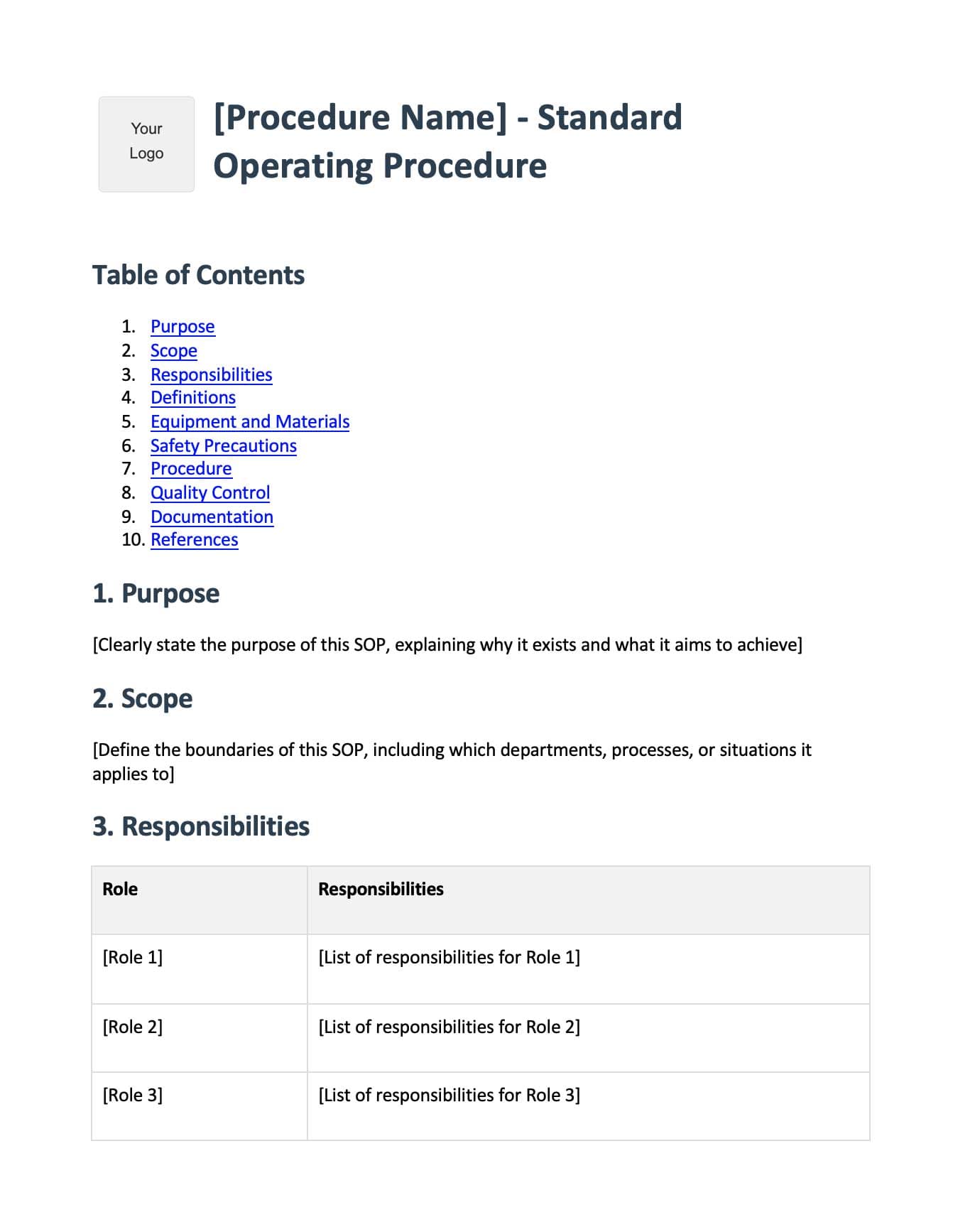
Create SOPs in minutes with AI
Recent Posts