

Turn any process
into a step-by-step guide
Documentation done for you - in seconds. Convert any recording into a shareable SOP.
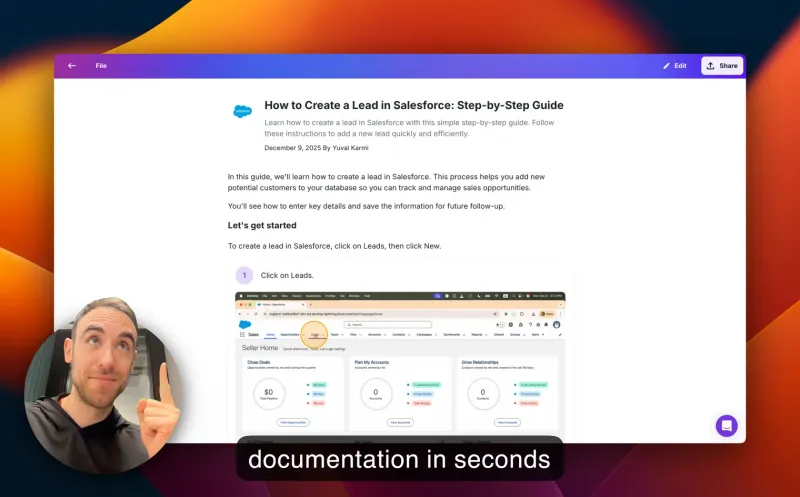

Create documentation in seconds with Glitter AI

Guide employees
Create visual onboarding and training guides that get employees productive faster.
Start for Free
Guide customers
Create visual help guides and documentation that help customers succeed faster.
Start for Free
Create SOPs
Turn critical processes into SOPs (standard operating procedures) that reduce errors and ensure quality outcomes.
Start for FreeTrusted by teams at leading companies



























Turn anything into a guide
Capture on both desktop and web
Use our desktop app or browser extension to automatically capture screenshots and intelligently transcribe your speech AI
Upload any existing videoNEW
Turn any existing videos into a guide: Meeting recordings, screen-captures, live footage! Glitter AI identifies key moments in your video and creates a written guide for you.
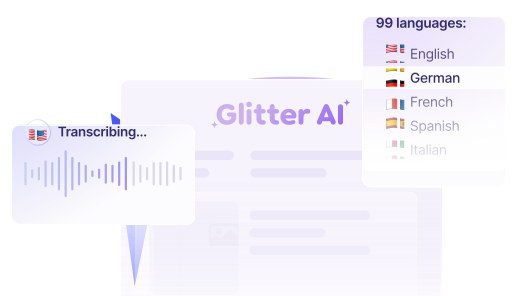
Works in 99 Languages
Translate any guide to one of 99 languages with a single click. Record in your language, share in theirs.
Share a link, export, or embed
Share your guides with anyone via a public or private link, export to a variety of formats, or embed your guide anywhere.
Integrations
Choose whether to export your content from Glitter or embed your documentation into hundreds of supported platforms.

Real customer reviews
Genuine feedback from real customers ❤️

“This software is mind-blowing! After 2+ months, it's an invaluable asset to my company. The transcription quality is out of this world, and the new image editing tools are so fluid and better than [competitor name redacted]. ...you've saved me so much time; I'm elated and highly anticipate subscribing for another year!”
Tim M.
May 3, 2025
“Our company has asked each department to use AI tools to increase productivity, and this has made a huge difference. One of our leaders had originally sent a link to check out Glitter AI, and we love it! We're now using it for clients as well as internal staff.”
Kim W.
December 18, 2024
“This is exactly the documentation solution that we've been looking for. Every software system requires operating instructions, and you make them so easy to create! It's perfect for employee training purposes.”
Erez A.
January 9, 2025
“Glitter is really cool! The step-by-step guide it created was exactly what we needed for our corporate Salesforce setup, which was a literal mess. Just having a video isn't great because it's a nightmare to update all the fields for billing. This tool is saving us so much time!”
Dustin R.
March 8, 2025
“This is amazing! I just used the desktop app to make a quick guide for a Photoshop tool that I can use in my class. It would have taken me at least 30 minutes before and I just did it in about 5 minutes. Thanks for such a great tool!”
Sarah
January 28, 2025
“I tested 2 products today to solve the problem of rapidly creating 60+ articles to onboard our customers, and Glitter AI is excellent! It's really easy to use and edit. The output is so easy to import into our CMS for our Knowledge Hub; it's fantastic.”
Emily W.
February 15, 2025
“Really love this product! We use Guru for documentation at our company. With Glitter, I can do a quick walkthrough, and it creates a guide that can be pasted right into Guru, which saves us from undocumented tasks.”
Jens A.
April 12, 2025
“So far, I'm liking Glitter a great deal; it's very intuitive and useful. Our school district has an old method for online help for our student information system. Glitter is a great way to save many, MANY, person-hours of work, and our IT person is excited about it too!”
John
January 9, 2025
“This software is mind-blowing! After 2+ months, it's an invaluable asset to my company. The transcription quality is out of this world, and the new image editing tools are so fluid and better than [competitor name redacted]. ...you've saved me so much time; I'm elated and highly anticipate subscribing for another year!”
Tim M.
May 3, 2025
“Our company has asked each department to use AI tools to increase productivity, and this has made a huge difference. One of our leaders had originally sent a link to check out Glitter AI, and we love it! We're now using it for clients as well as internal staff.”
Kim W.
December 18, 2024
“This is exactly the documentation solution that we've been looking for. Every software system requires operating instructions, and you make them so easy to create! It's perfect for employee training purposes.”
Erez A.
January 9, 2025
“Glitter is really cool! The step-by-step guide it created was exactly what we needed for our corporate Salesforce setup, which was a literal mess. Just having a video isn't great because it's a nightmare to update all the fields for billing. This tool is saving us so much time!”
Dustin R.
March 8, 2025
“This is amazing! I just used the desktop app to make a quick guide for a Photoshop tool that I can use in my class. It would have taken me at least 30 minutes before and I just did it in about 5 minutes. Thanks for such a great tool!”
Sarah
January 28, 2025
“I tested 2 products today to solve the problem of rapidly creating 60+ articles to onboard our customers, and Glitter AI is excellent! It's really easy to use and edit. The output is so easy to import into our CMS for our Knowledge Hub; it's fantastic.”
Emily W.
February 15, 2025
“Really love this product! We use Guru for documentation at our company. With Glitter, I can do a quick walkthrough, and it creates a guide that can be pasted right into Guru, which saves us from undocumented tasks.”
Jens A.
April 12, 2025
“So far, I'm liking Glitter a great deal; it's very intuitive and useful. Our school district has an old method for online help for our student information system. Glitter is a great way to save many, MANY, person-hours of work, and our IT person is excited about it too!”
John
January 9, 2025
“This software is mind-blowing! After 2+ months, it's an invaluable asset to my company. The transcription quality is out of this world, and the new image editing tools are so fluid and better than [competitor name redacted]. ...you've saved me so much time; I'm elated and highly anticipate subscribing for another year!”
Tim M.
May 3, 2025
“Our company has asked each department to use AI tools to increase productivity, and this has made a huge difference. One of our leaders had originally sent a link to check out Glitter AI, and we love it! We're now using it for clients as well as internal staff.”
Kim W.
December 18, 2024
“This is exactly the documentation solution that we've been looking for. Every software system requires operating instructions, and you make them so easy to create! It's perfect for employee training purposes.”
Erez A.
January 9, 2025
“Glitter is really cool! The step-by-step guide it created was exactly what we needed for our corporate Salesforce setup, which was a literal mess. Just having a video isn't great because it's a nightmare to update all the fields for billing. This tool is saving us so much time!”
Dustin R.
March 8, 2025
“This is amazing! I just used the desktop app to make a quick guide for a Photoshop tool that I can use in my class. It would have taken me at least 30 minutes before and I just did it in about 5 minutes. Thanks for such a great tool!”
Sarah
January 28, 2025
“I tested 2 products today to solve the problem of rapidly creating 60+ articles to onboard our customers, and Glitter AI is excellent! It's really easy to use and edit. The output is so easy to import into our CMS for our Knowledge Hub; it's fantastic.”
Emily W.
February 15, 2025
“Really love this product! We use Guru for documentation at our company. With Glitter, I can do a quick walkthrough, and it creates a guide that can be pasted right into Guru, which saves us from undocumented tasks.”
Jens A.
April 12, 2025
“So far, I'm liking Glitter a great deal; it's very intuitive and useful. Our school district has an old method for online help for our student information system. Glitter is a great way to save many, MANY, person-hours of work, and our IT person is excited about it too!”
John
January 9, 2025