
Read summarized version with
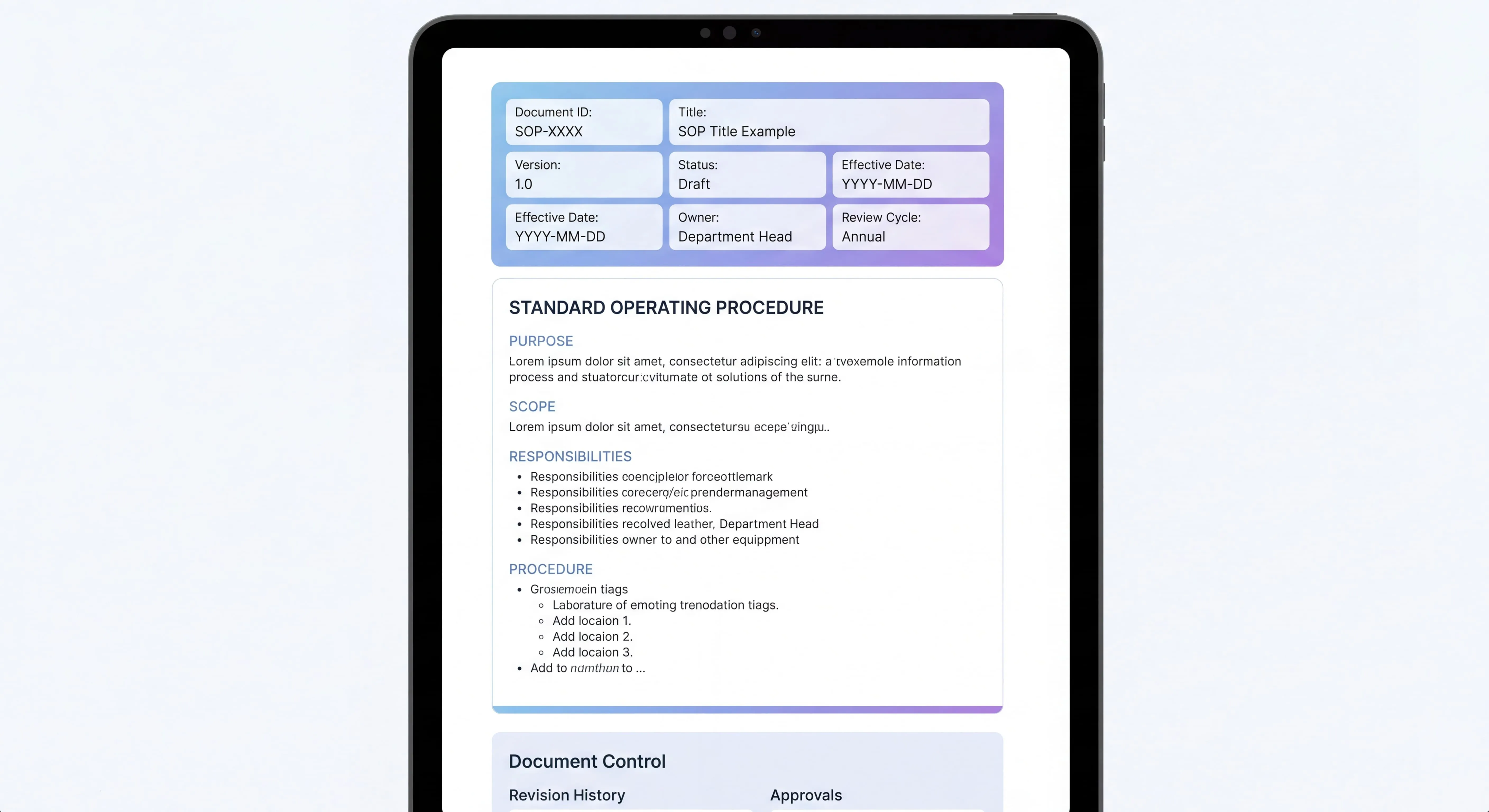
An SOP header is the structured metadata block at the top of a standard operating procedure - the title, SOP ID, version, owner, approver, review dates, and compliance tags that tell readers and auditors what the document is and whether they can trust it. A complete SOP header has 12 fields, and this post walks through every one with good and bad examples plus a free template you can copy.
I’ve read thousands of SOPs, and the first thing I look at every single time is the header.
Not the steps. Not the screenshots. The header. It tells me whether I can trust the thing: was it reviewed recently, is it honest about its scope, is anyone actually on the hook for it? A sloppy header is almost always a tell. The SOP underneath is probably sloppy too, and the team likely skipped SOP format best practices along with the management discipline that keeps a library trustworthy.
So if you’re only going to put real work into one part of your SOP, make it the header. This post walks through exactly what belongs there, with good and bad examples, and a free template you can drop into Markdown, Word, or Notion (much like our manufacturing SOP template).
Quick intro: I’m Yuval, CEO of Glitter AI. We help teams generate SOPs automatically by recording their screens, and the header is the one section we render the same way every single time. That consistency at the top is what makes a documentation library searchable and auditable in the first place.
Teach your co-workers or customers how to get stuff done – in seconds.


What is an SOP header?
The SOP header is the metadata block sitting at the top of every standard operating procedure. It’s everything before the actual steps: ID, version, owner, dates, approval signatures, and compliance tags.
Picture the cover page of a book stapled to its copyright page. Readers use it to figure out what they’re holding, when it was last touched, and whether to trust it. Auditors use it to confirm the document is under control. Search systems use it to surface the right SOP when someone types a query.
This isn’t just good hygiene. It’s what document-control standards expect. ISO 9001:2015 (clause 7.5 on documented information) requires controlled documents to carry identification such as a title, date, author, and reference number, plus defined review and approval. The SOP header is exactly where you satisfy that requirement.
For a wider view of what goes into the full document, check out my SOP checklist of essentials. This post stays narrow: just the metadata block at the top.
The 12 sections every SOP header needs
Here’s the full list. I’ll break each one down below with a good and bad example.
- Title
- SOP ID / Reference Number
- Version
- Effective Date
- Last Reviewed Date
- Next Review Due Date
- Owner Name + Role
- Approver Name + Role
- Department / Function
- Related SOPs
- Compliance Tags
- Distribution List / Audience
That’s the list. Twelve fields. Fewer than that and you’re leaving auditors guessing. More than that and you’re padding.
1. Title
The title is the most-read and most-mis-written field in any SOP. It should be specific and action-oriented.
Bad: “Invoice Process” Good: “Process Vendor Invoices in NetSuite (US Entities)”
The bad version tells you nothing about scope. Are you creating invoices? Approving them? Paying them? Which entity? The good version answers all of that in one line, and it starts with a verb. If you can’t tell what the SOP actually does from the title alone, rewrite it.
2. SOP ID / Reference Number
Every SOP needs a unique, stable identifier. The exact format matters less than picking one and sticking with it.
Three common schemes:
- Department prefix + sequential:
FIN-AP-001,FIN-AP-002,HR-ONB-001 - Pure sequential:
SOP-0001,SOP-0002 - Hybrid (department + year + sequential):
FIN-2026-001
For most teams I’d go with the department prefix scheme. It’s human-readable (you can guess FIN-AP-001 is a finance/accounts-payable SOP without opening it) and it scales cleanly. Pure sequential numbers get painful to navigate somewhere past 50 SOPs. Hybrids with the year baked in are fine too, though they invite questions like “do I bump the year prefix when I revise it next year?” You don’t. People will keep asking anyway.
Whatever scheme you pick, document it once and stick to it. Changing your numbering scheme three years in is a special kind of pain.
3. Version
Use semantic versioning: MAJOR.MINOR. So 1.0, 1.1, 2.0, 2.1.
The bump rules:
- Major version (1.0 → 2.0): The procedure itself changed. Steps were added, removed, or reordered. The underlying system changed. Anyone following the old version will get a different result.
- Minor version (1.0 → 1.1): Cosmetic or clarifying changes. Fixed a typo. Added a screenshot. Reworded a step without changing what it does.
Why bother? When someone says “we trained the team on version 1” and you’re now on 2.3, you immediately know there’s a real gap. A single counter can’t tell you whether version 5 was a typo fix or a complete rewrite.
4. Effective Date
The date this version of the SOP officially takes effect. Not the day you wrote it. Not the day it got approved. The day staff are expected to follow it.
The three dates often line up. Not always, though. You might approve an SOP in March and have it go live in April when a new system launches. The effective date is what an auditor uses to answer “what was the official procedure on the day this transaction happened.”
5. Last Reviewed Date
The date someone (usually the owner) last looked at the SOP and confirmed it’s still accurate. This can be later than the effective date. A review that confirms “no changes needed” doesn’t bump the version.
A lot of teams skip this field and lean on the effective date instead. Don’t. The reviewed date is the single best signal of whether anyone is actually maintaining your SOP library.
6. Next Review Due Date
When the SOP needs another look. For most procedures, set it 12 months out from the last review. For high-risk or fast-moving areas like security, compliance, or anything touching payment data, 6 months is safer.
This field is what powers any “stale SOP” report you build later. Without it, there’s no programmatic way to know what’s overdue.
7. Owner Name + Role
The one person responsible for keeping this SOP accurate. Always list both the name and the role. Names change when people leave; roles tend to stick around.
Bad: “Owner: Finance Team” Good: “Owner: Jane Doe, AP Manager”
A team can’t own an SOP. When everyone’s responsible, no one actually is.
8. Approver Name + Role
The person who signed off on this version. Usually one rung above the owner: a manager, director, or department head. For compliance-sensitive SOPs, you might add a second approver from compliance or legal.
The owner and approver should not be the same person. That’s the entire point of having two fields.
Glitter generates the entire metadata block - title, ID, version, dates, owner - the moment you finish recording.
9. Department / Function
Which team owns the procedure. Finance. HR. Engineering. Customer Support. This drives folder structure, access permissions, and search filters.
If an SOP genuinely spans two departments (a hiring procedure that pulls in both HR and IT for laptop provisioning, say), pick the primary owner department and use Related SOPs to link to the secondary one. Don’t list both in the department field. That’s how search starts to break.
10. Related SOPs
A short list of other SOPs this one depends on, references, or hands off to. Use the SOP IDs, not just the titles, so links survive renames.
Example: “Related: FIN-AP-002 (Vendor Onboarding), FIN-GL-014 (Month-End Close)”
This is the field that turns a flat list of documents into an actual process map. For more on how to structure a full library, see my SOP format best practices guide.
11. Compliance Tags
Any regulatory frameworks this SOP supports. Common ones:
SOX- Sarbanes-Oxley (financial controls)SOC 2- security and availability controlsHIPAA- healthcare informationGDPR- EU data privacyISO 27001- information security managementPCI DSS- payment card data
When auditors ask “show me every SOP in scope for SOX,” this field is the answer. Without compliance tags, you’re combing through every document by hand during every audit. With them, it’s a one-click filter.
If an SOP doesn’t fall under any compliance scope, set the field to None rather than omitting it. An explicit None tells an auditor you considered the question.
12. Distribution List / Audience
Who should read and follow this SOP. Be specific.
Bad: “All employees” Good: “AP team (3 staff), Controller, CFO”
The distribution list drives training assignments, access permissions, and acknowledgment tracking. “All employees” is almost always wrong. Your average warehouse SOP means nothing to the marketing team, and pretending otherwise just buries people in documents they’ll ignore.
Good vs bad SOP header: side by side
Here’s what a complete bad header looks like:
Title: Invoice Process
Last Updated: Sometime last year
Owner: Finance
And here’s the same SOP done right:
Title: Process Vendor Invoices in NetSuite (US Entities)
SOP ID: FIN-AP-001
Version: 2.1
Effective Date: 2026-04-01
Last Reviewed: 2026-04-01
Next Review Due: 2027-04-01
Owner: Jane Doe, AP Manager
Approver: John Smith, Controller
Department: Finance - Accounts Payable
Related SOPs: FIN-AP-002 (Vendor Onboarding), FIN-GL-014 (Month-End Close)
Compliance Tags: SOX, SOC 2
Audience: AP Team (3 staff), Controller, CFO
The good version takes maybe 30 extra seconds to fill in. It saves hours during audits, onboarding, and reviews.
Free SOP header template
Copy this block as your starting template. It works in Markdown, Notion, Confluence, Word, or Google Docs.
Markdown / Plain text version
---
SOP ID: [PREFIX-CATEGORY-###]
Title: [Action verb + specific scope]
Version: [Major.Minor]
Effective Date: [YYYY-MM-DD]
Last Reviewed: [YYYY-MM-DD]
Next Review Due: [YYYY-MM-DD]
Owner: [Name, Role]
Approver: [Name, Role]
Department: [Department / Function]
Related SOPs: [List of SOP IDs]
Compliance Tags: [SOX | SOC 2 | HIPAA | GDPR | ISO 27001 | PCI DSS | None]
Audience: [Specific roles or teams]
---
Word / Google Docs version
Set up a 2-column table at the top of your SOP template with field labels on the left and values on the right. Lock the labels and the formatting so authors can’t accidentally rename “Effective Date” to “Date” halfway through the year.
Notion property setup
In Notion, create an SOP database with these properties:
- Title (title field)
- SOP ID (text)
- Version (text)
- Effective Date (date)
- Last Reviewed (date)
- Next Review Due (formula:
dateAdd(prop("Last Reviewed"), 1, "years")) - Owner (person + text for role)
- Approver (person + text for role)
- Department (select)
- Related SOPs (relation, self-referencing)
- Compliance Tags (multi-select)
- Audience (multi-select or text)
That formula on Next Review Due is the trick that lets a Notion-based library half-maintain itself. Update Last Reviewed and the next deadline recalculates on its own.
For a fuller starter set, see my SOP template guide.
Teach your co-workers or customers how to get stuff done – in seconds.
Making headers searchable across your library
A header is only useful if you can actually search across it. A few rules that make this work:
Store headers as structured fields, not free text. If your header lives in a paragraph at the top of a Word doc, no one can filter on it. Use a database, a properties block, or front-matter. Fields have to be queryable.
Standardize the vocabulary. Pick one spelling for each compliance framework: SOC 2, not SOC2 or SOC-2. Pick one set of department names. Lock them as enums, not free text.
Index the header separately from the body. When someone searches “vendor invoices,” a hit in the title field should outrank a hit buried in step 47 of the body. Most modern documentation tools handle this for you. Older wikis don’t.
Use the SOP ID as the canonical reference everywhere. Training material should reference the ID, not the title. Titles get edited; IDs shouldn’t change. That way a typo fix in a title doesn’t break every internal link.
Audit trail in the header (or just below it)
Below the metadata block, most mature SOPs include a short revision history table:
Version Date Author Approver Summary of Changes
1.0 2024-06-15 J. Doe J. Smith Initial release
2.0 2026-01-10 S. Chen D. Kim Migrated process from QuickBooks to NetSuite
2.1 2026-04-01 S. Chen D. Kim Added 3-way match step before approval
Three rules for the revision table:
- Never delete entries. Auditors care about history. Delete the row and you’ve lost the trail.
- Summarize the change in plain English. “Added 3-way match step before approval” is useful. “Updated process” is not.
- Don’t try to capture every edit. Only version bumps. Typo fixes inside a minor version don’t get their own row; they get a sentence in the description of the next minor version.
How Glitter generates SOP headers automatically
Here’s why I care about headers so much. When teams write SOPs by hand, the header is the first thing they cut corners on. It’s metadata, not “real content,” so it gets rushed or skipped outright. Two years later, the library is unsearchable.
When you record a procedure with Glitter’s SOP generator, the header gets populated for you. The title comes from what we watched you do. The owner is whoever recorded it. The effective date is today. The version starts at 1.0. The department is inferred from your workspace setup. You fill in the approver and the compliance tags, and that’s it.
It isn’t a fancy AI feature. It just removes the activation energy from the most-skipped part of documentation. Once headers are easy, people actually fill them in. Once they’re filled in, the library becomes searchable. And once it’s searchable, the SOPs actually get read.
For a deeper walkthrough of writing the rest of an SOP, see my full guide on how to write an SOP.
A final thought
Headers feel like the boring part of an SOP. They’re not the steps. They’re not the screenshots. They’re not the diagrams. Just metadata.
But every documentation library I’ve watched succeed has rigorous headers, and every one I’ve watched fall apart had sloppy ones. The header is the load-bearing structure of the whole system. Get it right and everything else gets easier. Get it wrong and you’ll spend the next three years cleaning up.
Twelve fields. One template. Fill them in every time. - Yuval, CEO of Glitter AI
Frequently Asked Questions
What is an SOP header?
An SOP header is the metadata block at the top of a standard operating procedure. It includes the title, SOP ID, version, effective date, owner, approver, department, related SOPs, compliance tags, and audience. The header tells readers and auditors what the document is, who owns it, and whether it can be trusted.
What should I put in an SOP header?
Every SOP header should include 12 fields: title, SOP ID, version, effective date, last reviewed date, next review due date, owner name and role, approver name and role, department, related SOPs, compliance tags, and distribution list. These twelve fields cover everything an auditor, reader, or search system needs to use the document.
What is a good SOP ID format?
The most common format is department prefix plus sequential number, like FIN-AP-001 or HR-ONB-001. This makes IDs human-readable while keeping them unique and stable. Pure sequential numbers like SOP-0001 also work but get hard to navigate past about 50 SOPs.
How do I version an SOP?
Use semantic versioning with major and minor numbers like 1.0, 1.1, 2.0. Bump the major version when the procedure actually changes - steps added, removed, or reordered. Bump the minor version for cosmetic changes like typo fixes, reworded steps, or new screenshots that do not change what gets done.
What is the difference between effective date and last reviewed date?
The effective date is when this version of the SOP becomes the official procedure staff must follow. The last reviewed date is when the owner last confirmed the SOP is still accurate, even if no changes were needed. A review that confirms no changes does not bump the version, but it does update the last reviewed date.
How often should SOPs be reviewed?
For most procedures, set the next review due date 12 months from the last review. For high-risk areas like security, compliance, or anything touching payment data, review every 6 months. The next review due date is what powers any stale-SOP report you build later.
Should the SOP owner and approver be the same person?
No. The owner is responsible for maintaining accuracy. The approver signs off on the version, usually one level up from the owner. Keeping them separate is the whole point of having two fields - it builds in a second pair of eyes before any version goes live.
What compliance tags should I include in an SOP header?
Tag any regulatory framework the SOP supports - SOX for financial controls, SOC 2 for security, HIPAA for healthcare, GDPR for EU data, ISO 27001 for information security, or PCI DSS for payment cards. If no framework applies, set the field explicitly to None rather than leaving it blank, so auditors know you considered the question.
How do I make SOP headers searchable?
Store header fields as structured properties or database fields, not free text in a paragraph. Standardize the vocabulary so SOC 2 is always written the same way. Index the header fields separately from the body so title and ID matches rank higher than body matches. Always reference SOPs by their ID, not their title.
What is the audit trail in an SOP header?
The audit trail is usually a small revision history table just below the header. Each row captures a version, the date, the author, the approver, and a plain-English summary of what changed. Never delete past rows - auditors care about the full history, and removing entries breaks the trail.







