
Read summarized version with
The first time I had to write an HR SOP, I stared at a blank page for forty minutes.
I’m Yuval, CEO of Glitter AI. Before this I ran a company called Simpo. When we first got serious about HR - onboarding, payroll, PTO requests, all of it - I figured I’d find a clean, copy-pasteable template online and wrap it up in an hour. What I actually found was a graveyard. PDFs from 2014. Generic “policy” documents that didn’t tell anyone what to actually do. Consulting firms charging four figures for a Word doc.
So we built our own. Then we rebuilt them. Then we rebuilt them again when our payroll provider changed, and when we hired our first remote employee, and when an offer letter went out with the wrong start date because nobody had written down who reviews them.
This post is the template pack I wish I’d had back then. Ten HR SOPs covering the core processes every SMB needs, with the structure, owners, required fields, common pitfalls, and compliance notes for each, drawn from the beginner’s guide to standard operating procedures. Copy them, adapt them, ship them.
Teach your co-workers or customers how to get stuff done – in seconds.


What Makes an HR SOP Template Actually Useful
Most HR SOP templates fail for one reason: they describe policy, not procedure.
A policy says “employees must request PTO with at least two weeks of notice.” A procedure says “open BambooHR, click Time Off, select dates, click Submit, your manager gets a notification, they have 48 hours to approve, here’s what happens if they don’t.” One is a rule. The other is something a new hire can actually execute on day three.
Every template here follows the same structure, because consistency is what makes a template pack actually work:
- Purpose - what this SOP is for, in one sentence
- When to use - the trigger that kicks the procedure off
- Owner - the single person accountable
- Required fields/sections - the data that has to be captured
- Step-by-step procedure - the actual clicks and decisions
- Compliance notes - the laws that touch this process
- Common pitfalls - what goes wrong if you skip something
If you want the broader theory first, my post on HR standard operating procedures walks through how an HR SOP system fits together. For the principles behind keeping these documents alive (versioning, ownership, review cadence), see HR documentation best practices.
1. Employee Onboarding SOP Template
Purpose: Get a new hire from signed offer letter to fully productive within 30 days, without anything slipping through the cracks.
When to use: As soon as an offer letter is countersigned. Don’t wait for the start date. Pre-boarding starts now.
Owner: HR Generalist (with hiring manager as co-owner for role-specific tasks).
Required sections:
- Pre-start checklist (background check, I-9 verification, equipment ordering, account provisioning, payroll setup)
- Day 1 agenda (welcome, paperwork, system access, team introductions)
- Week 1 milestones (training schedule, manager 1:1, buddy assignment)
- 30/60/90 day review checkpoints
- Required forms: W-4, I-9, state withholding, direct deposit, benefits enrollment, employee handbook acknowledgment
Procedure highlights:
- Pre-start: send a welcome email with start date confirmation, equipment shipping, and links to portal accounts
- Day 1: complete I-9 within three business days of start date (this one is non-negotiable, see compliance below)
- Week 1: complete benefits enrollment, finalize payroll setup, schedule manager 1:1s
- Day 30: first formal check-in, address any access or training gaps
Compliance notes: Form I-9 must be completed within three business days of hire (USCIS). W-4 must be on file before the first paycheck (IRS). EEOC self-identification forms are voluntary but have to be offered. State-specific requirements vary. California, New York, and Illinois all pile on additional onboarding paperwork.
Common pitfalls: Forgetting to revoke a contractor’s old access before converting them to FTE. Not collecting I-9 supporting documents in person (or via an authorized representative for remote hires). Skipping the handbook acknowledgment, which becomes a real problem later in any disciplinary action.
For the full operational checklist version of this template, see my employee onboarding checklist guide.
2. Recruitment and Hiring SOP Template
Purpose: Move a candidate from open req to signed offer in a consistent, defensible, fair process.
When to use: When a hiring manager submits a requisition for an open role.
Owner: Recruiter or HR Generalist (whoever owns the req).
Required sections:
- Job description template (responsibilities, requirements, salary range, EEO statement)
- Sourcing channels (job boards, employee referrals, agencies)
- Screening criteria and rubric
- Interview loop structure (phone screen, technical, panel, final)
- Scorecard template (one per interviewer, one per candidate)
- Offer approval workflow
- Reference check procedure
- Rejection communication templates
Procedure highlights:
- Hiring manager submits requisition with approved budget and salary band
- Recruiter posts job, sources candidates, conducts initial phone screens
- Candidates progress through interview loop with structured scorecards
- Debrief meeting after final round, hiring decision documented
- Offer drafted, approved by HR and finance, extended within 48 hours of decision
- References checked before offer is extended (or contingent on satisfactory references)
Compliance notes: EEOC requires that hiring criteria be job-related and applied consistently. Document why each candidate was rejected, in factual, non-discriminatory terms. Many states now require salary ranges in job postings (CA, CO, NY, WA, and others). Ban-the-box laws vary by jurisdiction. Keep all interview notes for at least one year (EEOC retention requirement).
Common pitfalls: Asking interview questions that vary wildly by candidate. That’s how you end up with an EEOC complaint. Letting reqs sit open for weeks because the approval workflow is unclear. Not documenting rejection rationale, then having no defensible record if it gets challenged.
3. Performance Review SOP Template
A solid performance review SOP is one of the highest-leverage HR standard operating procedures you can build. It pairs well with the broader set of procedures covered in this guide to SOP for the HR department.
Purpose: Run consistent, fair, calibrated performance reviews across the company.
When to use: On a defined review cycle (annual, semi-annual, or quarterly), plus probationary reviews at 30/60/90 days.
Owner: HR Manager (with managers executing for their direct reports).
Required sections:
- Review cycle calendar with deadlines
- Self-assessment template
- Manager assessment template
- Goal-setting framework (OKRs, SMART goals, or competency-based)
- Calibration meeting structure
- Review meeting talking points
- Compensation and promotion decision workflow
- Performance Improvement Plan (PIP) template (separate but linked)
Procedure highlights:
- HR opens review cycle and sends instructions to all managers and employees
- Employee completes self-assessment by deadline
- Manager completes assessment, includes peer feedback if applicable
- Calibration meeting across managers to normalize ratings
- Manager delivers review in 1:1, both sign off
- Compensation and promotion decisions follow within two weeks
- Goals for next cycle documented and signed
Compliance notes: Performance reviews show up as evidence in any wrongful termination claim. Be specific, factual, and tied to documented expectations. Avoid protected-class language entirely. If an employee is on a PIP, the paperwork has to show clear expectations, support provided, and timelines. Retain reviews for at least the duration of employment plus one year.
Common pitfalls: Inflated ratings (“everyone’s a 4 out of 5”) that make terminations indefensible later. Vague feedback like “needs to communicate better” instead of specific, observable behaviors. Skipping calibration, which leads to one team’s “exceeds expectations” being another team’s “meets.”
Run payroll in ADP. Post a job in Workday. Approve PTO in BambooHR. Record it once with Glitter and stop re-explaining.
4. Time Off Request and Approval SOP Template
Purpose: Process PTO, sick leave, and other time off requests consistently and within company policy.
When to use: Any time an employee requests time off, regardless of duration.
Owner: HR Generalist (with managers as approvers).
Required sections:
- Time off types (PTO, sick, bereavement, jury duty, parental, unpaid)
- Accrual policy and balance lookup procedure
- Request submission process (system, lead time required)
- Approval workflow (auto-approval thresholds, manager review, HR escalation)
- Coverage planning expectations
- Holiday and blackout date calendar
- Exception handling (denied requests, mid-flight changes)
Procedure highlights:
- Employee checks PTO balance in HRIS
- Submits request with dates, type, and coverage notes
- Manager receives notification, has defined window to approve or decline
- Approved time off updates calendar, payroll, and out-of-office notifications
- Denied requests require manager to provide reason in writing
Compliance notes: State-specific paid sick leave laws (CA, NY, WA, MA, and many cities) have minimum accrual and use requirements. PTO payout at termination is required in some states (CA, CO). FMLA requests are tracked separately (see SOP 9). Don’t comingle disciplinary attendance issues with protected leave.
Common pitfalls: Letting PTO requests rot in a manager’s inbox for weeks. Not tracking sick leave separately from PTO in states that require it. Approving time off without checking team coverage, then scrambling the week of.
5. Termination and Offboarding SOP Template
This is where a well-documented termination SOP pays for itself, since offboarding mistakes carry the highest legal exposure of any HR process.
Purpose: Conduct terminations (voluntary or involuntary) cleanly, legally, and with dignity.
When to use: Any time an employee is leaving. Resignation, layoff, or termination for cause.
Owner: HR Manager.
Required sections:
- Termination type classification (voluntary, involuntary, layoff, end of contract)
- Pre-termination preparation (legal review, final pay calculation, asset list)
- Termination meeting script and attendees
- Final paycheck timing and content (per state law)
- COBRA notification procedure
- System access revocation checklist (with timing - same day for involuntary, last day for voluntary)
- Asset return checklist (laptop, phone, badges, credit cards)
- Knowledge transfer plan
- Exit interview procedure
- Severance and release agreement (if applicable)
Procedure highlights:
- Decision made and documented (with HR and legal review for involuntary)
- Termination date, final pay, and benefits continuation calculated
- Termination meeting conducted with HR present
- System access revoked according to access matrix and timing
- Final paycheck issued per state requirements
- COBRA paperwork sent within 14 days
- Exit interview conducted (voluntary terminations only)
Compliance notes: Final paycheck timing varies dramatically by state. California requires immediate payment for involuntary terminations. COBRA notification is required within 14 days for groups of 20+. WARN Act may require 60 days’ notice for layoffs of 50+ employees at one site. Document the reason for involuntary terminations factually and consistently. Severance offered in exchange for a release must comply with OWBPA for employees over 40 (21-day consideration, 7-day revocation).
Common pitfalls: Forgetting to revoke access on the last day, especially for terminations for cause. Miscalculating final pay (PTO payout, expense reimbursements, commissions). Inconsistent severance offers that turn into discrimination claims later.
6. Payroll Processing SOP Template
Purpose: Run payroll accurately and on time, every cycle.
When to use: Every pay period. Usually biweekly or semi-monthly.
Owner: Payroll Specialist or HR Generalist (with finance review).
Required sections:
- Pay schedule and cutoff times
- Time and attendance review procedure
- Pre-payroll checklist (new hires, terminations, raises, bonuses, deductions)
- Payroll run procedure (provider-specific - ADP, Gusto, Rippling, Paychex)
- Approval and submission workflow
- Post-payroll reconciliation
- Tax filing and remittance verification
- Year-end procedures (W-2s, 1099s, ACA reporting)
Procedure highlights:
- Time and attendance closes on cutoff day
- HR reviews timecards and runs the payroll processing steps, resolving exceptions with managers (the full payroll process guide walks the cycle end to end)
- Pre-payroll changes entered (new hires, terminations, comp changes, garnishments)
- Payroll run, results reviewed against expected totals
- Approval and submission to provider
- Post-run reconciliation against GL
- Tax filings verified
Compliance notes: FLSA governs minimum wage, overtime, and exempt classification. Misclassification (treating non-exempt employees as exempt to avoid OT) is one of the most common and most expensive HR mistakes out there. State wage and hour laws often exceed federal requirements. Garnishments have to be honored within the specified timeline. Keep payroll records for at least three years (FLSA), longer for tax records (seven years per IRS).
Common pitfalls: Misclassifying employees as exempt when they don’t meet the duties test, a mistake that gets baked in when nobody has written down the actual payroll processing steps. Missing a state tax registration after hiring in a new state. Not tracking off-the-clock work for non-exempt employees, which turns into a wage and hour claim.
7. Benefits Enrollment SOP Template
Purpose: Enroll new hires and process annual open enrollment cleanly.
When to use: New hire enrollment (within first 30 days), annual open enrollment, or qualifying life events.
Owner: HR Generalist (with benefits broker as advisor).
Required sections:
- Plan summary documents (medical, dental, vision, life, disability, 401k, HSA/FSA)
- Eligibility rules (waiting period, hours threshold, dependent definitions)
- Enrollment timeline and deadlines
- Required forms and elections
- Qualifying life event (QLE) procedure
- COBRA procedure for terminations
- ACA reporting requirements
- 401k enrollment and contribution change procedure
Procedure highlights:
- New hire receives benefits packet with summary plan descriptions
- HR conducts benefits orientation (live or recorded)
- Employee makes elections within enrollment window
- Elections submitted to carriers, payroll deductions configured
- Confirmation sent to employee, ID cards delivered
- Annual open enrollment runs on defined window each year
- QLEs processed within 30 days of event
Compliance notes: ACA requires applicable large employers (50+ FTEs) to offer compliant coverage and file 1094/1095 forms. ERISA governs most group benefits and requires summary plan descriptions. HIPAA requires privacy of protected health information, so keep benefits files separate from personnel files. Section 125 cafeteria plan rules govern when elections can be changed mid-year.
Common pitfalls: Missing the new hire enrollment window and forcing the employee to wait until next open enrollment. Not documenting QLE supporting evidence (marriage certificate, birth certificate). Storing benefits elections in the same file as performance reviews. That’s a HIPAA problem waiting to happen.
8. Disciplinary Action SOP Template
Purpose: Address performance and conduct issues in a consistent, documented, defensible way.
When to use: Any time corrective action is needed. Verbal warning, written warning, suspension, or termination.
Owner: HR Manager (with the employee’s direct manager).
Required sections:
- Progressive discipline framework (verbal, written, final, termination)
- Investigation procedure (when required)
- Documentation template for each step
- Manager training on delivery
- Employee acknowledgment process
- HR review and approval workflow
- Appeal/grievance procedure
- Performance Improvement Plan (PIP) template
Procedure highlights:
- Manager identifies issue, gathers facts
- HR consulted before any formal action
- Investigation conducted if facts are disputed
- Appropriate level of discipline determined based on policy and precedent
- Disciplinary meeting conducted with HR present (for written and above)
- Documentation signed by employee (or noted if refused)
- Follow-up timeline established
- PIP created if performance-based
Compliance notes: Documentation is your shield. Be factual, specific, and tied to documented expectations. Avoid any reference to protected characteristics. Apply discipline consistently. Different consequences for the same behavior is how discrimination claims get made. Some states and union contracts require specific procedures or just-cause standards.
Common pitfalls: Skipping steps in progressive discipline because “this is serious.” If you need to skip steps, document why. Inconsistent application across employees. Vague documentation (“attitude problem”) instead of specific behaviors with dates and witnesses.
9. FMLA and Leave Management SOP Template
Purpose: Process FMLA, ADA accommodations, parental leave, and other protected leaves correctly.
When to use: Any time an employee requests an extended leave or accommodation, or when the company becomes aware of a qualifying condition.
Owner: HR Manager.
Required sections:
- Leave types and eligibility (FMLA, state equivalents, ADA, parental, military, jury duty)
- Eligibility verification (12 months employed, 1,250 hours)
- Required forms (WH-380-E, WH-380-F, WH-381, WH-382, WH-384, WH-385)
- Designation and notification timing (5 business days)
- Intermittent leave tracking
- Return-to-work procedure
- Job restoration rights
- ADA interactive process
Procedure highlights:
- Employee requests leave or company becomes aware of qualifying condition
- HR sends Notice of Eligibility (WH-381) within 5 business days
- Employee returns medical certification within 15 days
- HR sends Designation Notice (WH-382) within 5 business days
- Leave tracked against entitlement (12 weeks per 12-month period for FMLA)
- Return-to-work fitness for duty if required
- Job restored to same or equivalent position
Compliance notes: FMLA applies to employers with 50+ employees within 75 miles. State equivalents (CFRA in California, PFL in NY, NJ, MA, and others) often have broader coverage and longer entitlements. ADA accommodations require an interactive process, so document every step. Keep medical information in a separate, confidential file. Pregnant Workers Fairness Act now requires accommodations for pregnancy-related conditions.
Common pitfalls: Missing the 5-day notification deadlines. Not tracking intermittent leave usage, which creates entitlement disputes. Treating ADA as a yes/no when it’s actually an interactive process you have to document. Comingling medical info with personnel files.
10. Training and Development SOP Template
Purpose: Deliver consistent compliance training, role-based training, and ongoing development.
When to use: New hire onboarding, annual compliance cycles, role changes, and skill development plans.
Owner: HR Manager or L&D Specialist (depending on company size).
Required sections:
- Required training catalog (anti-harassment, security, code of conduct, role-specific)
- Annual compliance schedule
- New hire training checklist
- LMS administration procedure
- Completion tracking and reporting
- Manager-led training expectations
- Tuition reimbursement and external training procedure
- Training records retention
Procedure highlights:
- New hire enrolled in required training during onboarding
- Annual compliance training assigned on cycle (anti-harassment, data security, etc.)
- Completion tracked in LMS, reminders automated
- Non-completion escalated to manager and HR
- Role-based training delivered by manager or SME
- Records retained per policy (typically 3+ years)
Compliance notes: Anti-harassment training is required annually in CA, NY, IL, CT, DE, ME, and WA (with varying requirements). OSHA training is required for many roles. Some industries have specific training mandates (HIPAA for healthcare, PCI for payment processing). Training records are evidence in any harassment or discrimination claim, so track completion meticulously.
Common pitfalls: Treating training as a checkbox exercise rather than actually verifying understanding. Not retaining completion records, then having no proof when a claim is filed. Inconsistent training between managers, which creates disparate experiences.
Teach your co-workers or customers how to get stuff done – in seconds.
How to Actually Roll These Templates Out
Templates are the easy part. Adoption is where most HR programs die.
Here’s the rollout sequence I’ve seen work at every SMB I’ve advised:
- Pick three to start. Don’t try to launch all ten in a quarter. Onboarding, payroll, and time off cover 80% of daily HR transactions, so start there.
- Adapt before adopting. Each template above is a starting point. Adjust for your HRIS, your state mix, your headcount. A 12-person company doesn’t need the same workflow as a 200-person one.
- Assign one owner per SOP. No exceptions. “HR” is not an owner. A specific person is.
- Document the actual clicks. This is where most HR teams hit a wall. Writing “submit a PTO request in BambooHR” is policy. Showing the screen, the menu, the field, and the button is procedure. First version is screenshots. Second version is a screen recording.
- Set a review cadence. Every SOP gets reviewed at least annually, more often when the underlying software or law changes. Put it on the calendar.
For more on the documentation side of this (how to keep templates current, who reviews what, version control), see policy procedure templates.
The Glitter Angle: Most HR SOPs Are Software Walkthroughs
Here’s the thing nobody tells you when you start writing HR SOPs.
Look at the templates above. Onboarding involves provisioning accounts in your IT stack. Payroll happens in ADP or Gusto or Rippling. Job postings live in Workday or Greenhouse. PTO approvals run through BambooHR. Benefits enrollment happens in your broker’s portal. Performance reviews live in Lattice or 15Five.
The “procedure” in 80% of HR SOPs is really just how to use a piece of software.
So when an HR Generalist sits down to document the payroll SOP, they spend three hours screenshotting ADP, annotating each field, writing out menu paths. Then six months later ADP redesigns its UI and the entire document is wrong.
That’s the problem we built Glitter’s SOP generator for. You record yourself doing the process once. Running payroll, approving PTO, posting a job. Glitter watches the screen, identifies each step, captures screenshots, and writes the SOP for you. When the software changes, you re-record. No more annotated screenshots from 2024.
The HR templates in this post tell you what goes in each SOP. The structure, owners, fields, compliance notes. Glitter handles the how, the actual click-by-click software walkthrough.
I’m not going to pretend it solves everything. Compliance language still needs a human. So does the disciplinary script. So does the FMLA medical certification process. But the 80% of HR work that’s “click here, then here, then submit”? That part can stop being a manual writing project.
Record your payroll run, your PTO approval, your offboarding checklist once. Glitter writes the SOP.
What to Do Next
If you’re starting from zero, here’s the order I’d build in:
- Onboarding SOP - biggest impact on new hire experience and I-9 compliance
- Payroll SOP - biggest financial and legal risk if it goes sideways
- Time off SOP - highest transaction volume, most user-visible
- Termination SOP - biggest legal exposure
- Performance review SOP - sets the foundation for everything else
- Then fill in the rest based on your specific risk profile
If you have existing HR documentation that’s stale, run an audit first. My post on HR documentation best practices walks through the audit framework I use.
If you want to go beyond templates into the strategic side of building an HR SOP system (governance, change management, training your team to maintain the docs), start with HR standard operating procedures.
The templates aren’t magic. They’re a starting point that saves you the forty-minute blank-page stare. What you do with them is the actual work. - Yuval, CEO of Glitter AI
Downloads
Skip the blank-page stare. Free Word templates for every HR SOP in this guide:
HR SOP Template
Free Word template built for HR processes: scope, RACI, trigger events, systems involved, step-by-step procedure, federal/state compliance notes, edge cases, and audit cadence. Use for any of the 10 SOPs above.
Download HR SOP Template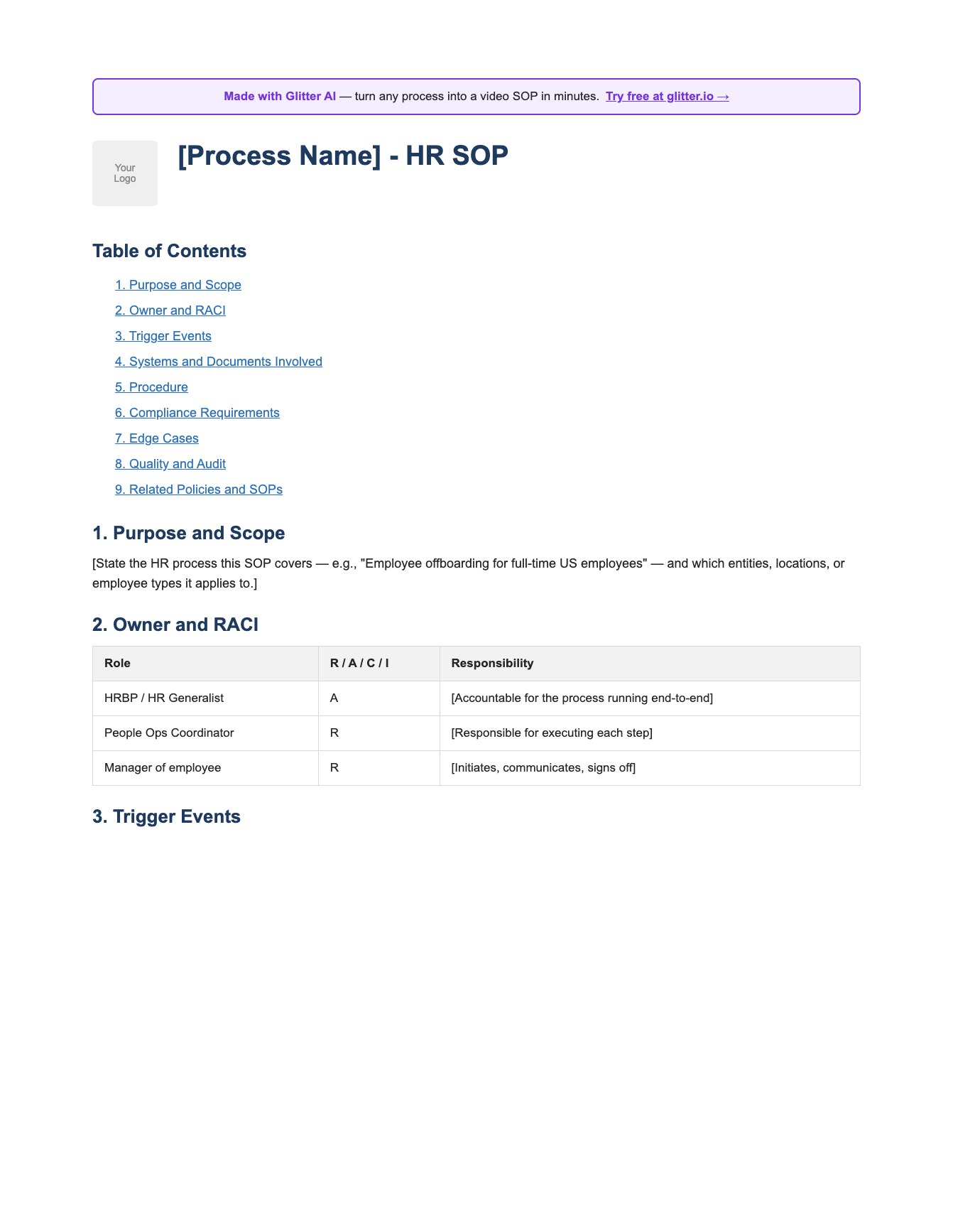
Employee Onboarding Template
Free onboarding checklist template in Word format. Covers pre-boarding, first day procedures, first week activities, training schedules, company policies, and key contacts. Drop-in replacement for SOP #1.
Download Onboarding Template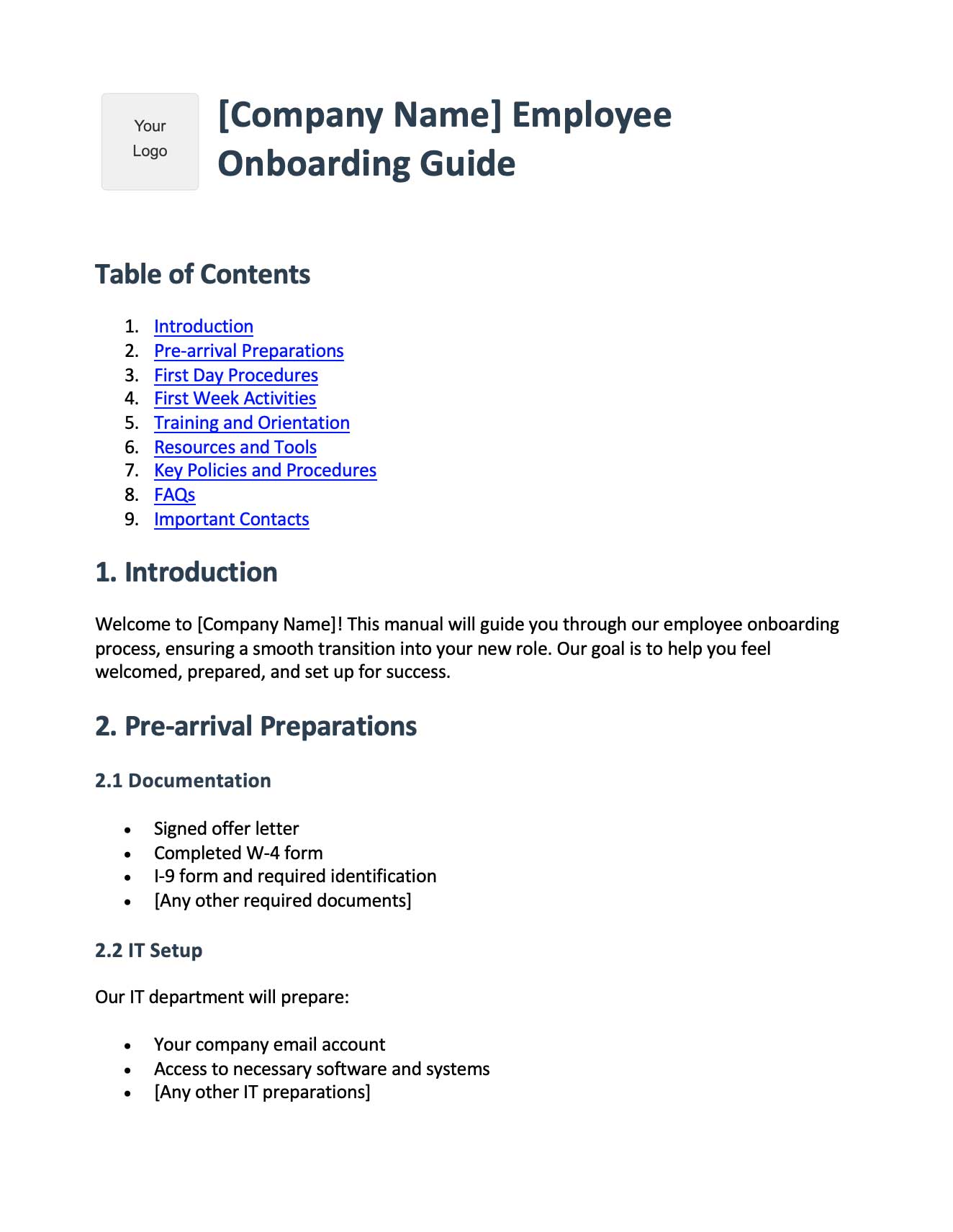
Generic SOP Template
A clean, role-agnostic SOP template in Word format - purpose, scope, responsibilities, equipment, procedure, quality control, references. Useful when an HR process needs a more procedural structure than the HR-specific template.
Download SOP Template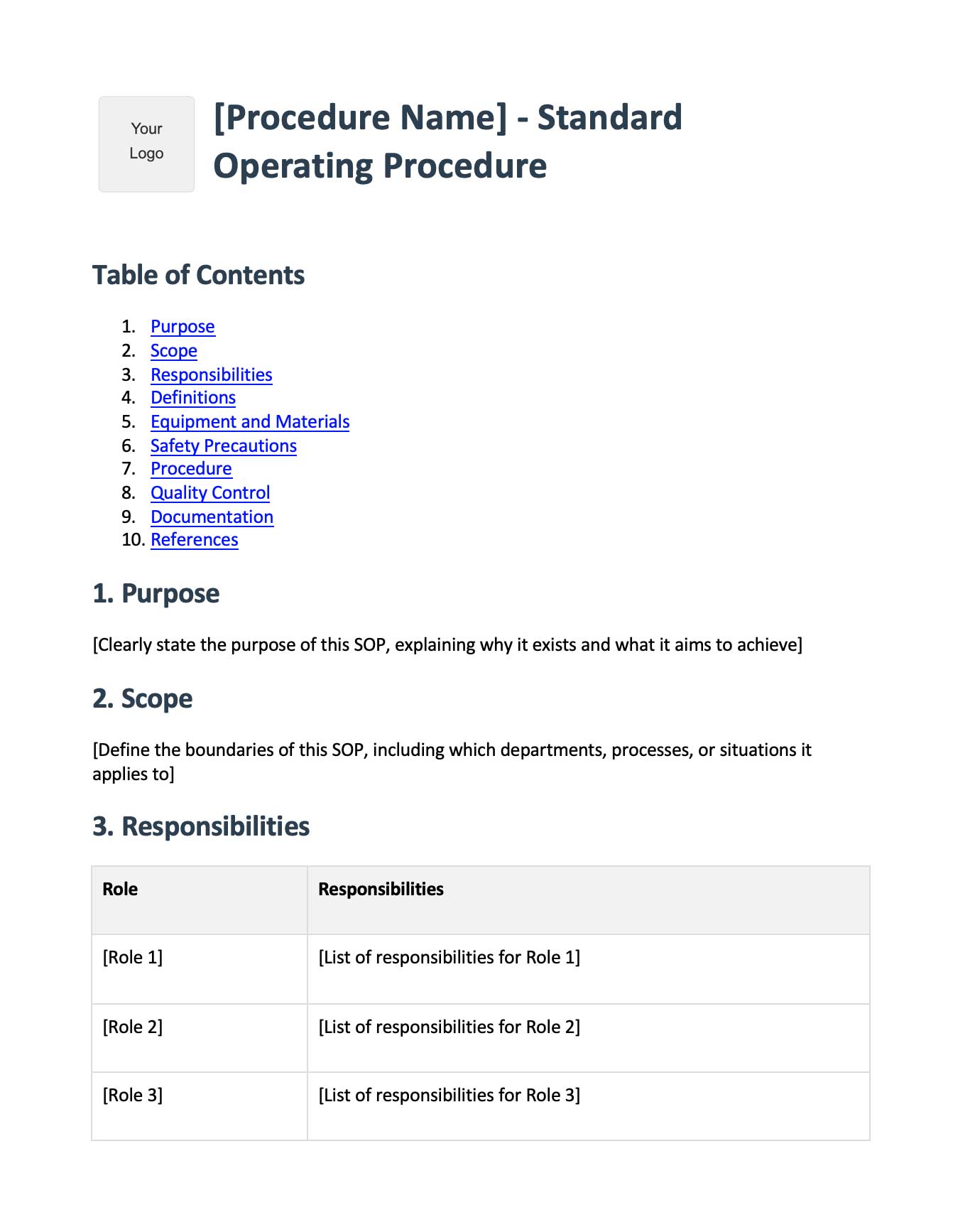
Frequently Asked Questions
What is an HR SOP template?
An HR SOP template is a reusable structure for documenting a human resources process - like onboarding, payroll, or terminations - with predefined sections for purpose, owner, required fields, step-by-step procedure, and compliance notes. It gives HR teams a consistent format so every SOP looks and reads the same way.
What HR SOPs does every company need?
At minimum, every company needs SOPs for employee onboarding, payroll processing, time off requests, and termination/offboarding. Companies with 20+ employees should add SOPs for recruitment, performance reviews, benefits enrollment, disciplinary action, FMLA/leave management, and training. These ten cover the vast majority of HR transactions.
What should an HR standard operating procedure template include?
Every HR SOP template should include the purpose, when to use it, the single accountable owner, required fields or sections, a step-by-step procedure, compliance notes referencing relevant laws (FLSA, EEOC, FMLA, ADA, ACA), and common pitfalls. Skipping any of these turns the SOP from a procedure into vague policy.
Who owns HR SOPs at a small company?
At small companies (under 50 employees), HR SOPs are typically owned by an HR Generalist, Office Manager, or the founder/COO if there's no dedicated HR person. The key is that one specific person - not a team - is accountable for keeping each SOP current and answering questions about it.
How often should HR SOPs be updated?
HR SOPs should be reviewed at least annually, with more frequent updates when underlying software changes (your HRIS, payroll provider, or ATS), when laws change (federal or state), or when the process itself changes. Set a calendar reminder for each SOP and tie reviews to a specific owner.
What compliance laws apply to HR SOPs?
The main federal laws are FLSA (wage and hour, classification), EEOC (anti-discrimination), FMLA (medical and family leave), ADA (disability accommodations), ACA (health coverage for large employers), ERISA (benefits), HIPAA (medical information privacy), and OSHA (safety). State laws often add to these - California, New York, Illinois, and Washington have particularly extensive HR requirements.
Are these HR SOP templates free to use?
Yes, the structures, sections, and procedures outlined in this post are free to copy and adapt for your company. They're starting points - you'll need to customize them for your specific HRIS, state mix, headcount, and industry requirements before using them in production.
What is the difference between an HR policy and an HR SOP?
An HR policy states a rule ("employees must request PTO with two weeks of notice"). An HR SOP describes the procedure ("open BambooHR, click Time Off, select dates, your manager has 48 hours to approve"). Policies set expectations; SOPs tell people exactly what to do. You need both.
How do I document HR SOPs that involve software like ADP or BambooHR?
Most HR work happens in software, so most SOPs are essentially software walkthroughs. The traditional approach is screenshots with annotations, but these go stale fast when vendors update their UI. A faster approach is screen recording the actual workflow once, then converting it to a step-by-step guide with current screenshots - which is what Glitter's SOP generator automates.
Where should HR SOPs be stored?
HR SOPs should be stored in a centralized, searchable location accessible to anyone who needs them - typically a knowledge base, internal wiki, or document management system like Notion, Confluence, or SharePoint. Sensitive items (employee files, medical info under HIPAA) belong in a separate, access-controlled HRIS, not in the same location as the procedures.







