
Read summarized version with
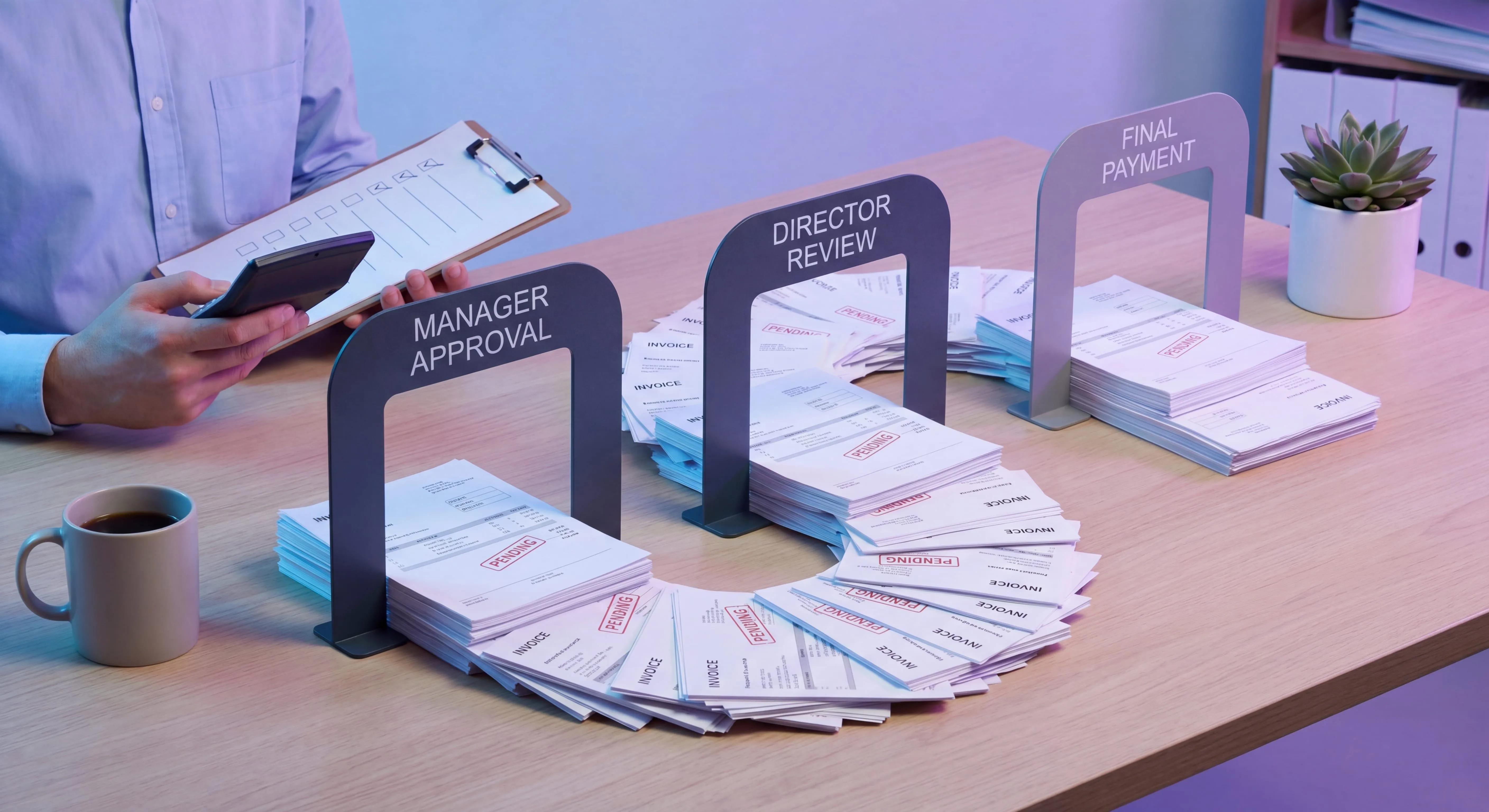
The fastest way to find a broken invoice approval workflow is to ask an AP clerk where an invoice is right now.
If the answer is “let me go ask Dana,” the workflow isn’t a workflow. It’s a person. And when Dana is on vacation, that $42,000 invoice with net-30 terms quietly ages into a late-payment fee while everyone assumes someone else has it.
I’ve watched this play out at almost every finance team I’ve worked with. The approval logic is real enough. It just lives in someone’s head: who signs off on what, at which dollar amount, what to do when the PO doesn’t match. Ardent Partners found that about 53% of AP professionals name invoice exceptions as their single biggest operational challenge - and most of those exceptions pile up because the approval rules were never written down. Works fine right up until that person leaves, gets sick, or gets buried under everything else.
I’m Yuval, CEO of Glitter AI. We help finance teams turn this kind of tribal knowledge into documentation that survives turnover. What follows is what I’ve picked up about building an invoice approval workflow that doesn’t depend on one irreplaceable person sitting in the middle of it.
Teach your co-workers or customers how to get stuff done – in seconds.


What Is an Invoice Approval Workflow?
An invoice approval workflow is the defined path an invoice takes from the moment it arrives to the moment it’s cleared for payment. Who reviews it, in what order, against what checks, and what happens when something doesn’t line up.
Think of it as a specific kind of approval workflow pointed at accounts payable. Narrow job, high stakes: every dollar leaving the company should be for something real, priced correctly, coded properly, and signed off by someone who actually has the standing to sign off on it.
A good workflow answers four questions for every invoice:
- Is this legitimate? Did we actually order and receive this?
- Is it correct? Do the amount, terms, and quantities match what we agreed to?
- Who approves it? Based on amount, department, and category.
- What if it fails a check? The exception path, not just the happy path.
Most teams document the happy path and wing the rest. The winging is where the money leaks.
The Core Steps of an Invoice Approval Workflow
Here’s the backbone most AP teams land on, more or less, no matter the industry or ERP.
1. Invoice Capture and Intake
The invoice enters the system: email inbox, vendor portal, EDI, paper scan. The one thing that matters most here is that every invoice lands in one place with a timestamp. If invoices show up in three inboxes and a desk drawer, nothing downstream can save you.
Grab the basics on entry: vendor, invoice number, amount, date, PO number if there is one. Duplicate detection belongs here too. Vendors resend invoices constantly, and paying twice is one of the most common AP errors and one of the most embarrassing. The FBI’s Internet Crime Complaint Center reported that business email compromise targeting AP teams - fake “updated banking details” emails that reroute payments - accounted for more than $3 billion in reported losses in 2025, making intake controls more than a housekeeping matter.
2. Coding and Matching
The invoice gets coded to the right GL account, cost center, and department. Then it’s matched.
- Three-way match (PO + receipt + invoice) for anything with a purchase order. The invoice has to agree with what was ordered and what actually showed up.
- Two-way match (PO + invoice) for services or items where a goods receipt doesn’t really make sense.
- Non-PO invoices skip matching and go straight to a person who can vouch for the spend. Which is precisely why non-PO spend deserves tighter approval rules, not looser ones.
A clean match should auto-advance. Only pull a human in when the match fails.
3. Approval Routing
This is the heart of it, and the next section digs into it properly. The invoice routes to the right approver based on amount, department, and spend category. As the dollar amount climbs, it may pass through several approvers in sequence.
4. Exception Handling
Price variance, missing PO, no receipt, wrong vendor banking details, budget overrun. The invoice leaves the main path, gets sorted out, and comes back in. More on this below, since it’s the part nearly everyone underdocuments.
5. Payment Release and Audit Trail
Once it’s approved, the invoice gets scheduled into a payment run. Every action along the way, who approved, when, and what they were looking at, lands in an audit trail. If you can’t reconstruct who approved an invoice and why, you don’t have a controlled process. You have a hopeful one.
Approval Routing: The Part That Actually Matters
Routing is where invoice approval workflows live or die. Get it wrong and you either funnel everything through one executive or rubber-stamp spend with no real review. Neither is good.
Use Dollar Thresholds, Not Vibes
The cleanest routing logic is tiered by amount. Here’s what that looks like in practice:
- Under $1,000: Department manager approves. One step.
- $1,000 to $10,000: Department manager, then director.
- $10,000 to $50,000: Manager, director, then VP of Finance.
- Over $50,000: Add CFO sign-off.
The exact numbers matter less than the principle behind them: the size of the spend sets the height of the approval ladder. Small invoices should clear in one fast step. Large ones earn more eyes.
Route by Category and Department, Too
Amount isn’t the only axis. A $5,000 software invoice and a $5,000 capital expenditure don’t necessarily belong on the same path. Plenty of teams add category-based rules: anything tagged “legal” routes through the GC, anything “capex” gets a finance review no matter the amount, marketing spend goes to the marketing budget owner.
Build In Delegation From Day One
Every approver is going to be unavailable at some point. If your workflow has no defined backup approver and nothing that auto-escalates after, say, three business days, you’ve baked the Dana problem straight into your process. Delegation rules and escalation timers aren’t nice-to-haves. They’re what separates a workflow from a single point of failure.
Teach your co-workers or customers how to get stuff done – in seconds.
Separate Who Does What
A basic control: whoever enters an invoice shouldn’t be the one who approves it, and the approver shouldn’t be the one who releases payment. This separation of duties sits at the core of any defensible accounts payable SOP. It isn’t about distrust. It’s about making both fraud and honest mistakes structurally harder.
Exception Handling: Designing for When Things Go Wrong
The happy path is easy. Real AP work is mostly exceptions, though, and a workflow that only documents the clean case forces your team to improvise under pressure, which happens to be exactly when errors and overrides creep in.
Write down a defined path for each common exception:
- Price or quantity variance: Set a tolerance (say, the lesser of 5% or $100). Within tolerance, auto-approve the variance. Outside it, send it to the buyer or requester to confirm or dispute before AP touches it.
- Missing or unmatched PO: Send it back to the requesting department to either produce the PO or formally acknowledge it as non-PO spend with the appropriate higher-level approval.
- No goods receipt: Hold it and notify the receiving owner. Don’t pay for things nobody confirms arrived.
- Vendor or banking changes: Treat any change to vendor bank details as a security event with out-of-band verification, not a routine edit. This is the single most common business-email-compromise attack on AP.
- Budget overrun: Send it to the budget owner with the overage flagged explicitly, not buried somewhere in the line items.
The goal isn’t to wipe out exceptions. It’s to make sure no exception ever forces someone to invent a response on the spot.
Automating the Invoice Approval Workflow
Once the logic is defined, most of it can run without a human touching it. This is where workflow automation earns its keep in AP. Ardent Partners data shows best-in-class AP teams process 49.2% of their invoices without any human intervention, compared to 32.6% for the average organization - a gap driven almost entirely by how well the approval routing rules are defined and encoded.
What automation handles well:
- Capture and data extraction. OCR and AI pull invoice fields automatically, which kills the manual keying.
- Duplicate detection. Flag repeat invoice numbers and near-duplicates before they get paid.
- Auto-matching. Clean three-way matches advance with no human in the loop.
- Threshold routing. The system sends each invoice to the right approver based on your rules, with reminders and escalation built in.
- Status visibility. Anyone can see exactly where any invoice is, which finally retires the “go ask Dana” problem.
What automation should not do: replace judgment on genuine exceptions, or remove the audit trail. The point of process automation here is to make the routine stuff instant, so your people spend their time only on the cases that actually need a brain.
One warning: automating a broken workflow just makes the breakage faster. Define and document the logic first. Automate second.
How to Document Your Invoice Approval Workflow (So It Survives Turnover)
Here’s the part most teams skip, and it’s the reason they end up with the Dana problem in the first place.
Even a fully automated AP system still has steps a human does: handling exceptions in the ERP, verifying a vendor banking change, coding an ambiguous invoice, running the payment batch. Those steps almost always live in one person’s head. When that person leaves, the documented “workflow” turns out to be a diagram with a hole in the middle.
The fix is to document the actual workflow as a real standard operating procedure, screen by screen, exception paths and all, including the parts that happen inside your software. A diagram tells someone the route. A screenshot-level guide shows them how to actually drive it.
This is exactly what we built Glitter AI for. You walk through your invoice approval workflow once in your real system, and it captures every click and field into a step-by-step guide with screenshots, automatically. When your routing rules change or you switch ERPs, you re-record the affected steps instead of rewriting a document nobody trusted anyway.
Document it once, and “where is this invoice and who approves it” stops being a question only one person can answer.
Teach your co-workers or customers how to get stuff done – in seconds.
A Quick Self-Check
Run your current invoice approval workflow against these:
- Can a new hire process a standard invoice end to end using only written documentation?
- Is there a defined backup approver for every approver?
- Does an invoice auto-escalate if it sits unapproved too long?
- Is there a documented path for each common exception, not just the clean case?
- Can you reconstruct who approved any given invoice, when, and against what?
- Are invoice entry, approval, and payment release done by different people?
Every “no” is a leak. Most teams have at least two.
FAQ
Frequently Asked Questions
What is an invoice approval workflow?
An invoice approval workflow is the defined path an invoice follows from intake to payment release, including capture, coding, matching, approval routing, and exception handling. It ensures every payment is legitimate, correct, properly coded, and authorized by someone with the authority to approve it.
What are the steps in an invoice approval process?
The core steps are invoice capture and intake, coding and matching (two-way or three-way match), approval routing based on amount and category, exception handling for mismatches, and payment release with an audit trail. Clean invoices should advance automatically while only exceptions pull in a human.
How should invoice approvals be routed?
Route primarily by dollar threshold, where larger amounts pass through more approval levels, and secondarily by department and spend category. Always include a defined backup approver and an auto-escalation timer so invoices never stall when an approver is unavailable.
What are good dollar thresholds for invoice approval?
A common tiered structure is one approver under $1,000, manager plus director from $1,000 to $10,000, adding a VP up to $50,000, and CFO sign-off above $50,000. The exact figures should match your organization's risk tolerance, but the principle is that spend size determines approval depth.
What is the difference between two-way and three-way matching?
Three-way matching compares the purchase order, the goods receipt, and the invoice, and is used for physical goods. Two-way matching compares only the purchase order and invoice, and is used for services where a goods receipt doesn't apply. Non-PO invoices skip matching and require direct approval.
How do you handle exceptions in invoice approval?
Define a documented path for each common exception: price or quantity variance outside tolerance, missing PO, no goods receipt, vendor banking changes, and budget overruns. The goal is that no exception ever requires staff to improvise a response under time pressure.
Can the invoice approval workflow be automated?
Yes. Automation handles capture and data extraction, duplicate detection, auto-matching of clean invoices, threshold-based routing, and status visibility. Human judgment should be reserved for genuine exceptions, and the audit trail should always be preserved. Document the logic before automating it.
Why should invoice entry and approval be separated?
Separating who enters, approves, and pays an invoice is a core internal control. It makes both fraud and honest mistakes structurally harder to commit and is expected by auditors as part of a defensible accounts payable process.
What causes invoice approval bottlenecks?
The most common causes are routing everything through one or two senior approvers, no defined backup when an approver is out, no escalation timer, and undocumented exception handling. Tiered thresholds, delegation rules, and auto-escalation resolve most bottlenecks.
How do you document an invoice approval workflow?
Document it as a screen-by-screen standard operating procedure that includes exception paths and the steps performed inside your ERP, not just a flowchart. Capturing the actual clicks and fields, for example with Glitter AI, ensures the workflow survives staff turnover and system changes.