
Read summarized version with
A maintenance manager once told me something that stuck: “I don’t trust the machine, I trust the log.” He’d just watched a pump get rebuilt twice in eight months, and nobody could explain why. The only trace of the first rebuild was somebody’s memory and a half-legible note on a whiteboard that had since been wiped clean.
That’s how maintenance ops fails quietly. The work gets done. It just doesn’t get written down anywhere a second person can find it later. So the same pump comes apart twice, the maintenance work order process leaves no paper trail, the machine maintenance checklist never gets ticked off, the warranty claim falls through because you can’t prove anything, and an audit turns up a gap you have no answer for. Siemens’ True Cost of Downtime research puts the average unplanned downtime incident at about four hours - and without a maintenance log, there’s no data to establish whether that failure was predictable, repeatable, or preventable.
An equipment maintenance log is what closes that gap. It’s the running history of every maintenance, inspection, and repair event on an asset, kept in one place, so the machine’s story doesn’t live inside one person’s head.
I’m Yuval, CEO of Glitter AI. I spend a fair amount of time with maintenance and operations teams, and the ones I respect want their asset history to be boring and complete rather than a scavenger hunt the moment something breaks. So here’s what an equipment maintenance log should actually record, what format works, where the digital-vs-paper argument lands, how it sits alongside a maintenance checklist template, and a free downloadable log template you can start using today. Jump to the downloads section if you just want the template.
Teach your co-workers or customers how to get stuff done – in seconds.


What an Equipment Maintenance Log Is (and Isn’t)
An equipment maintenance log is a chronological record of every maintenance event performed on a piece of equipment: what was done, when, by whom, with what parts, and how long the asset was down. One asset, one continuous history.
It’s worth being precise here, because three things tend to get muddled together:
- A preventive maintenance checklist is the plan - the tasks you intend to do on a schedule.
- A maintenance log is the record - proof of what actually happened, planned or not.
- A CMMS is the software that holds and automates all of this at scale.
You need the log whether or not you have the software. Plenty of solid maintenance programs run for years on a well-kept spreadsheet or a clipboard before anyone signs a CMMS contract. The discipline matters more than the tool. The log is also where total productive maintenance stops being a slide and starts being real: when operators log the small stuff daily, the patterns show up on their own instead of being guessed at.
Here’s the principle I’d tape to the wall: if it wasn’t logged, it didn’t happen. Not because the work wasn’t done, but because six months out, an undocumented repair is worth about as much as no repair at all.
What to Record in an Equipment Maintenance Log
This is where teams trip most often. They either log too little (“greased pump - Tom”) or they build a 20-field form nobody fills in. What you want is the smallest set of fields that still answers the questions you’ll actually ask later.
The Asset Header (Fill In Once Per Asset)
Before any events, capture what the log is about:
- Asset name and ID / tag number - the unique identifier you’ll reference everywhere else.
- Manufacturer, model, and serial number - needed for parts, warranty, and manuals.
- Location / department - where it physically lives.
- Date placed in service - the clock that drives life expectancy and depreciation.
- Warranty expiration - so you know when a repair should be a claim, not a cost.
- Maintenance owner - the one named person accountable for this asset’s log.
The Event Row (Fill In Every Time)
Every maintenance, inspection, or repair gets one row:
- Date - the day the work was actually performed, not the day you got around to writing it up.
- Type - preventive (PM), inspection, repair/corrective, or calibration. This single column is what lets you separate planned from reactive work later, and that split is the single most valuable thing a maintenance log will ever tell you. Industry maintenance benchmarks show world-class operations run 85-95% planned work; most facilities that lack good logging don’t even know what their ratio is.
- Work performed - plain language, specific enough that a different technician could repeat it.
- Parts and materials used - part numbers and quantities. This is what makes cost tracking and reorder forecasting possible.
- Labor hours - time on the task, for workload and cost.
- Downtime - how long the asset was unavailable (0 if none). This is the number leadership cares about.
- Technician - who did it, so any future question has an owner.
- Next due - the date or meter reading the next scheduled task is due, so the log also drives the schedule forward.
If you log nothing else, log date, type, work performed, and technician. Those four fields alone turn “I think we fixed that last spring” into something you can stand behind.
The Follow-Up Note (Fill In When You See Something)
The best logs leave room for observations that aren’t a finished task yet: a bearing starting to get noisy, a reading that’s drifting out of range. That’s how a $200 catch stays a $200 catch instead of turning into a $40,000 failure. Small thing, but it’s roughly the line between teams that react and teams that see it coming.
Teach your co-workers or customers how to get stuff done – in seconds.
The Right Format for a Maintenance Log
Format is really just the structure of the fields above. The question that actually matters is granularity: one log per asset, or one shared log for an area?
- One log per asset is the cleaner model. The full history of a single critical machine reads top to bottom in one place. Best for high-value or high-failure-rate equipment.
- One shared log per area, with an Asset ID column you filter on, is more practical for fleets of similar low-criticality assets (a row of identical conveyors, a set of HVAC units). You maintain one document instead of forty.
Most real programs end up running a hybrid: a dedicated log for the handful of assets that hurt when they go down, and shared area logs for everything else. Don’t overthink it. A consistent, filled-in shared log beats a beautifully designed per-asset log nobody updates.
Keep the columns identical across every log you run. The moment two logs carry different fields, you’ve lost the ability to compare assets, and comparison is the whole point.
Digital vs Paper Maintenance Logs
Every maintenance ops team eventually argues about this one, so I’ll be straight about the tradeoffs rather than pretend digital always wins.
Paper / clipboard. Hard to beat at the point of work. No login, no dead battery, no app, and it works fine in a wet plant room or jammed inside a panel. The trouble is everything that happens after the pen lifts. Paper doesn’t get searched, doesn’t get backed up, doesn’t trend, and doesn’t survive a spilled coffee. Great capture tool, terrible system of record.
Spreadsheet. The honest starting point for most teams, and there’s no shame in it. Searchable, sortable, free, and good enough to run a real program for years. Where it falls apart: concurrency (two people editing at once), mobile entry standing at the machine, and reminders. Nothing tells you the next-due date has arrived.
CMMS / dedicated software. Built for exactly this. It schedules the next PM off your “next due” field, attaches photos and manuals, tracks parts inventory, and reports planned-vs-reactive ratios without you hand-building a pivot table. The price is setup effort and adoption. Software nobody enters data into is worse than a clipboard people actually use. See what a CMMS is before you buy one.
My honest take: start wherever you’ll actually keep it up. A spreadsheet you fill in every day beats a CMMS you bought and never populated. The path is almost always paper, then spreadsheet, then CMMS, and jumping straight to software without the logging habit first is how expensive CMMS rollouts quietly die.
There’s one gap, though, that none of these three formats closes on its own.
The Real Gap: The Log Records That Work Happened, Not How
Go back to that pump rebuilt twice in eight months. Even a flawless log entry, “Date: 3/14, Type: REP, Work performed: rebuilt pump, Technician: Maria”, tells you it happened. It tells the next person nothing about how Maria did it.
So the knowledge still walks out the door when Maria does. The log captures the event. It doesn’t capture the procedure.
That’s the gap I built Glitter AI to close. The idea is pretty simple. The first time someone performs a recurring maintenance task, they record it once, screen by screen or step by step, and it becomes a guide any technician can follow the same way next time. The log says the PM got done; the guide makes sure the next person can do it correctly, even if they’ve never put hands on the machine before. Pair that with solid process documentation discipline and a clear standard operating procedure for each critical asset, and the log stops being a graveyard of events and starts being something that trains the next person.
A maintenance log answers what and when. A good guide answers how. You want both.
Downloads
Here’s the equipment maintenance log I’d hand a team starting from scratch. It has the asset header, the event table, a “what to record” reference so everyone fills it in the same way, and a follow-up notes section for the things you catch before they become failures.
Download the Equipment Maintenance Log Template
A free Word template you can fill in per asset and start using today - asset header, event log, and follow-up notes included.
Download Equipment Maintenance Log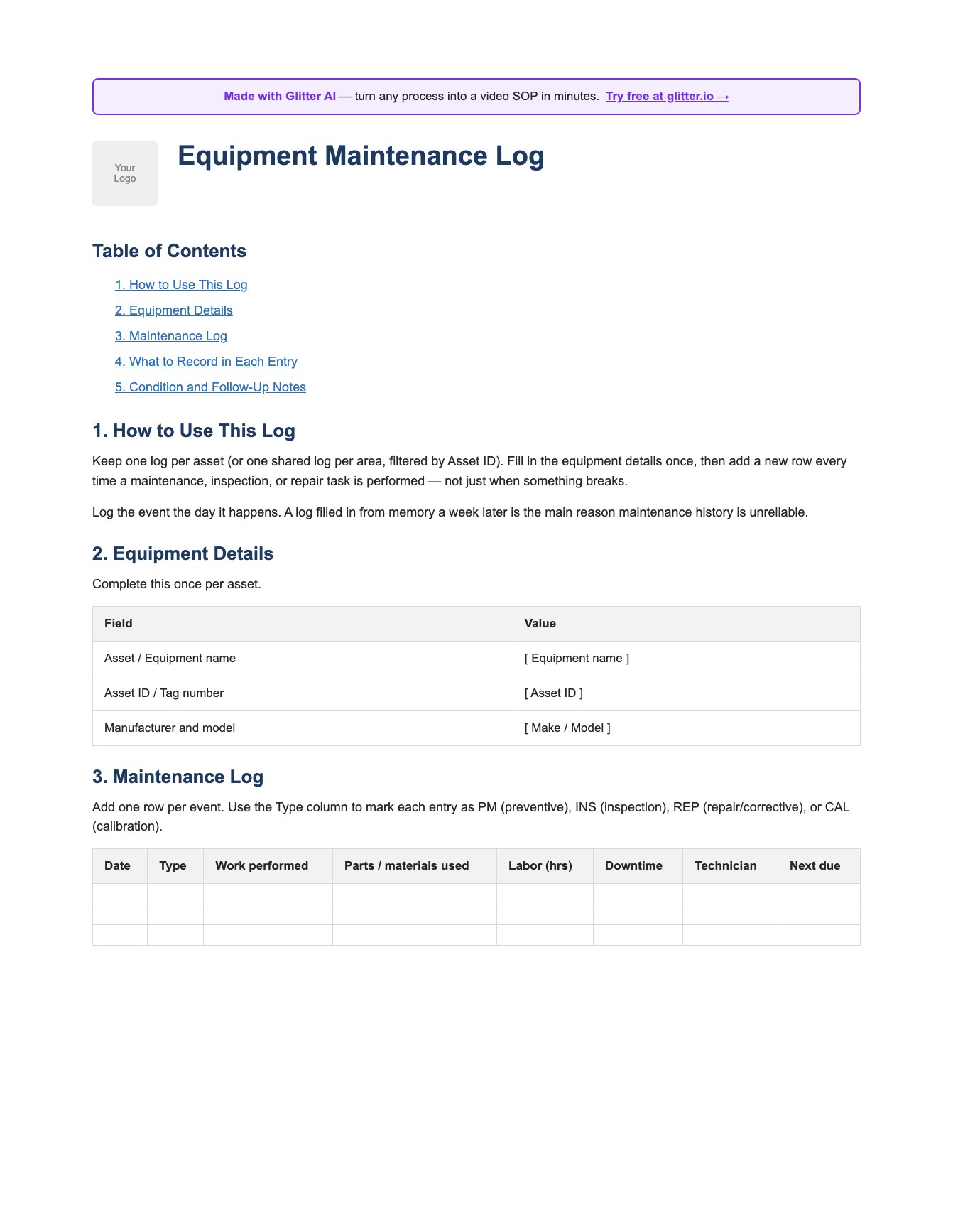
Fill in the asset header once, add a row every time work is done, and keep the columns identical across every asset so you can actually compare them later.
Teach your co-workers or customers how to get stuff done – in seconds.
A Few Hard-Won Tips for Keeping the Log Honest
- Log it the day it happens. A log filled in from memory on Friday afternoon is the main reason maintenance history can’t be trusted. Make logging the last step of the job, not a separate chore.
- One owner per asset. “Everyone logs it” means nobody does. Name the person accountable for each log.
- Standardize the words. “Greased,” “lubed,” and “PM’d” shouldn’t all describe the same task. A shared work instruction for recurring tasks fixes the vocabulary at the source.
- Review the log, don’t just keep it. A monthly five-minute scan of the “follow-up notes” column is where you catch the slow failures before they catch you.
- Don’t log to satisfy an auditor. Log so the next technician, who might be you in eight months, knows exactly what this machine has been through.
The teams with the least maintenance drama usually aren’t the ones with the newest equipment. They’re the ones whose logs you could hand to a stranger and have them understand the machine by lunch.
Frequently Asked Questions
What is an equipment maintenance log?
An equipment maintenance log is a chronological record of every maintenance, inspection, and repair event performed on a piece of equipment. It captures what was done, when, by whom, with what parts, and how long the asset was down, so the full service history of the asset lives in one place.
What should be recorded in an equipment maintenance log?
Each entry should include the date the work was performed, the type of work (preventive, inspection, repair, or calibration), a description of the work performed, parts and materials used, labor hours, downtime, the technician, and the next due date. A one-time asset header also captures the equipment name, ID, model, serial number, location, and warranty info.
What is the difference between a maintenance log and a preventive maintenance checklist?
A preventive maintenance checklist is the plan - the tasks you intend to perform on a schedule. A maintenance log is the record - proof of what actually happened, whether it was planned or a reactive repair. You need both: the checklist drives the work, the log proves and analyzes it.
Should an equipment maintenance log be digital or paper?
Paper is best at the point of work but poor as a system of record. A spreadsheet is the honest starting point for most teams. A CMMS is built for scale, automating scheduling, parts tracking, and reporting. The best choice is the format your team will actually keep up to date every day.
How do I create an equipment maintenance log?
Start with an asset header (name, ID, model, serial, location, warranty), then create a table with columns for date, type, work performed, parts used, labor hours, downtime, technician, and next due. Keep the columns identical across every asset so you can compare them. You can download a free Word template above to skip the setup.
Should I keep one log per asset or one shared log?
Use one dedicated log per asset for high-value or high-failure-rate equipment so the full history reads in one place. Use a shared log with an Asset ID column for fleets of similar low-criticality assets. Most teams run a hybrid of both.
How often should you update an equipment maintenance log?
Update it the same day the work is performed, ideally as the final step of the job. Logs filled in from memory days later are the main reason maintenance history becomes unreliable and incomplete.
Why is an equipment maintenance log important?
It prevents duplicated repairs, supports warranty and audit claims, reveals failure patterns, tracks maintenance cost and downtime, and preserves equipment history when the person who did the work leaves. Without it, undocumented work is worth as much as no work at all.
What is the difference between a maintenance log and a CMMS?
A maintenance log is the record of maintenance events and can live on paper or in a spreadsheet. A CMMS is software that holds and automates that record at scale, including scheduling, parts inventory, and reporting. You need the logging discipline regardless of whether you have the software.
Does a maintenance log capture how to perform the work?
No. A maintenance log records that work happened - the what, when, and who. It does not capture how the task was performed, so that knowledge still leaves when the technician does. Pairing the log with step-by-step guides or SOPs for recurring tasks closes that gap.