
Read summarized version with
Here’s something I’ve come to believe about finance teams. The smaller the company, the more of the accounting workflow lives in exactly one person’s head.
I’ve watched it go the same way maybe a dozen times. You ask a controller to walk you through how money moves through the business, and they nail it, out loud, from memory. Invoices come in here. This gets matched against that. Payroll runs on this cadence. The close starts on day one and wraps by day five, “unless something weird happens with prepaids again.” It all hangs together. And none of it is written down anywhere.
I’m Yuval, CEO of Glitter AI. A big part of what we do is help finance and operations teams pull processes like this out of people’s heads and into something a new hire can actually follow. This guide is about the accounting workflow specifically: what the core workflows really are, how to map them, and how to document and standardize them so the whole thing doesn’t wobble every time someone takes a vacation or hands in their notice.
Teach your co-workers or customers how to get stuff done – in seconds.


What Is an Accounting Workflow?
An accounting workflow is the repeatable sequence of steps your team follows to record, process, and report financial activity. It’s the path money and information travel: a transaction happens, it gets captured, reviewed, approved, reconciled, and finally rolled up into financial statements.
People mix up the workflow and the rulebook all the time. A workflow is the path, the ordered set of steps and handoffs. A standard operating procedure is the written instructions for how each of those steps should be done. You need both. But most teams I meet are far weaker on the workflow side. They can describe individual tasks fine. Very few can show you the whole flow, end to end, without quietly skipping a handoff.
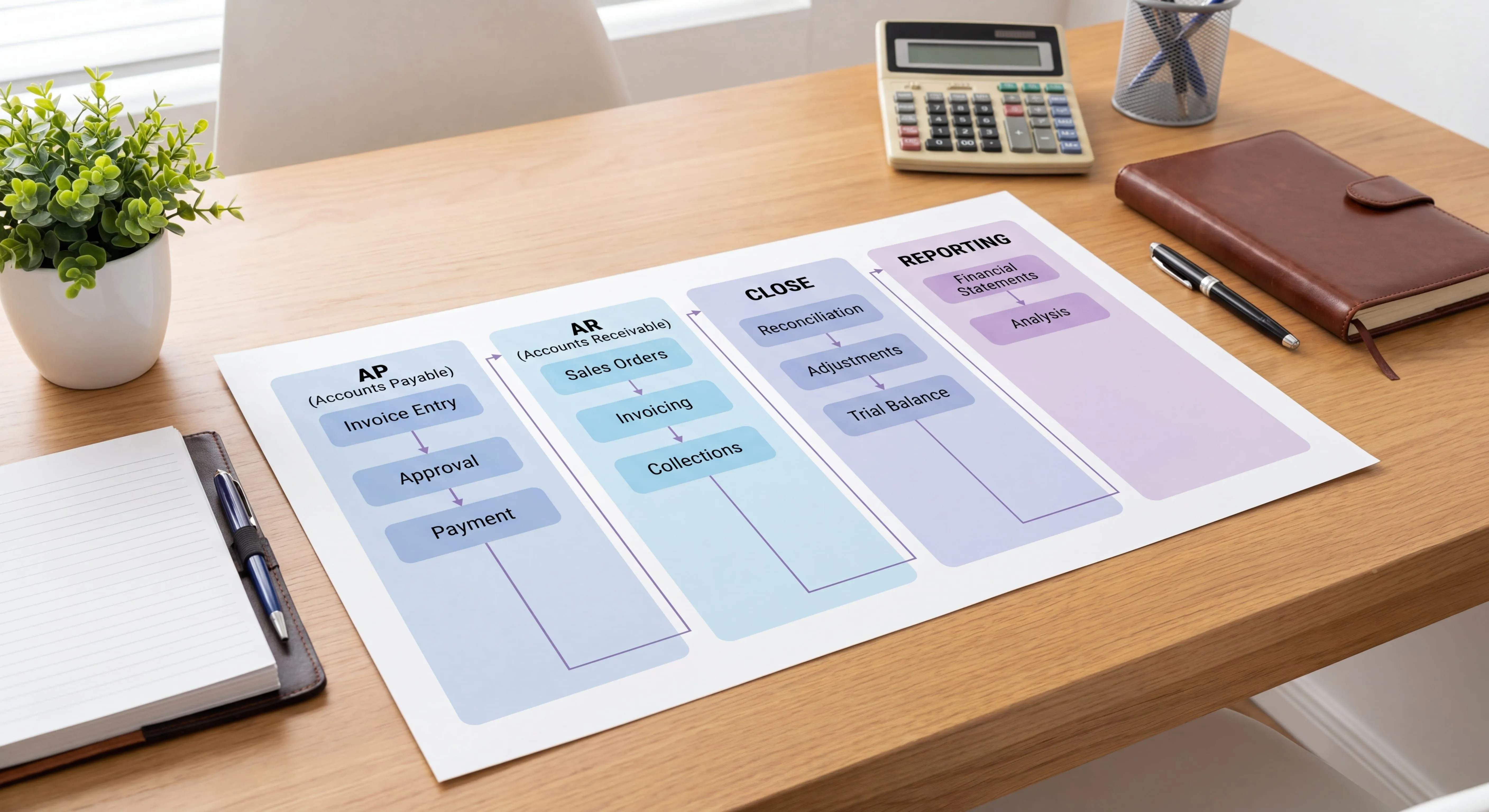
In practice, “the accounting workflow” isn’t a single thing. It’s a handful of distinct workflows that feed each other:
- Accounts payable (AP) - money going out to vendors
- Accounts receivable (AR) - money coming in from customers
- Month-end close - pulling everything together into accurate books
- Financial reporting - turning closed books into decisions
Let’s go through each one, then talk about how to actually document and standardize them.
The Core Accounting Workflows
1. The Accounts Payable Workflow
AP is where most finance teams hurt the most, because the invoice management process has the most handoffs and the most exceptions. The standard flow looks like this:
Invoice received → Capture & log → Match to PO/receipt → Code to GL account → Route for approval → Schedule payment → Pay → Record & reconcileThe steps that quietly break:
- Capture. Invoices arrive by email, mail, portal, and EDI. With no single intake point, invoices get lost or paid twice.
- Matching. Two-way (invoice to PO) or three-way (invoice to PO to receipt) matching is where errors and fraud get caught. Skip it to “save time” and you end up paying for things you never received.
- Approval routing. This is the step that lives in someone’s head most often. Who approves what, at which dollar threshold, and who’s the backup when they’re out - a documented invoice approval workflow is what makes this survivable.
If you only document one accounting workflow first, make it AP. It carries the highest fraud exposure and the highest volume. The cost differential between teams that have it documented and automated versus those that don’t is measurable: APQC benchmarking shows top-quartile AP teams process invoices at $2.07 or less per invoice, while bottom-quartile teams spend $10 or more on the same transaction.
2. The Accounts Receivable Workflow
AR is the mirror image, getting paid instead of paying. The flow:
Order/contract → Invoice customer → Record receivable → Track aging → Send reminders → Collect payment → Apply cash → ReconcileThe standardization wins in AR almost always sit in the back half:
- Aging cadence. When does a 30-day-late invoice trigger a reminder versus a phone call versus a hold on the account?
- Cash application. Matching incoming payments to the right invoices sounds trivial until you’re staring at partial payments and a customer who paid three invoices with one wire.
- Collections escalation. Who decides when an account goes to collections, and on what timeline?
Undocumented AR is why companies get blindsided by their own cash position. The work still happens, just inconsistently, so the numbers lag reality.
Teach your co-workers or customers how to get stuff done – in seconds.
3. The Month-End Close Workflow
The close is where the other workflows get reconciled into numbers you can actually trust. A typical sequence:
Cut-off → Reconcile bank & balance sheet accounts → Post accruals & adjusting entries → Review → Lock the period → Produce financial statementsThe close is the workflow that gains the most from a documented month-end close checklist, because it’s calendar-driven and repetitive. The same accounts get reconciled in the same order every single month. And yet most teams run it from a controller’s memory and a spreadsheet only that person understands. When they’re out during close week, the whole thing stalls.
A documented close workflow assigns an owner and a due day to every reconciliation and entry. That’s the difference between a five-day close and a “we’ll get to it eventually” close. A 2025 month-end close benchmark found that only 18% of finance teams currently close in three days or less - and the gap between them and the other 82% almost always comes down to whether the workflow is written down and owned.
4. The Financial Reporting Workflow
Reporting turns closed books into decisions:
Closed books → Build statements (P&L, balance sheet, cash flow) → Variance analysis → Management reporting pack → Distribute → ArchiveThe risk here usually isn’t errors. It’s inconsistency. If the reporting pack looks different every month because a different person built it, leadership can’t compare periods or trust the trends. Standardizing the reporting workflow means the same template, the same variance commentary structure, and the same distribution list, every month.
How to Map Your Accounting Workflow
Before you can standardize anything, you have to see it. So mapping comes first.
- Pick one workflow. Don’t try to map all of accounting at once. Start with AP or the close, whichever causes the most fire drills.
- Sit with the person who runs it. Have them do the work and narrate as they go. Don’t ask them to describe it in the abstract. Watch the actual screens and clicks. The abstract description always skips the exceptions.
- Capture every handoff. Workflows break at handoffs, not within steps. Note exactly who hands what to whom, and what triggers it.
- Mark the exceptions. “Usually it goes here, but if it’s this vendor it goes there.” Those branches are the parts that aren’t in anyone’s head except the person doing them.
- Draw it. Even a rough boxes-and-arrows diagram beats prose. People follow a picture. They skim a paragraph.
Map it this way and you almost always find the same thing. The workflow is more branched than anyone admitted, and the riskiest branches are the undocumented ones.
How to Document and Standardize It
Mapping shows you the current state. Documentation makes it repeatable. Standardization makes it consistent across people and time. Here’s the order I’d do it in.
Capture the workflow as it’s performed
The fastest way to document an accounting workflow is to record someone doing it once, then turn that recording into a step-by-step guide with screenshots. This is exactly the gap Glitter AI fills. Instead of a controller burning a weekend on a procedure doc nobody reads, they run through the close (or the AP run, or the AR reconciliation) one time while Glitter captures each step and screen, and it produces a clean SOP automatically.
Why this matters for accounting specifically: financial workflows are screen-heavy and detail-dense. A written instruction like “reconcile the bank account” is useless. What a new hire can actually follow is a guide that shows the exact screens, the exact match logic, and the exact entries. Capturing it from the real workflow, rather than from memory, is also how you catch the exceptions, because they only show up when the work is actually being done.
Standardize the structure
Every documented accounting workflow should answer the same five questions:
- Trigger - what starts this workflow?
- Owner - who’s responsible (and who’s the backup)?
- Steps - the exact sequence, with screens.
- Controls - the checks that must happen (matching, review, approval).
- Output - what “done” looks like and where it’s recorded.
Use that same skeleton for AP, AR, close, and reporting. Consistency in how workflows are documented makes them easier to follow and a lot easier to maintain. For a deeper, role-by-role treatment of the rulebook layer, the accounting SOP guide is a good companion to this workflow-mapping approach.
Assign owners and review dates
A documented workflow that nobody owns rots within two quarters. Software changes, an ERP gets upgraded, a control gets added. Assign each workflow an owner and a review cadence (quarterly is reasonable for most accounting workflows). The owner of the accounting SOP is the same person who should re-walk the workflow when the underlying system changes.
Build it into onboarding
The real test of a standardized accounting workflow is whether a new hire can run it without the incumbent sitting next to them. If your AP specialist can hand a new teammate the accounts payable SOP and the documented workflow, then step away, you’ve succeeded. If they still have to hover, the workflow is still in their head and the document just describes its shadow.
Teach your co-workers or customers how to get stuff done – in seconds.
Common Accounting Workflow Mistakes
A few patterns I see constantly:
- Documenting the happy path only. Real accounting workflows are mostly exceptions. A guide that ignores the weird vendor, the partial payment, and the prepaid adjustment isn’t documentation. It’s marketing.
- Writing prose instead of showing screens. Accounting is screen-heavy. Words describing clicks don’t transfer skill. Annotated screens do.
- One mega-document. AP, AR, close, and reporting are different workflows with different owners and cadences. Cram them into one 40-page doc and nobody reads any of it.
- No owner, no review date. An unmaintained workflow doc is more dangerous than none at all, because people trust it right up until it’s wrong.
- Standardizing too early. Map and document the actual workflow first. Standardize once you can see it. Impose a “standard” before you understand the real exceptions and you just drive them underground.
The teams that get this right treat the accounting workflow like infrastructure: mapped, documented, owned, and reviewed. Not folklore passed between controllers.
Downloads
For the AR and AP rulebooks that sit alongside these workflows, see the accounts receivable SOP and the broader accounting department SOP guides. They pair well with the mapping process above.
Frequently Asked Questions
What is an accounting workflow?
An accounting workflow is the repeatable sequence of steps a finance team follows to record, process, review, and report financial activity. It covers core flows like accounts payable, accounts receivable, month-end close, and financial reporting, including the handoffs and approvals between steps.
What are the core accounting workflows?
The four core accounting workflows are accounts payable (money going out), accounts receivable (money coming in), month-end close (reconciling everything into accurate books), and financial reporting (turning closed books into decisions). Each has its own owner, cadence, and controls.
How do I document an accounting workflow?
Sit with the person who runs it and watch them perform the workflow rather than describe it. Capture every step, screen, handoff, and exception. The fastest method is to record the workflow once and turn that recording into a step-by-step guide with screenshots, so the documentation reflects how the work is actually done.
What is the difference between an accounting workflow and an accounting SOP?
The workflow is the path: the ordered sequence of steps and handoffs. The SOP is the rulebook: the written instructions for how each step should be performed. You need both, but most teams are weaker on documenting the end-to-end workflow than on describing individual tasks.
Which accounting workflow should I document first?
Start with accounts payable or the month-end close. AP has the highest fraud exposure and transaction volume, while the close is calendar-driven and stalls most visibly when the owner is unavailable. Document whichever causes the most recurring fire drills first.
How do you standardize an accounting process?
Map the workflow as it is actually performed, document it with screens and exceptions, then apply a consistent structure across AP, AR, close, and reporting: trigger, owner, steps, controls, and output. Assign an owner and a review cadence so it stays accurate as systems change.
Why does the month-end close benefit most from documentation?
The close is calendar-driven and highly repetitive: the same accounts get reconciled in the same order every month. Documenting it with an owner and due day for every reconciliation and entry is what separates a fast, predictable five-day close from one that stalls whenever the controller is out.
What are common accounting workflow mistakes?
The biggest mistakes are documenting only the happy path, writing prose instead of showing screens, cramming every workflow into one mega-document, leaving documents without an owner or review date, and standardizing before you actually understand the real exceptions.
How often should accounting workflows be reviewed?
A quarterly review is reasonable for most accounting workflows. Each workflow should have a named owner who re-walks it whenever the underlying ERP, control environment, or approval thresholds change, so the documentation never drifts from reality.
How do I know if my accounting workflow is properly standardized?
The test is whether a new hire can run the workflow from the documentation without the incumbent sitting next to them. If they still need someone hovering, the workflow still lives in a person's head and the document only describes its shadow.